
GPT Image 2AI 提示词
Brainrot Projector Screen: Gaming & Math — Sora 2 Prompt
This Sora 2 prompt generates a viral-worthy image: a lecture hall projector shows gaming videos beside a math lecture, framed by students' silhouettes.
提示词 · EN
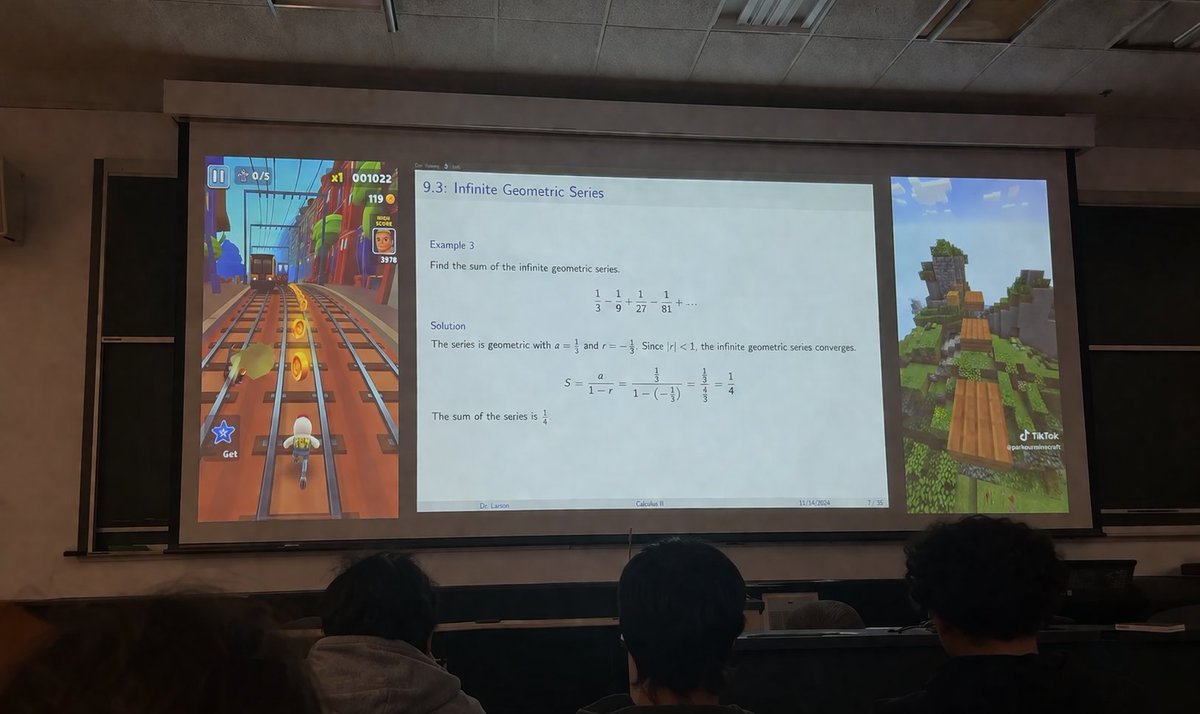
一张从昏暗的大学阶梯教室观众席拍摄的写实照片,镜头越过前景中三名学生的后脑勺,望向巨大的投影屏幕。投影屏幕呈现出分为三个独立垂直面板的布局。左侧面板显示垂直的 argleft game: 地铁跑酷游戏画面,画面中一个角色在铁轨上奔跑并收集金币,带有显示分数为 "001022" 的 UI 元素。宽大的中央面板显示一张学术演示 Slides,标题为 "argslide topic: 9.3:无穷几何级数"。幻灯片包含数学文本:"例 3:求无穷几何级数的和。1/3 - 1/9 + 1/27 - 1/81 + ... 解:该级数为几何级数,其中 a = 1/3 且 r = -1/3。由于 |r| < 1,该无穷几何级数收敛。S = a / (1 - r) = (1/3) / (1 - (-1/3)) = (1/3) / (4/3) = 1/4。级数之和为 1/4。" 幻灯片页脚显示 "argprofessor name: Larson 博士"、"argcourse name: 微积分 II"、"2024 年 11 月 14 日" 以及 "7 / 35"。右侧面板显示垂直的 argright game: 我的世界跑酷游戏画面,展示了草地景观上方的浮动木块,右下角带有 TikTok 水印。房间装有吊顶,屏幕边缘后方可见黑板。
关于这个提示词
This Sora 2 prompt generates a viral-worthy image: a lecture hall projector shows gaming videos beside a math lecture, framed by students' silhouettes. 它更适合作为 GPT Image 2 的概念艺术起点:先保留画面结构、主体关系和风格约束,再替换成你的品牌、人物或场景。
使用时优先替换 left game、slide topic、professor name、course name 等占位符,并保持镜头、构图和材质描述的顺序不变。这样更容易获得稳定的画面结果,也方便继续做多版本对比。
如何使用这个提示词
- Copy the prompt from this page.
- Open your preferred AI image model (e.g., Sora 2).
- Paste the prompt and tweak the variables in curly braces: left game, slide topic, professor name, course, right game.
- Generate the image, then download and share your brainrot creation.


