
GPT Image 2AI 提示词
Cute Cat Livestream UI Mockup with Custom Sign
Generate a realistic, adorable mobile livestream interface screenshot featuring a fluffy cat host holding a customizable sign, complete with interactive chat and gift notifications.
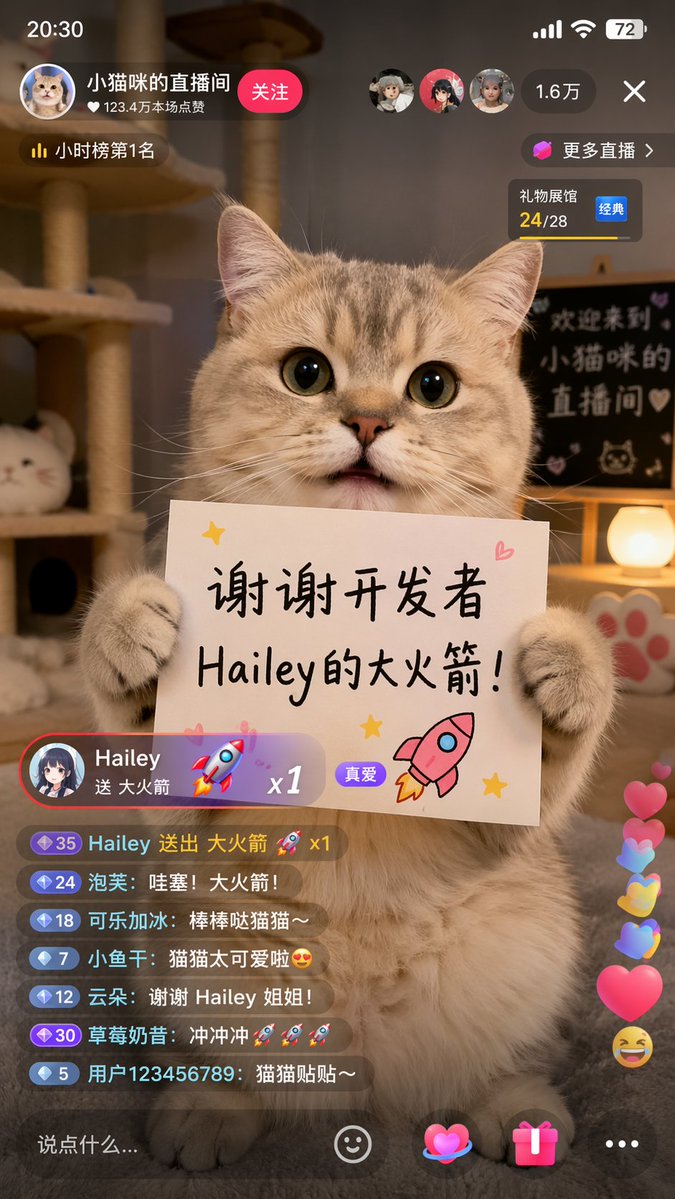
提示词 · EN
type
mobile livestream app screenshotsubject
description
cute fluffy tabby cat sitting upright, holding a white rectangular sign with both front pawssign_content
text
{argument name="sign text" default="谢谢开发者 Hailey的大火箭!"}illustrations
item 1
pink rocketitem 2
yellow starsitem 3
pink heartbackground
setting
cozy room with warm lightingelements
item 1
cat treeitem 2
glowing spherical lampitem 3
paw print decorationblackboard_text
{argument name="background text" default="欢迎来到 小猫咪的 直播间"}ui_layout
status_bar
time
20:30battery
72header
host_info
name
{argument name="host name" default="小猫咪的直播间"}likes
123.4万本场点赞button
关注rank
小时榜第1名viewers
count
1.6万avatars_count
3widgets
item 1
更多直播 >item 2
礼物展馆 24/28 经典gift_notification
sender
{argument name="gift sender" default="Hailey"}action
送 {argument name="gift name" default="大火箭"}multiplier
x1badge
真爱chat_box
message_count
7messages
item 1
35 Hailey 送出 大火箭 🚀 x1item 2
24 泡芙: 哇塞!大火箭!item 3
18 可乐加冰: 棒棒哒猫猫~item 4
7 小鱼干: 猫猫太可爱啦😍item 5
12 云朵: 谢谢 Hailey 姐姐!item 6
30 草莓奶昔: 冲冲冲🚀🚀🚀item 7
5 用户123456789: 猫猫贴贴~floating_reactions
item 1
pink heartsitem 2
yellow heartsitem 3
blue heartsitem 4
laughing emojibottom_bar
input_placeholder
说点什么...icons_count
4icons
item 1
smiley faceitem 2
heartitem 3
gift boxitem 4
ellipsis关于这个提示词
Generate a realistic, adorable mobile livestream interface screenshot featuring a fluffy cat host holding a customizable sign, complete with interactive chat and gift notifications. 它更适合作为 GPT Image 2 的概念艺术起点:先保留画面结构、主体关系和风格约束,再替换成你的品牌、人物或场景。
这条提示词使用结构化 JSON 组织信息,包含 type、subject、background、ui layout 等字段。保留这种层级能让模型更清楚地区分画面主题、布局、界面元素和细节约束。
使用时建议先小幅修改主体、场景、镜头和色调,再生成多个版本对比构图与细节。这样页面内容对用户有实际帮助,也避免把模型名或标签机械堆在正文里。
如何使用这个提示词
- Copy the full prompt JSON object above.
- Choose an AI image generation model that supports detailed scene and UI rendering (e.g., Sora, Midjourney).
- Customize the variables like
sign text,host name,gift sender, orbackground textto personalize your mockup. - Paste the modified prompt into your chosen model's input field.
- Generate the image and adjust as needed for your desired resolution or style.


