
GPT Image 2AI 提示词
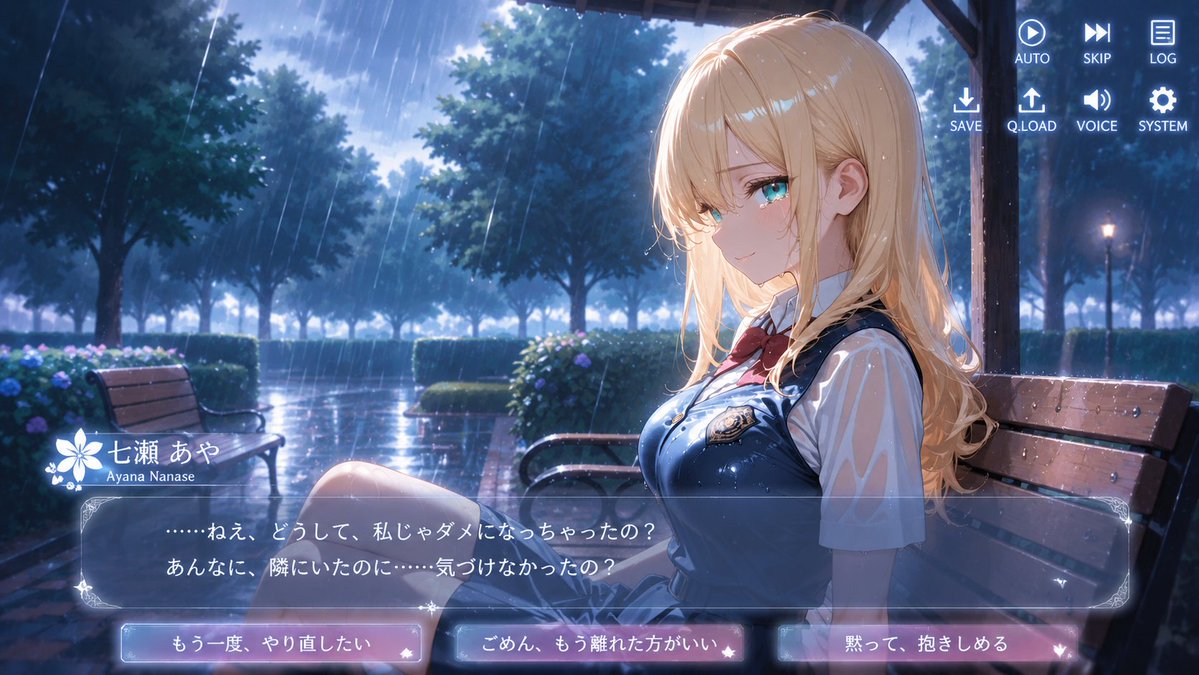
Rainy Park Anime Visual Novel CG — Sora 2 Prompt
Create a cinematic, rainy evening anime visual novel scene with a melancholic high school girl, Japanese dialogue UI, and interactive player choices.
提示词 · EN
type
anime visual novel screenshotformat
16:9 widescreen game CGscene
雨天傍晚的公园凉亭,电影般的浪漫剧情氛围,光泽感的潮湿表面与蓝色暮光照明subject
character name
{argument name="character name" default="七瀬 あや"}romanized name
{argument name="romanized name" default="Ayana Nanase"}appearance
坐在遮雨棚下木质长椅侧面的动漫女高中生,长波浪金发配柔和刘海,露出耳朵,身形纤细,面部特意用纯肤色方块遮挡,无五官outfit
白色短袖衬衫,海军蓝校服背心或背带裙,带有光泽的雨滴,领口系红色蝴蝶结,胸前有小型徽章,百褶裙,部分裸露的双腿pose
位于构图右侧,身体向左转,膝盖朝向观众,忧郁安静的姿态environment
location
绿树成荫的公园,配有长椅、树篱、绣球花、潮湿的砖砌步道、远处的路灯,深色木质凉亭柱子与屋顶勾勒出角色轮廓weather
大雨,带有明显的斜向雨丝,角色和长椅上有水滴,地面有积水倒影lighting
冷蓝色夜雨氛围,阴云密布的天空提供明亮的背光,金发上有柔和的轮廓光,高细节动漫背景绘画visual novel interface
top right menu
count
8items
item 1
AUTO(带播放图标)item 2
SKIP(带快进图标)item 3
LOG(带文档图标)item 4
SAVE(带下载箭头图标)item 5
Q.LOAD(带上传箭头图标)item 6
VOICE(带扬声器图标)item 7
SYSTEM(带齿轮图标)item 8
作为 2x4 菜单组一部分的额外间距/行对齐nameplate
position
对话框左上方style
白色花朵徽章与装饰性闪光visible text
item 1
七瀬 あやitem 2
Ayana Nanasedialogue box
position
底部三分之一处style
半透明深蓝色玻璃面板,配有华丽的浅色边角与细边框speaker
七瀬 あやtext
{argument name="dialogue text" default="……ねえ、どうして、私じゃダメになっちゃったの?\nあんなに、隣にいたのに……気づけなかったの?"}choice buttons
count
3position
最底部水平排列style
发光的圆角矩形按钮,蓝粉色半透明渐变,带有小型爱心/星星装饰labels
item 1
{argument name="left choice" default="もう一度、やり直したい"}item 2
{argument name="middle choice" default="ごめん、もう離れた方がいい"}item 3
{argument name="right choice" default="黙って、抱きしめる"}composition
角色占据右半部分,左侧为深邃的雨中公园空景,长椅与凉亭营造出透视感,UI 叠加层保持清晰易读,精致的 gpt-image-2 动漫游戏 CG 质量,无多余角色关于这个提示词
Create a cinematic, rainy evening anime visual novel scene with a melancholic high school girl, Japanese dialogue UI, and interactive player choices. 它更适合作为 GPT Image 2 的概念艺术起点:先保留画面结构、主体关系和风格约束,再替换成你的品牌、人物或场景。
这条提示词使用结构化 JSON 组织信息,包含 type、format、scene、subject、environment、visual novel interface、composition 等字段。保留这种层级能让模型更清楚地区分画面主题、布局、界面元素和细节约束。
使用时建议先小幅修改主体、场景、镜头和色调,再生成多个版本对比构图与细节。这样页面内容对用户有实际帮助,也避免把模型名或标签机械堆在正文里。
如何使用这个提示词
- Copy the full prompt JSON and paste it into an AI image generation model like Sora 2.
- Select the 16:9 aspect ratio for the widescreen game CG format.
- Customize variables like
character nameanddialogue textto personalize the story. - Generate the image and review the high-detail anime background and UI overlay.


