
GPT Image 2AI 提示词
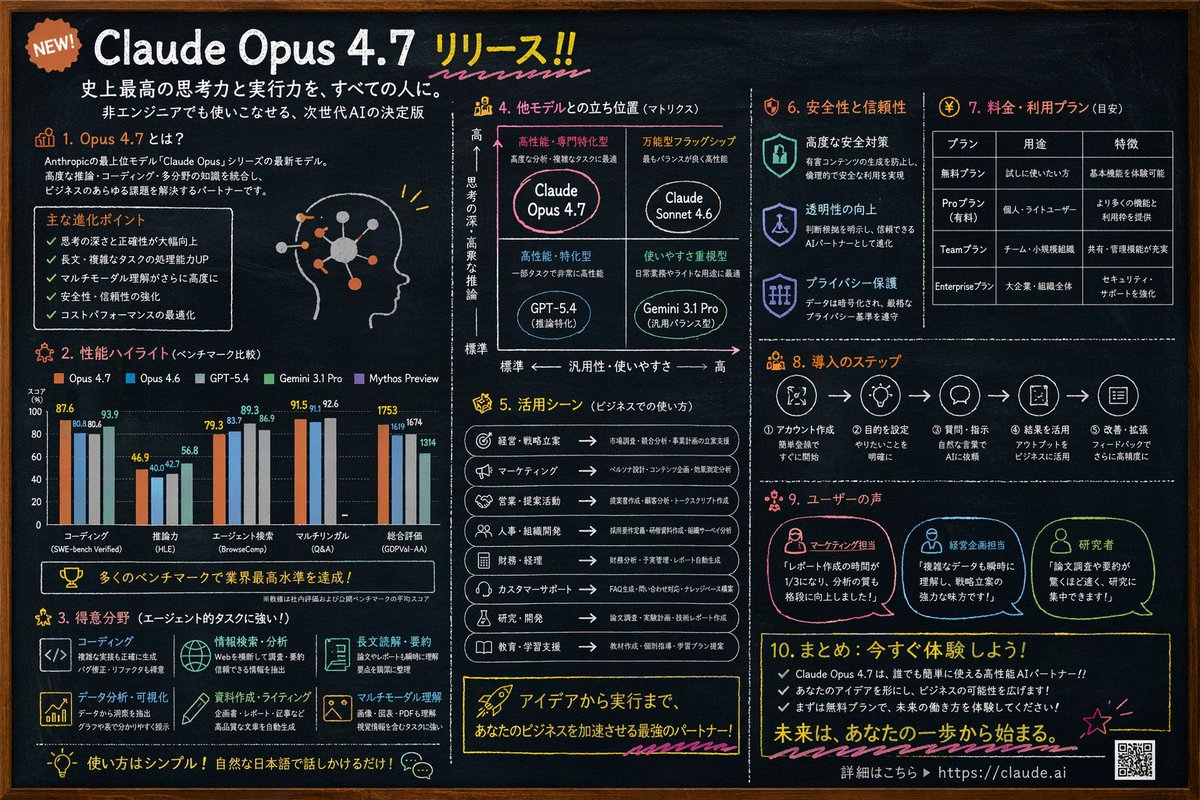
Chalkboard AI Infographic Prompt — 10-Section Product Launch
Generate a chalkboard infographic for AI product launches: 10 sections with charts, matrices, tables, and accents to visualize features, pricing, and comparisons.
提示词 · EN
type
黑板风格信息图style
深板岩色背景,白色文字,手绘风格装饰,简洁排版colors
background
深板岩灰text
白色accents
item 1
{argument name="accent color 1" default="橙色"}item 2
{argument name="accent color 2" default="浅蓝色"}item 3
黄色item 4
粉色header
badge
全新发布!title
{argument name="main headline" default="Claude Opus 4.7 发布!!"}subtitles
item 1
为每个人提供史上最强的思考与执行能力。item 2
非技术人员也能轻松驾驭的下一代 AI 决定版layout
sections
item 1
id
1title
1. 什么是 Opus 4.7?content
描述文本,5 个要点,带有发光神经节点的个人资料头像插图item 2
id
2title
2. 性能亮点(基准测试对比)content
分组柱状图,对比 5 个模型在 5 个类别中的表现:编码、推理能力、Agent 搜索、多语言能力、综合评估item 3
id
3title
3. 擅长领域(强大的 Agent 任务处理能力!)content
2x3 网格,展示 6 项优势及对应图标:编码、信息检索与分析、长文阅读与摘要、数据分析与可视化、文档编写与写作、多模态理解item 4
id
4title
4. 与其他模型的定位对比(矩阵图)content
2x2 定位矩阵,包含 4 个象限:{argument name="product name" default="Claude Opus 4.7"}、Claude Sonnet 4.6、GPT-5.4、Gemini 3.1 Proitem 5
id
5title
5. 应用场景(商业用途)content
包含 8 个商业用例的列表,配有图标和箭头item 6
id
6title
6. 安全性与可靠性content
3 个垂直排列的项目,配有盾牌/锁图标:高级安全措施、透明度提升、隐私保护item 7
id
7title
7. 价格与套餐(参考)content
3 列 4 行的数据表格,展示定价层级:免费版、Pro 版、Team 版、Enterprise 版item 8
id
8title
8. 部署步骤content
水平流程图,包含 5 个由箭头连接的编号步骤item 9
id
9title
9. 用户评价content
3 条用户感言,配有个人资料图标:市场营销人员、经营企划人员、研究人员item 10
id
10title
10. 总结:立即体验!content
3 个要点,行动号召,URL {argument name="website url" default="https://claude.ai"},以及一个二维码关于这个提示词
Generate a chalkboard infographic for AI product launches: 10 sections with charts, matrices, tables, and accents to visualize features, pricing, and comparisons. 它更适合作为 GPT Image 2 的概念艺术起点:先保留画面结构、主体关系和风格约束,再替换成你的品牌、人物或场景。
这条提示词使用结构化 JSON 组织信息,包含 type、style、colors、header、layout 等字段。保留这种层级能让模型更清楚地区分画面主题、布局、界面元素和细节约束。
使用时建议先小幅修改主体、场景、镜头和色调,再生成多个版本对比构图与细节。这样页面内容对用户有实际帮助,也避免把模型名或标签机械堆在正文里。
如何使用这个提示词
- Copy the prompt from this page.
- Pick an image-generating AI model (e.g., DALL·E 3, Midjourney, or Stable Diffusion).
- Edit the template: replace the placeholder variables (like
{argument name="main headline" default="Claude Opus 4.7 发布!!"}) with your actual product name, colors, and details. - Paste the modified prompt into the model's input and generate the infographic.


