
GPT Image 2AI 提示词
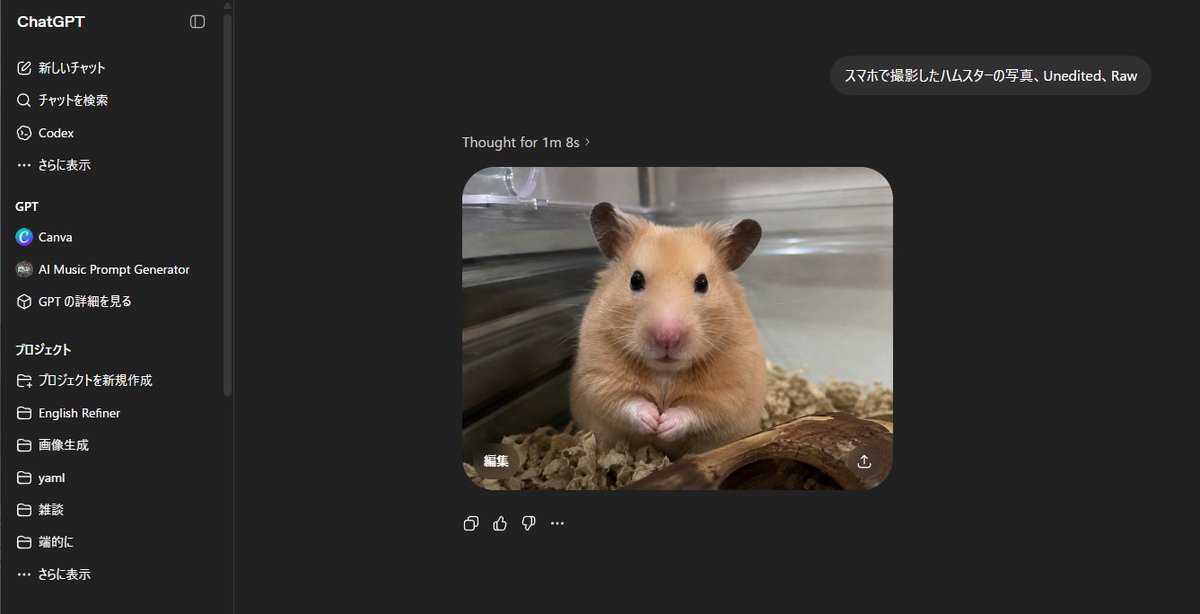
ChatGPT Dark Mode Screenshot with Hamster Image Prompt
Generate a photorealistic ChatGPT interface screenshot featuring a Japanese prompt and a raw, unedited smartphone-style hamster photo result.
提示词 · EN
type
ChatGPT 网页版深色模式的逼真桌面截图canvas
宽屏 16:9 截图,尺寸约为 1200x645,UI 清晰,不显示浏览器边框main_scene
description
ChatGPT 对话页面,中心显示生成的图像结果:一张逼真的手机风格照片,展示了一只在玻璃围栏内的金丝熊仓鼠,正对着镜头,两只小爪子合在一起,黑色光亮的眼睛,粉红色的鼻子,棕褐色的毛发,下方有垫料,前景有一块弯曲的木头,背景是金属或玻璃笼壁,浅景深,未经编辑的原始照片质感。user_prompt_bubble
{argument name="user prompt text" default="スマホで撮影したハムスターの写真、Unedited、Raw"}assistant_status_text
思考用时 1 分 8 秒 ›generated_image
position
聊天区域中右侧shape
圆角矩形count
1content
仓鼠照片style
逼真,略显柔和的手机摄像头拍摄效果,自然室内光线,温暖的棕褐色动物毛发,透明围栏的反射overlay_controls_count
2overlay_controls
item 1
生成图像左下角带有日语“编辑”字样的编辑按钮item 2
生成图像右下角的下载/分享图标layout
background
近乎黑色的 ChatGPT 深色主题left_sidebar
position
左侧width
约占图像的五分之一title
ChatGPTvisible_top_navigation_count
4visible_top_navigation
item 1
新しいチャットitem 2
チャットを検索item 3
Codexitem 4
さらに表示gpt_section
title
GPTvisible_items_count
3items
item 1
Canvaitem 2
AI Music Prompt Generatoritem 3
GPT の詳細を見るprojects_section
title
项目visible_items_count
7items
item 1
プロジェクトを新規作成item 2
English Refineritem 3
画像生成item 4
yamlitem 5
雑談item 6
端的にitem 7
さらに表示details
侧边栏边缘附近有细垂直分割线和滚动条chat_area
position
侧边栏右侧,深色空白工作区message_count
2messages
item 1
右上角附近的一个用户消息气泡,包含日语/英语提示词item 2
下方居中显示一个助手生成的图像回复,上方带有状态文本below_image_action_icons_count
4below_image_action_icons
item 1
复制图标item 2
点赞图标item 3
点踩图标item 4
更多选项省略号style_directives
使界面看起来像一张地道的日语环境 ChatGPT 网页应用截图,采用简洁的无衬线 UI 字体、深灰色面板、白色和浅灰色文本、微妙的圆角、精确的间距,并将一张逼真的仓鼠照片作为主要输出嵌入其中。避免使用装饰性边框或额外的注释。customization
animal
{argument name="animal" default="golden Syrian hamster"}photo style
{argument name="photo style" default="smartphone photo, unedited, raw"}interface language
{argument name="interface language" default="Japanese"}关于这个提示词
Generate a photorealistic ChatGPT interface screenshot featuring a Japanese prompt and a raw, unedited smartphone-style hamster photo result. 它更适合作为 GPT Image 2 的概念艺术起点:先保留画面结构、主体关系和风格约束,再替换成你的品牌、人物或场景。
这条提示词使用结构化 JSON 组织信息,包含 type、canvas、main scene、layout、style directives、customization 等字段。保留这种层级能让模型更清楚地区分画面主题、布局、界面元素和细节约束。
使用时建议先小幅修改主体、场景、镜头和色调,再生成多个版本对比构图与细节。这样页面内容对用户有实际帮助,也避免把模型名或标签机械堆在正文里。
如何使用这个提示词
- Copy the full prompt from this page.
- Paste it into a compatible AI image generator (e.g., Sora 2, Midjourney).
- Adjust the
{user prompt text}variable to change the animal or subject matter. - Set your desired output aspect ratio (ideally 16:9).
- Generate the image to create a realistic desktop screenshot.


