
GPT Image 2AI 提示词
AI & Retirement Planning — Chinese Infographic Prompt
Create a polished Chinese editorial infographic on AI's limits in retirement planning, perfect for business education and thought-leadership visuals.
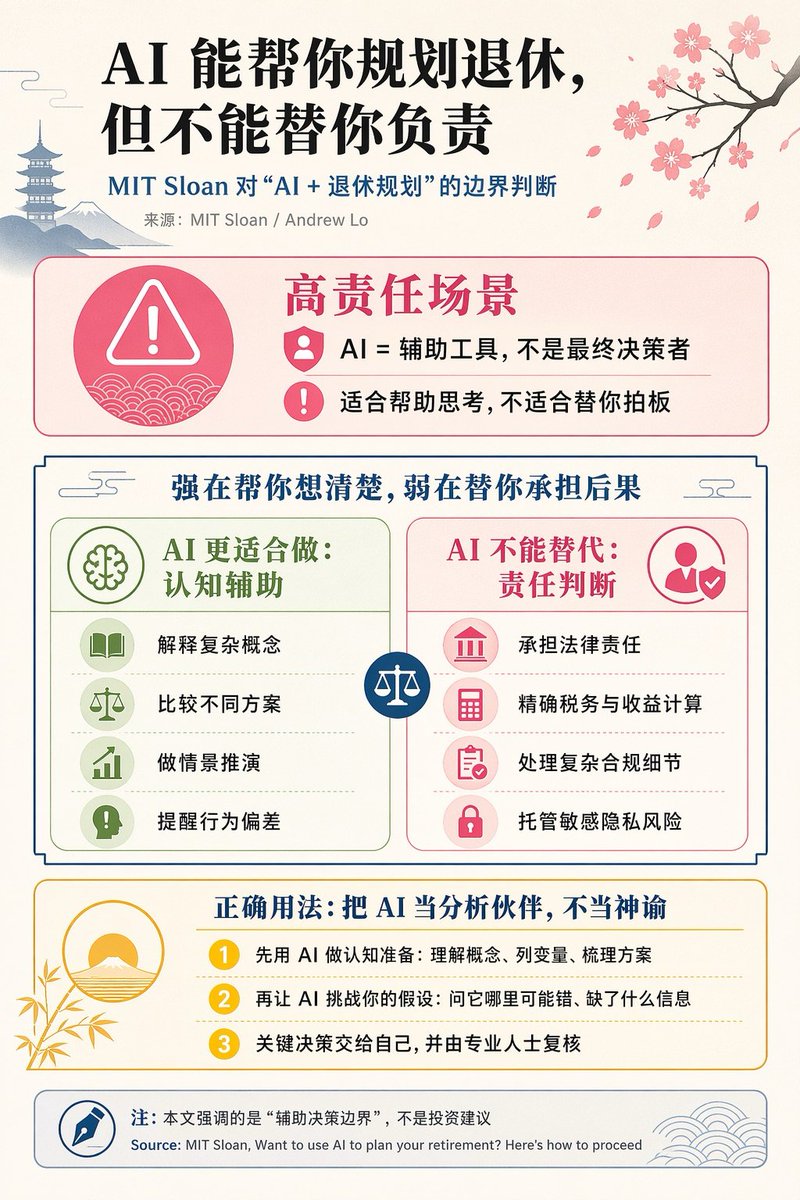
提示词 · EN
type
editorial Chinese infographic postertopic
AI and retirement planning boundariesstyle
clean academic magazine infographic, flat vector icons, soft textured off-white paper background, balanced Chinese editorial typography, minimal Japanese-inspired decorative motifscanvas
orientation
portraitaspect_ratio
3:4palette
background
warm ivoryprimary_text
blacksecondary_text
deep blueaccent_red
rose pinkaccent_green
muted olive greenaccent_yellow
golden yellowaccent_blue
navy blueline_color
soft gray-blueheadline
text
{argument name="headline text" default="AI 能帮你规划退休,但不能替你负责"}position
top leftfont
bold Chinese serif or Song-style displaylarge
truesubheadline
text
MIT Sloan 对“AI + 退休规划”的边界判断position
below headlinecolor
deep bluefont
bold Chinese sans-serifsource_line
text
来源:MIT Sloan / Andrew Loposition
below subheadlinecolor
graylayout
sections
item 1
title
高责任场景position
upper middlecount
2shape
rounded rectangle with pink border and pale pink fillicon_count
3labels
item 1
AI = 辅助工具,不是最终决策者item 2
适合帮助思考,不适合替你拍板left_icon
large pink warning triangle inside circle over wave patternitem_icons
item 1
person badgeitem 2
exclamation markitem 2
title
强在帮你想清楚,弱在替你承担后果position
centercount
2shape
large framed comparison panelsubsections
item 1
title
AI 更适合做:认知辅助position
leftcount
4color
greenlabels
item 1
解释复杂概念item 2
比较不同方案item 3
做情景推演item 4
提醒行为偏差icons
item 1
bookitem 2
balance scaleitem 3
upward chartitem 4
exclamation in speech bubbleitem 2
title
AI 不能替代:责任判断position
rightcount
4color
pink-redlabels
item 1
承担法律责任item 2
精确税务与收益计算item 3
处理复杂合规细节item 4
托管敏感隐私风险icons
item 1
courthouseitem 2
calculatoritem 3
clipboarditem 4
lockcenter_icon
blue circle with white balance scaleitem 3
title
正确用法:把 AI 当分析伙伴,不当神谕position
lower middlecount
3shape
rounded rectangle with yellow border and pale cream filllabels
item 1
先用 AI 做认知准备:理解概念、列变量、梳理方案item 2
再让 AI 挑战你的假设:问它哪里可能错、缺了什么信息item 3
关键决策交给自己,并由专业人士复核left_illustration
yellow rising sun over stylized landscape with bamboo leavesstep_markers
three yellow numbered circles: 1, 2, 3item 4
title
注:本文强调的是“辅助决策边界”,不是投资建议position
bottomcount
1shape
rounded rectangle with blue-gray borderlabels
item 1
Source: MIT Sloan, Want to use AI to plan your retirement? Here’s how to proceedleft_icon
blue fountain pen nib in circleright_decoration
gray-blue wave patterndecorations
count
5items
item 1
top right cherry blossom branch with pink flowers and falling petalsitem 2
top left pagoda silhouetteitem 3
top left distant mountain silhouetteitem 4
small cloud-line motifs near upper corners of comparison sectionitem 5
subtle wave patterns inside circular icons and lower right footercomposition
ample margins, all text in Chinese except the English source line at bottom, strong hierarchy from headline to colored content boxes, symmetrical comparison layout in the middle, polished social-media-ready infographicrendering
sharp vector infographic, crisp text, subtle paper grain, no photorealism关于这个提示词
Create a polished Chinese editorial infographic on AI's limits in retirement planning, perfect for business education and thought-leadership visuals. 它更适合作为 GPT Image 2 的概念艺术起点:先保留画面结构、主体关系和风格约束,再替换成你的品牌、人物或场景。
这条提示词使用结构化 JSON 组织信息,包含 type、topic、style、canvas、palette、headline、subheadline 等字段。保留这种层级能让模型更清楚地区分画面主题、布局、界面元素和细节约束。
使用时建议先小幅修改主体、场景、镜头和色调,再生成多个版本对比构图与细节。这样页面内容对用户有实际帮助,也避免把模型名或标签机械堆在正文里。
如何使用这个提示词
- Copy the full prompt from sora2hub.com.
- Choose a text-to-image model like Sora 2 or Midjourney that supports detailed prompts.
- Customize the headline text variable (e.g., change the default Chinese headline).
- Adjust the canvas aspect ratio if needed for your platform.
- Generate the image and refine by tweaking style or color palette keywords.


