
GPT Image 2AI 提示词
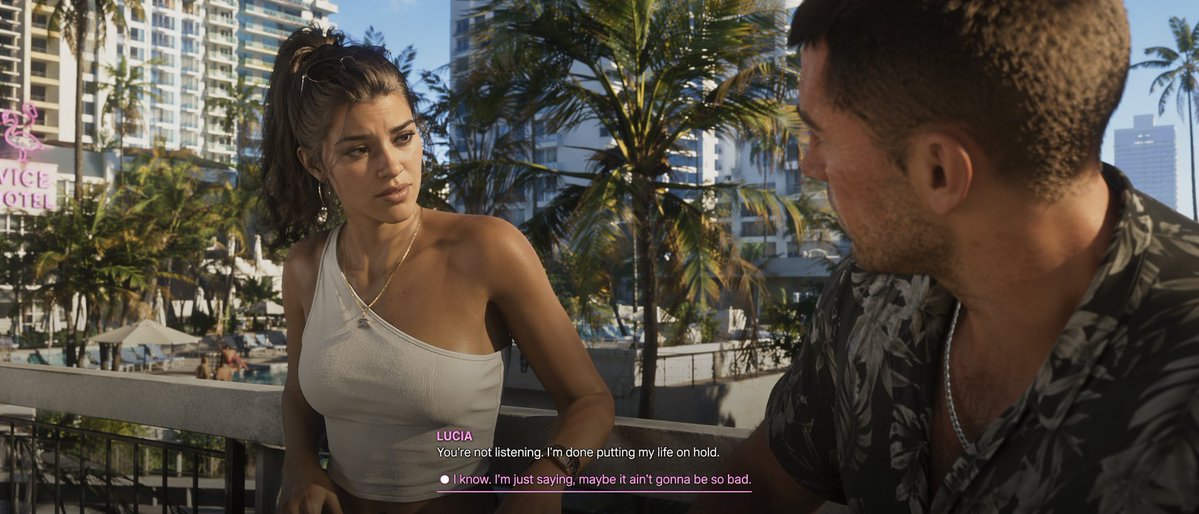
GTA-Style Cutscene Prompt with Custom Dialogue UI
Generate a photorealistic video game cutscene screenshot with customizable characters, setting, and interactive subtitle UI.
提示词 · EN
A argvisual style: photorealistic modern video game cutscene of a young Latina woman and a Caucasian man conversing on a argsetting: tropical city balcony overlooking palm trees and a hotel pool. The woman faces the camera, wearing a messy high ponytail, hoop earrings, and a white one-shoulder crop top, looking serious. The man is seen from an over-the-shoulder profile on the right, wearing a dark floral shirt. The background features a pink neon 'VICE HOTEL' sign. At the bottom center, video game subtitles show the speaker name argspeaker name: LUCIA in pink, above the white dialogue argdialogue text: You're not listening. I'm done putting my life on hold.. Below is a player choice with a white circle and pink underlined text reading argresponse option: I know. I'm just saying, maybe it ain't gonna be so bad..
关于这个提示词
Generate a photorealistic video game cutscene screenshot with customizable characters, setting, and interactive subtitle UI. 它更适合作为 GPT Image 2 的概念艺术起点:先保留画面结构、主体关系和风格约束,再替换成你的品牌、人物或场景。
常见用途包括 gptimage2api prompts、gptimage2api、en。这些标签只作为创作方向参考,实际生成时仍应以提示词结构和预览图为准。
使用时优先替换 visual style、setting、speaker name、dialogue text 等占位符,并保持镜头、构图和材质描述的顺序不变。这样更容易获得稳定的画面结果,也方便继续做多版本对比。
如何使用这个提示词
- Copy the prompt text. 2. Choose an AI video or image generation model (like Sora). 3. Edit the variables in the curly brackets {} to change the visual style, setting, speaker name, dialogue, and response option. 4. Generate the image or video. 5. Use the result as a story asset or creative reference.


