GPT Image 2AI 提示词
Claude Evolution Infographic — Sora 2 Prompt
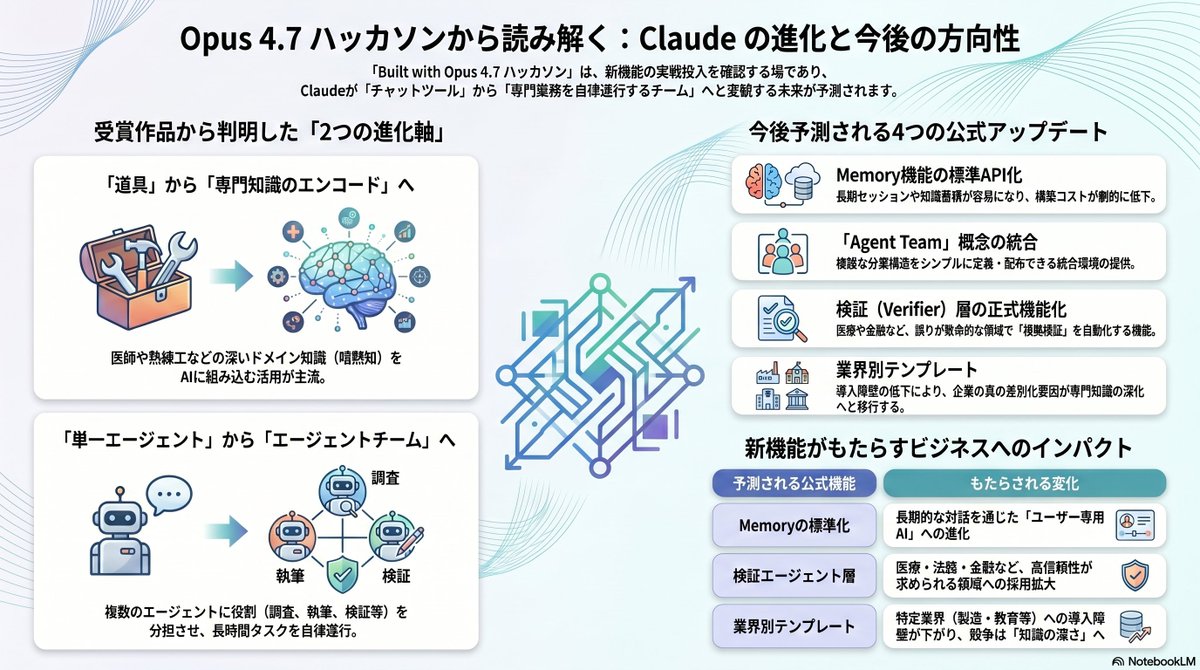
Generate a detailed Japanese business infographic mapping Claude’s evolution from the Opus 4.7 hackathon, including future predictions and team-based AI agents.
提示词 · EN
type
日语商业信息图topic
从 Opus 4.7 黑客松推断 Claude 的演进与未来方向language
日语style
look
简洁现代的企业信息图background
极浅灰白色,配以从左上、右上及下边缘扫过的柔和青色与蓝色抽象流动轮廓线palette
item 1
黑色item 2
深灰色item 3
白色item 4
青色item 5
蓝绿色item 6
天蓝色item 7
靛蓝色item 8
薰衣草色item 9
柔紫色lighting
平整明亮的编辑风格布光finish
高分辨率演示图,带有细微的投影和圆角卡片canvas
aspect_ratio
2:1 横向approx_resolution
1200x670header
title
{argument name="headline text" default="从 Opus 4.7 黑客松解读:Claude 的演进与未来方向"}subtitle_lines_count
2subtitle
“Built with Opus 4.7 黑客松”不仅是验证新功能实战应用的场所,更预示着 Claude 将从“聊天工具”转变为“自主执行专业业务的团队”的未来。alignment
centertitle_style
大号粗体黑色无衬线字体subtitle_style
较小号粗体深灰色无衬线字体layout
sections
item 1
title
从获奖作品中发现的“两大演进轴”position
左上方区域count
2cards
item 1
title
从“工具”到“专业知识编码”position
左上卡片visuals_count
2visuals
item 1
以柔和等距卡通风格绘制的装有扳手和螺丝刀等工具的开放式工具箱item 2
带有连接节点、电路及周围环绕小型医疗/技术图标气泡的大脑connector
工具箱与大脑之间指向右侧的青色箭头body
将医生或熟练工等深层领域知识(隐性知识)植入 AI 的应用成为主流。item 2
title
从“单一 Agent”到“Agent 团队”position
左下卡片visuals_count
2visuals
item 1
带有对话气泡的可爱机器人item 2
由 3 个机器人组成的联网团队,通过三角形工作流图连接,并标注有“调查”、“执笔”、“验证”及盾牌勾选图标connector
单个机器人与机器人团队之间指向右侧的青色箭头body
让多个 Agent 分担角色(调查、执笔、验证等),自主执行长时间任务。item 2
title
预测未来 4 项官方更新position
右上方区域count
4cards
item 1
title
Memory 功能的标准化 API 化icon
圆角方形图标框内,粉色与蓝色大脑分裂图样及堆叠的数据库磁盘body
长期会话与知识积累变得更加容易,构建成本大幅降低。item 2
title
“Agent Team”概念的整合icon
圆角方形图标框内,一群人与一个小机器人body
提供可简单定义及分发复杂分工结构的集成环境。item 3
title
验证(Verifier)层的正式功能化icon
圆角方形图标框内,带有勾选标记和放大镜的文档body
在医疗或金融等错误代价高昂的领域,实现“机器审计”自动化的功能。item 4
title
行业模板icon
圆角方形图标框内,城市/建筑与银行/政府机构body
随着导入门槛的降低,企业的真正差异化因素将转向专业知识的深化。item 3
title
新功能带来的商业影响position
右下方区域count
3structure
带标题胶囊的双栏对比表headers
item 1
预测的官方功能item 2
带来的变化rows
item 1
left
Memory 的标准化right
通过长期对话进化为“用户专属 AI”right_icon
带有用户徽章的身份证或个人资料卡item 2
left
验证 Agent 层right
在医疗、法律、金融等高可靠性需求领域扩大采用right_icon
盾牌徽章item 3
left
行业模板right
降低特定行业(制造、教育等)的导入门槛,竞争转向“知识深度”right_icon
上升趋势箭头centerpiece
position
中心description
大型抽象几何线条艺术徽标或字母组合,采用青色至蓝色至紫色的渐变色,对称且具有棱角,作为左右两栏之间的视觉分隔符branding
count
1items
item 1
右下角有小型 NotebookLM 标志和文字typography
font_family
简洁粗体日语无衬线字体section_titles
粗体黑色card_titles
粗体黑色body_text
中等粗细黑色或深灰色header_pills
蓝色和青色圆角胶囊上的白色文字关于这个提示词
Generate a detailed Japanese business infographic mapping Claude’s evolution from the Opus 4.7 hackathon, including future predictions and team-based AI agents. 它更适合作为 GPT Image 2 的概念艺术起点:先保留画面结构、主体关系和风格约束,再替换成你的品牌、人物或场景。
这条提示词使用结构化 JSON 组织信息,包含 type、topic、language、style、canvas、header、layout 等字段。保留这种层级能让模型更清楚地区分画面主题、布局、界面元素和细节约束。
使用时建议先小幅修改主体、场景、镜头和色调,再生成多个版本对比构图与细节。这样页面内容对用户有实际帮助,也避免把模型名或标签机械堆在正文里。
如何使用这个提示词
- Copy the entire prompt JSON.
- Paste it into an AI infographic generator that supports structured layout descriptions (e.g., a JSON-to-image tool).
- (Optional) Adjust colors, text, or canvas size in the JSON to match your brand.
- Generate the infographic and download the 1200x670 PNG.
- Use it in presentations, articles, or social media to visualize Claude's future directions.