
GPT Image 2AI 提示词
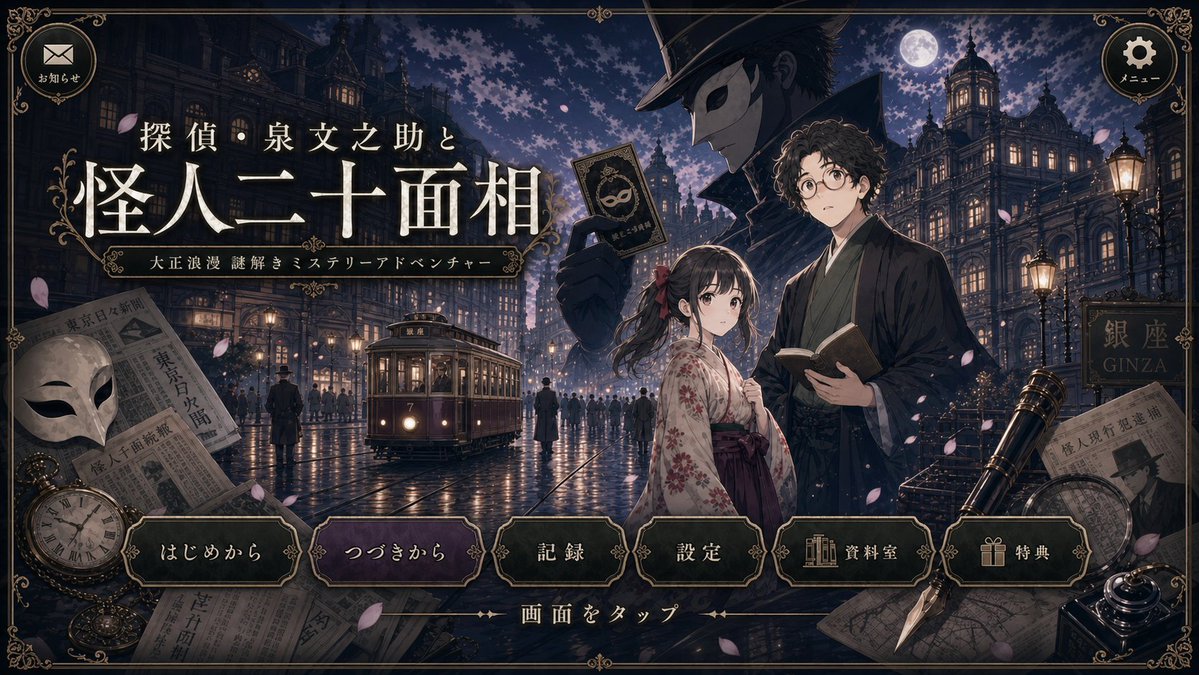
Taisho-romantic Mystery Title Screen — Polished AI Redraw
Generates a sharp, high-quality revision of a Taisho-era mystery visual novel title screen, preserving the original layout and UI while cleaning up artifacts.
提示词 · EN
Using the provided reference image, create a cleaned-up revised version of the same Taisho-romantic mystery game title screen. Preserve the overall composition, Japanese logo text, ornate UI frame, character placement, moonlit Ginza street setting, and all interface elements unchanged, including the 2 top circular buttons and the 6 bottom menu buttons labeled 「はじめから」, 「つづきから」, 「記録」, 「設定」, 「資料室」, and 「特典」. Redraw the linework and repaint the colors for a sharper, higher-quality illustration with clearer edges, richer but still dark antique tones, and more polished lighting. Correct the streetcar so it has a more believable vintage tram shape, perspective, windows, rails, and front details. Greatly reduce GPT-image-style tiny dot garbage, speckle noise, random artifacts, muddy textures, and messy broken lines while keeping the cinematic nighttime atmosphere, falling petals, wet pavement reflections, newspapers, mask, pocket watch, telescope, pen, and decorative border.
关于这个提示词
Generates a sharp, high-quality revision of a Taisho-era mystery visual novel title screen, preserving the original layout and UI while cleaning up artifacts. 它更适合作为 GPT Image 2 的概念艺术起点:先保留画面结构、主体关系和风格约束,再替换成你的品牌、人物或场景。
使用时建议先小幅修改主体、场景、镜头和色调,再生成多个版本对比构图与细节。这样页面内容对用户有实际帮助,也避免把模型名或标签机械堆在正文里。
如何使用这个提示词
- Copy the full prompt body below into your AI image generator.
- Select a high-fidelity model like Sora 2 or DALL·E 3.
- Upload your reference image when prompted.
- Optionally adjust terms like 'dark antique tones' or 'wet pavement reflections' to shift the mood.
- Generate and download the revised title screen.


