
GPT Image 2AI 提示词
Codex Launch Poster Prompt — Apple-Style SaaS Visual
Generate a sleek product update poster in Apple minimalist style with this AI prompt, perfect for SaaS launches and announcements.
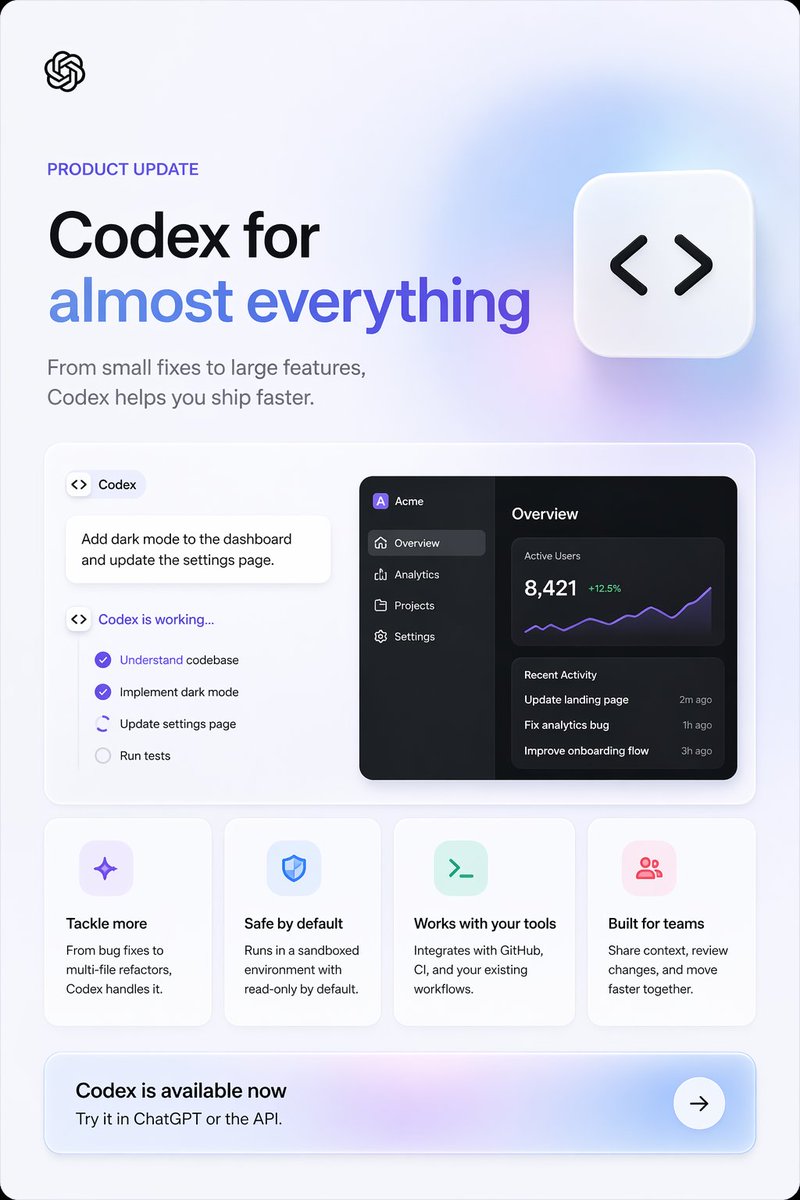
提示词 · EN
type
产品更新营销海报style
简洁现代的 SaaS 落地页图形,Apple 风格的极简主义,柔和的环境渐变,细腻的阴影,圆角卡片,清晰的矢量 UI,高端宣传设计brand
OpenAIcanvas
aspect_ratio
2:3 竖版background
极浅的冷灰色,带有淡淡的薰衣草蓝光渐变,外框圆角layout
sections
item 1
title
顶部首屏position
顶部count
4labels
item 1
OpenAI logoitem 2
产品更新item 3
主标题item 4
辅助副标题item 2
title
主展示面板position
中部count
3labels
item 1
Codex 任务卡片item 2
工作清单卡片item 3
深色分析仪表盘预览item 3
title
功能卡片position
中下部count
4labels
item 1
应对更多挑战item 2
默认安全item 3
兼容现有工具item 4
为团队打造item 4
title
行动号召横幅position
底部count
3labels
item 1
Codex 现已推出item 2
在 ChatGPT 或 API 中试用。item 3
箭头按钮centerpiece
右上角附近有一个大型悬浮圆角方形图标,带有黑色代码括号符号content_blocks
eyebrow
{argument name="eyebrow text" default="产品更新"}headline_line_1
{argument name="headline line 1" default="Codex,助力"}headline_line_2
{argument name="headline line 2" default="一切可能"}subheadline
{argument name="subheadline" default="从小型修复到大型功能开发,Codex 助你更快交付。"}cta_title
{argument name="call to action title" default="Codex 现已推出"}visual_details
logo
左上角小型黑色 OpenAI 绳结 logoheadline
左侧超大加粗无衬线标题,第一行黑色,第二行蓝紫色渐变文字subheadline_style
中灰色无衬线字体,标题下方两行floating_icon
白色圆角方形磁贴,带有柔和阴影,包含黑色 <> 代码符号,置于右上角showcase_panel
大型白色圆角矩形,带有细边框和柔和阴影left_task_area
count
3items
item 1
带有代码图标和 Codex 文字的小型胶囊标签item 2
白色提示卡片,内容为:为仪表盘添加深色模式并更新设置页面。item 3
标题为“Codex 正在运行...”的状态清单checklist
count
4items
item 1
理解代码库(紫色勾选)item 2
实现深色模式(紫色勾选)item 3
更新设置页面(激活/进行中,带有部分圆形指示器)item 4
运行测试(未勾选,灰色)right_dashboard
theme
深色模式 UI 预览app_name
Acmesidebar
count
4items
item 1
概览(已选中)item 2
分析item 3
项目item 4
设置main_panels
count
3items
item 1
概览标题item 2
活跃用户指标 8,421,带绿色 +12.5% 和紫色折线图item 3
包含 3 条记录的近期活动列表recent_activity
count
3items
item 1
更新落地页 — 2 分钟前item 2
修复分析错误 — 1 小时前item 3
优化引导流程 — 3 小时前feature_cards
count
4cards
item 1
title
应对更多挑战icon
淡薰衣草色圆角方形中的紫色闪光/星形图标body
从 Bug 修复到多文件重构,Codex 都能胜任。item 2
title
默认安全icon
淡蓝色圆角方形中的蓝色盾牌图标body
在沙盒环境中运行,默认只读。item 3
title
兼容现有工具icon
淡薄荷色圆角方形中的绿色终端提示符图标body
与 GitHub、CI 及你现有的工作流集成。item 4
title
为团队打造icon
淡粉色圆角方形中的粉色群组/用户图标body
共享上下文,审查变更,共同加速前进。cta_banner
style
宽圆角矩形,带有柔和的紫蓝色渐变底色,右侧为白色圆形箭头按钮subtitle
在 ChatGPT 或 API 中试用。composition
平衡的左对齐排版,下方采用模块化卡片网格,留白充足,高端科技广告质感rendering
锐利的排版,细腻的深度感,柔和的玻璃质感光效,无摄影元素关于这个提示词
Generate a sleek product update poster in Apple minimalist style with this AI prompt, perfect for SaaS launches and announcements. 它更适合作为 GPT Image 2 的概念艺术起点:先保留画面结构、主体关系和风格约束,再替换成你的品牌、人物或场景。
这条提示词使用结构化 JSON 组织信息,包含 type、style、brand、canvas、layout、content blocks、visual details 等字段。保留这种层级能让模型更清楚地区分画面主题、布局、界面元素和细节约束。
使用时建议先小幅修改主体、场景、镜头和色调,再生成多个版本对比构图与细节。这样页面内容对用户有实际帮助,也避免把模型名或标签机械堆在正文里。
如何使用这个提示词
- Copy the prompt from the page.
- Open your preferred AI image generator (e.g., DALL·E, Midjourney, or Sora).
- Replace the bracketed
{argument name="..." default="..."}variables with your own text, such as headline, subhead, and CTA. - Adjust any visual details like colors or layout if your tool supports negative prompts or style tuning.
- Generate the image and download your high-quality poster.


