
GPT Image 2AI 提示词
Cold Authority AI Poster — Cinematic Futuristic Tech Ad
Create a cinematic, dark-toned tech advertising poster featuring a powerful executive silhouette, ice-blue lighting, and bold typography with customizable text fields.
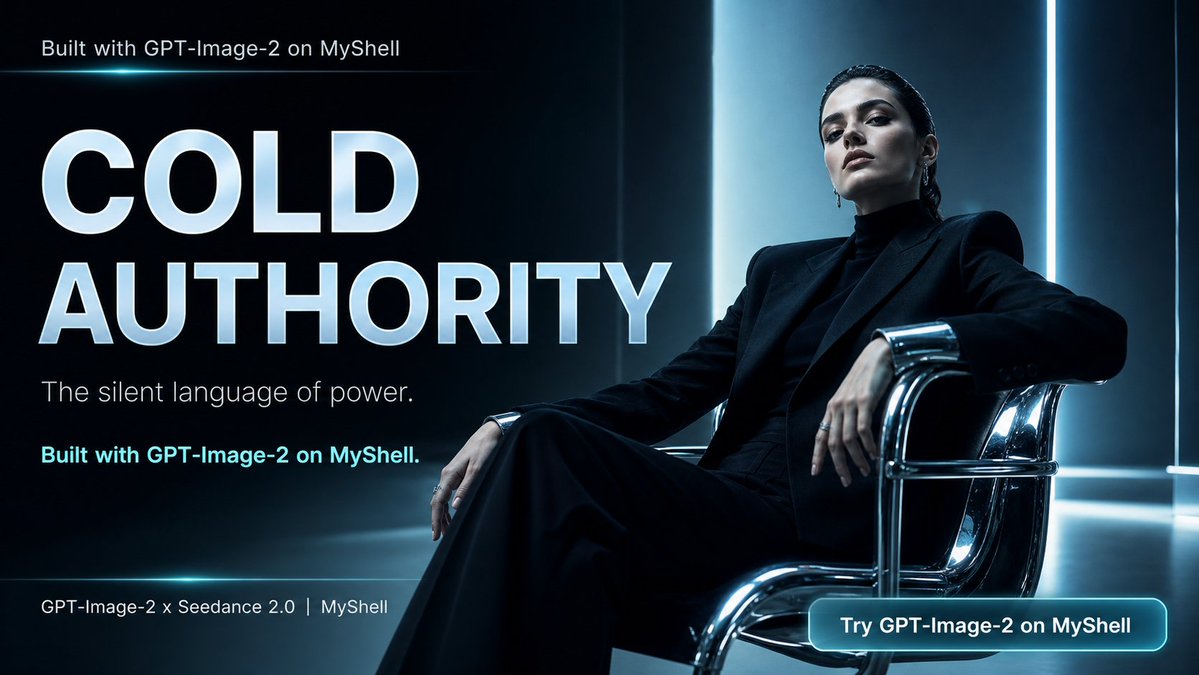
提示词 · EN
type
电影质感科技广告海报format
16:9 宽屏社交媒体横幅theme
冷峻权威、奢华力量、未来感 AI 创意流程composition
background
深色光泽感行政办公室,黑色与深青色墙面,垂直冰蓝色灯带,反光地板,高对比度阴影left_side
占据左半部分的巨幅排版文字right_side
单人坐姿权威形象,坐在铬合金现代休闲椅上,采用低角度微广角拍摄mood
静谧、威严、优雅、商务、电影感main_subject
count
1description
中性风高管形象,梳着干练的深色背头,面部被一个柔和的灰色方形隐私遮罩刻意遮挡,身着全黑结构感西装,内搭黑色高领衫,姿态从容且具统治力,单腿交叠,双臂自然搭在铬合金椅上,手指佩戴戒指outfit
pieces_count
3pieces
item 1
黑色结构感垫肩西装外套item 2
黑色高领衫item 3
黑色阔腿西裤chair
抛光铬合金管状休闲椅,配黑色皮革座垫,带有明亮反光lighting
style
冷蓝色电影级灯光key_light
主体后方的高大垂直青白色灯板rim_light
勾勒头发、肩膀、双手和铬合金椅的蓝色轮廓光atmosphere
轻微雾感,光泽反光,深色至青色的渐变text_elements
count
6items
item 1
position
左上角text
Built with GPT-Image-2 on MyShellstyle
小型白色无衬线字体item 2
position
左侧居中text
{argument name="headline text" default="COLD AUTHORITY"}style
巨型粗体大写无衬线字体,白色,带淡蓝色光晕和金属质感阴影item 3
position
标题下方text
{argument name="tagline" default="The silent language of power."}style
纤细白色无衬线字体item 4
position
标语下方左侧text
Built with GPT-Image-2 on MyShell.style
青色粗体无衬线字体item 5
position
左下角text
{argument name="footer text" default="GPT-Image-2 × Seedance 2.0 | MyShell"}style
小型白色无衬线字体item 6
position
右下角text
{argument name="button text" default="Try GPT-Image-2 on MyShell"}style
圆形发光青色按钮内的白色粗体文字graphic_details
ui_components_count
2ui_components
item 1
左上角附近的细长发光青色水平线item 2
右下角圆角矩形青色行动号召按钮color_palette
黑色、炭灰色、冰蓝色、青色光晕、铬银色、白色排版typography
简洁现代几何无衬线字体,超大标题,高端科技品牌感rendering
照片级真实感电影广告静帧,超高细节,清晰排版,光泽反光,变形镜头对比度,高端编辑构图,无多余人物,无杂乱,无拼写错误customization
subject style
{argument name="subject style" default="androgynous executive in an all-black power suit"}关于这个提示词
Create a cinematic, dark-toned tech advertising poster featuring a powerful executive silhouette, ice-blue lighting, and bold typography with customizable text fields. 它更适合作为 GPT Image 2 的概念艺术起点:先保留画面结构、主体关系和风格约束,再替换成你的品牌、人物或场景。
这条提示词使用结构化 JSON 组织信息,包含 type、format、theme、composition、main subject、lighting、text elements 等字段。保留这种层级能让模型更清楚地区分画面主题、布局、界面元素和细节约束。
使用时建议先小幅修改主体、场景、镜头和色调,再生成多个版本对比构图与细节。这样页面内容对用户有实际帮助,也避免把模型名或标签机械堆在正文里。
如何使用这个提示词
- Copy the prompt into your preferred AI image generator (e.g., Midjourney, DALL·E 3, Stable Diffusion).
- Choose a model that excels in cinematic lighting and high-contrast compositions.
- Replace the placeholder text like
{headline text}and{tagline}with your own messaging. - Generate the image, reviewing the first output for mood and text placement accuracy.
- Iterate by adjusting lighting descriptors or subject pose if the initial result needs refinement.


