
GPT Image 2AI 提示词
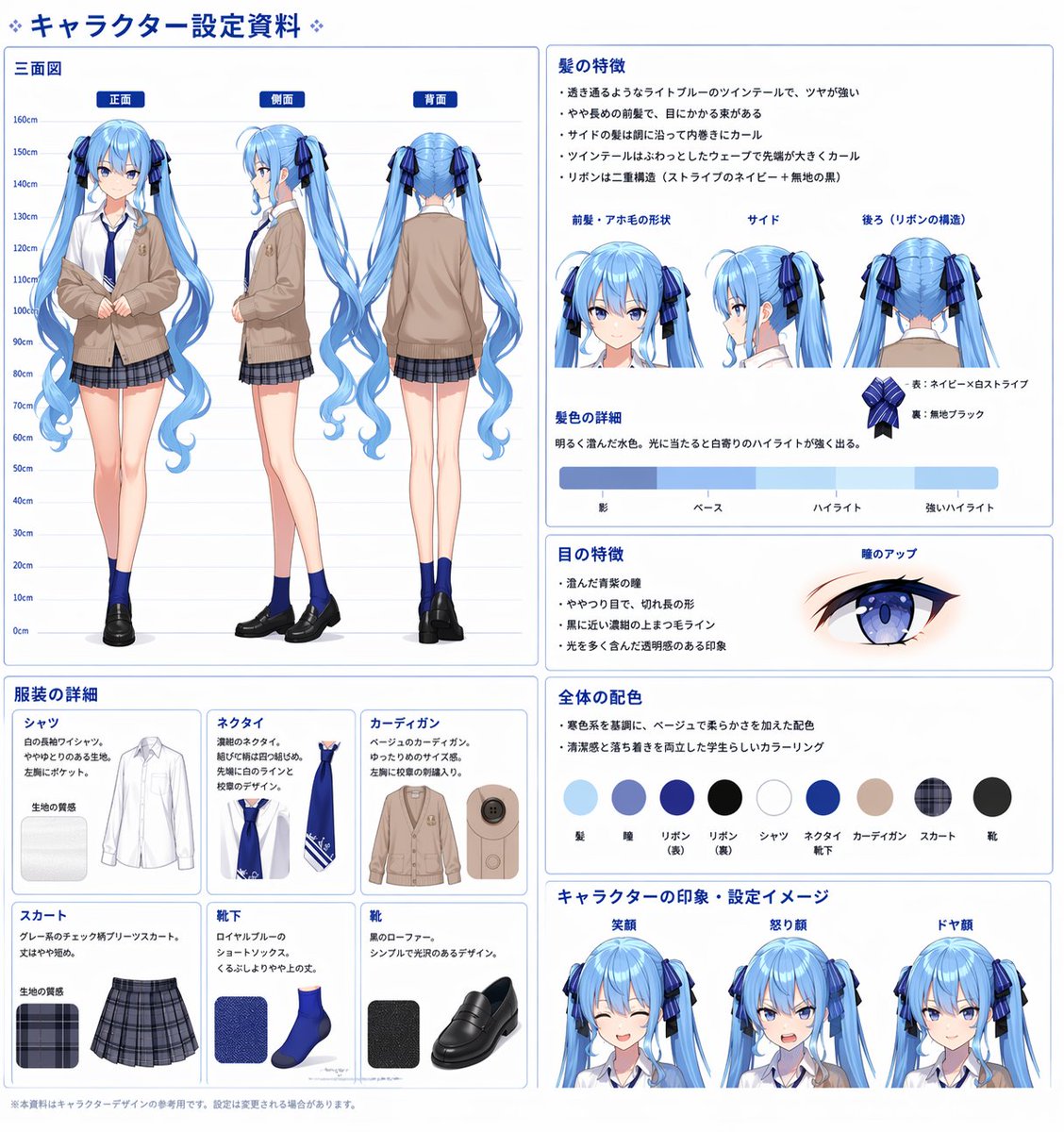
Anime Character Sheet Generator — Full 3-View & Color Palette
Create professional, highly detailed character design documents featuring 360° turnarounds, costume breakdowns, and precise color palettes for artists and studios.
提示词 · EN
type
anime character design reference sheetheader
{argument name="document title" default="❖ キャラクター設定資料 ❖"}character
description
{argument name="character description" default="anime girl with long twin tails"}hair_color
{argument name="hair color" default="light blue"}eye_color
{argument name="eye color" default="blue"}outfit
{argument name="outfit style" default="beige cardigan, white shirt, blue tie, grey plaid skirt, blue socks, black loafers"}layout
left_column
title
三面図description
Height chart (0cm-160cm) with full-body posescount
3labels
item 1
正面item 2
側面item 3
背面bottom_left_grid
title
服装の詳細description
Grid of individual clothing items with text and fabric texturescount
6labels
item 1
シャツitem 2
ネクタイitem 3
カーディガンitem 4
スカートitem 5
靴下item 6
靴top_right
title
髪の特徴description
Bullet points, headshots for hair angles, and ribbon detailcount
3labels
item 1
前髪・アホ毛の形状item 2
サイドitem 3
後ろ (リボンの構造)middle_right_color_bar
title
髪色の詳細description
Horizontal color gradient barcount
4labels
item 1
影item 2
ベースitem 3
ハイライトitem 4
強いハイライトmiddle_right_eye
title
目の特徴description
Bullet points and close-up eye illustrationcount
1labels
item 1
瞳のアップmiddle_right_palette
title
全体の配色description
Bullet points and circular color swatchescount
9labels
item 1
髪item 2
瞳item 3
リボン(表)item 4
リボン(裏)item 5
シャツitem 6
ネクタイ/靴下item 7
カーディガンitem 8
スカートitem 9
靴bottom_right_expressions
title
キャラクターの印象・設定イメージdescription
Expression headshotscount
3labels
item 1
笑顔item 2
怒り顔item 3
ドヤ顔关于这个提示词
Create professional, highly detailed character design documents featuring 360° turnarounds, costume breakdowns, and precise color palettes for artists and studios. 它更适合作为 GPT Image 2 的概念艺术起点:先保留画面结构、主体关系和风格约束,再替换成你的品牌、人物或场景。
这条提示词使用结构化 JSON 组织信息,包含 type、header、character、layout 等字段。保留这种层级能让模型更清楚地区分画面主题、布局、界面元素和细节约束。
使用时建议先小幅修改主体、场景、镜头和色调,再生成多个版本对比构图与细节。这样页面内容对用户有实际帮助,也避免把模型名或标签机械堆在正文里。
如何使用这个提示词
- Copy the Prompt: Copy the JSON code block above into your clipboard.
- Select a Model: Paste it into a compatible image generation model like Sora or a text-to-image AI that supports complex JSON inputs.
- Customize Inputs: Change the
defaultvalues in the arguments (e.g., hair color, outfit) to describe your unique character. - Generate: Run the model. The AI will produce a full reference sheet with labeled panels.
- Refine: Adjust the character description or specific labels for a more tailored output if needed.


