
GPT Image 2AI 提示词
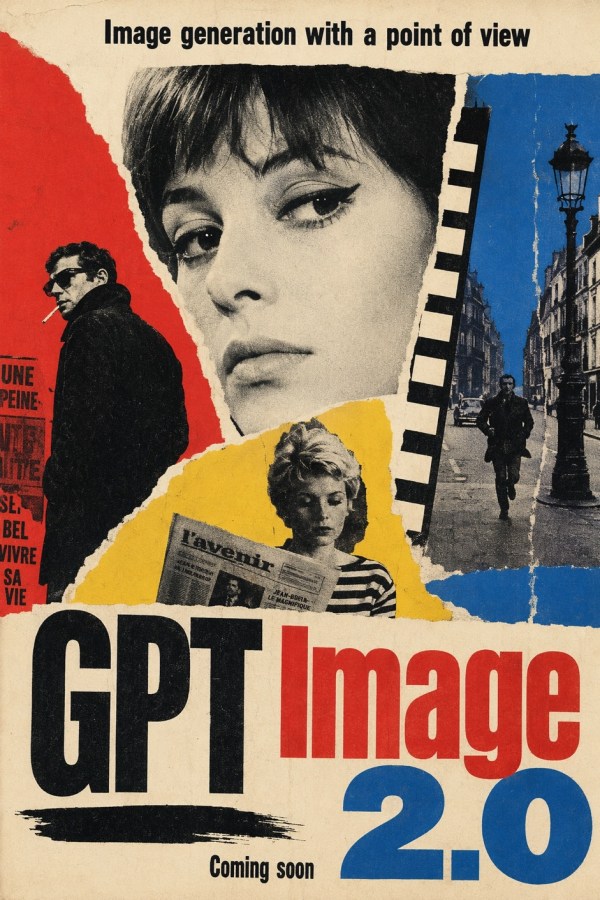
GPT Image 2.0 Constructivist Poster — AI Art Prompt
Generate a vintage constructivist poster with AI: torn paper collage, bold typography, and editable text for your headline, brand, and version—perfect for announcements.
提示词 · EN
一张复古政治宣传风格的海报拼贴画,背景为陈旧的米色纸张,带有磨损、轻微污渍的质感,边缘呈现撕纸效果。整体构图为一张强烈的垂直海报,具有鲜明的构成主义和苏联风格设计,仅使用黑色、红色、蓝色、黄色和灰白色。在最上方,居中放置粗体黑色无衬线文本标题 argheadline text: Image generation with a point of view。在中心位置,预留一个大的垂直矩形区域作为主要视觉焦点,长宽比略高,填充平淡的柔和米色至灰褐色渐变,如同空白的海报插页。围绕该区域,构建一个由 4 个可见拼贴区域组成的撕纸照片蒙太奇:左侧为红色纸面,配有身穿深色外套的人物背影或侧影的黑白剪纸,旁边是法语海报文本碎片;中央矩形后方顶部,露出部分黑白人脸或头部碎片;右侧为蓝色纸面,配有黑白巴黎街景,包括 1 根高大的装饰性路灯、古老建筑、1 辆汽车和 1 名行人;底部中央为黄色撕纸区域,配有手持报纸、身穿条纹衬衫的人物黑白剪影。在中央矩形右上边缘附近添加一条垂直的黑色矩形块条,如同剪切的图形条。在底部,放置巨大的粗体压缩字体主标题 argbrand text: GPT Image,其中“GPT”为黑色,“Image”为亮红色。在下方右侧,添加一个巨大的蓝色 argversion text: 2.0。在左侧标题区域下方,添加一道粗糙的水平黑色笔触下划线。在底部附近居中位置,用较小的黑色文本书写 argfooter text: Coming soon。整体外观应呈现 20 世纪中叶前卫海报艺术的质感,包括粗糙的撕纸拼贴、磨损的印刷效果、高对比度半色调摄影、不完美的纸张套印以及大胆的编辑排版。
关于这个提示词
Generate a vintage constructivist poster with AI: torn paper collage, bold typography, and editable text for your headline, brand, and version—perfect for announcements. 它更适合作为 GPT Image 2 的概念艺术起点:先保留画面结构、主体关系和风格约束,再替换成你的品牌、人物或场景。
使用时优先替换 headline text、brand text、version text、footer text 等占位符,并保持镜头、构图和材质描述的顺序不变。这样更容易获得稳定的画面结果,也方便继续做多版本对比。
如何使用这个提示词
- Copy the prompt text from this page.
- Paste it into your preferred AI image model (DALL-E 3, Midjourney, Stable Diffusion, etc.).
- Replace the
{argument}placeholders with your desired headline, brand name, version number, and footer text. - Leave the descriptive elements unchanged to maintain the constructivist style.
- Generate your image and download the result.


