
GPT Image 2AI 提示词
Ikebukuro Cosplay Street Photo — Realistic Sora 2 Prompt
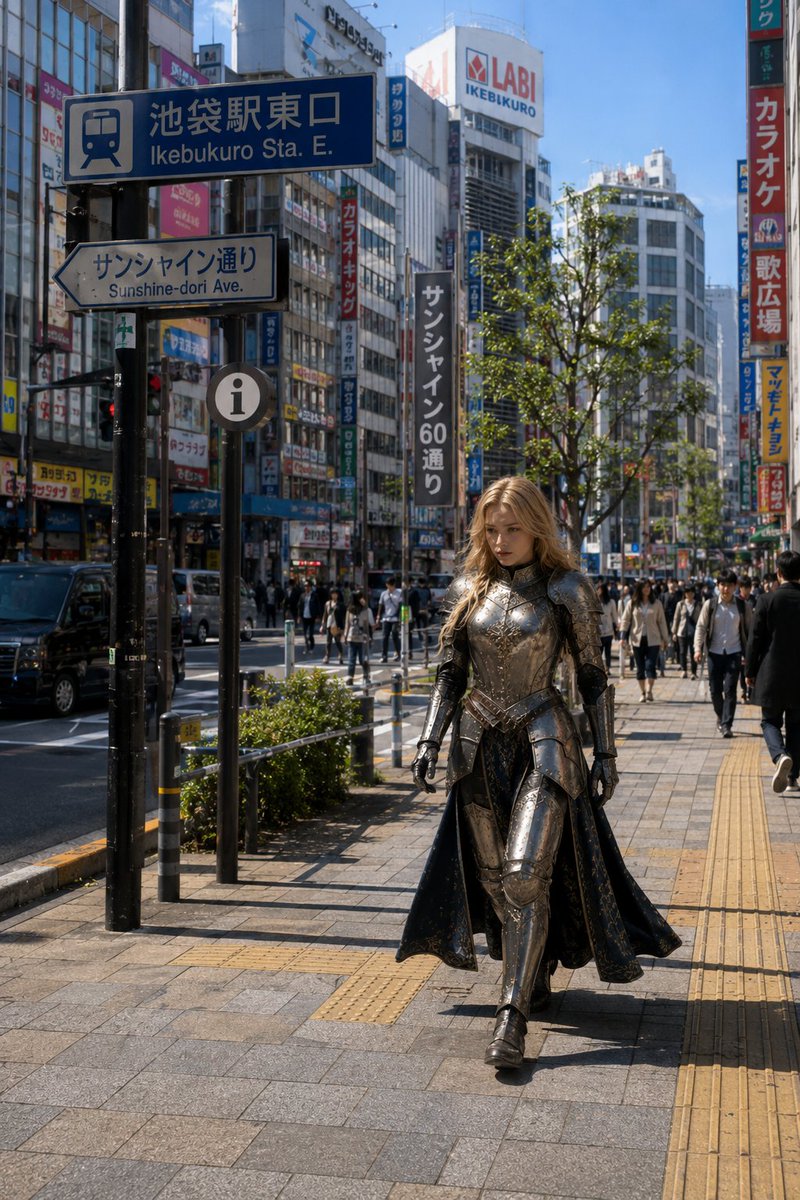
Generate a photorealistic street-style image of a medieval fantasy knight cosplayer blending into Tokyo's bustling Ikebukuro crowds under natural daylight.
提示词 · EN
创作一张写实的竖构图街头时尚/Cosplay 照片,场景设定在 arglocation: 东京池袋车站东口,天气晴朗。画面展现了池袋繁忙的日本城市人行道,背景有高大的商业建筑、密集的竖向店招、行人、车流、行道树、黄色盲道,左上方有一个醒目的蓝色车站标志,上面写着“Ikebukuro Sta. E.”以及对应的日文;下方是一个写着“Sunshine-dori Ave.”的白色箭头指示牌。包含可辨识的城市细节,如远处的 LABI 池袋店招牌以及色彩鲜艳的卡拉 OK/零售店招。前景中,一位成年女性 Cosplayer 正自信地向镜头走来,位置略微偏右,身着 argcostume style: 华丽的中世纪奇幻骑士盔甲:抛光的深银色板甲,带有雕刻细节、关节护手、胸甲、肩甲、大腿和胫骨护甲、黑色靴子,以及身后飘动的深色长斗篷或开叉裙。她有着 arghair color: 波浪长金发,在阳光下闪烁,面部被刻意处理为平滑的中性模糊,没有五官。整体氛围是一张真实可信的城市抓拍,展现了一位身着精致奇幻盔甲的 Cosplayer 融入池袋日常人流的景象。使用真实的自然日光、清晰的阴影、纪实摄影风格、35mm 街拍视角、高细节、真实的色彩,拒绝插画风格,无额外奇幻特效,无武器,无水印。
关于这个提示词
Generate a photorealistic street-style image of a medieval fantasy knight cosplayer blending into Tokyo's bustling Ikebukuro crowds under natural daylight. 它更适合作为 GPT Image 2 的概念艺术起点:先保留画面结构、主体关系和风格约束,再替换成你的品牌、人物或场景。
使用时优先替换 location、costume style、hair color 等占位符,并保持镜头、构图和材质描述的顺序不变。这样更容易获得稳定的画面结果,也方便继续做多版本对比。
如何使用这个提示词
- Copy the full prompt and paste it into your preferred AI image generator.
- Select a photorealistic model such as Sora 2, DALL·E 3, or Midjourney for best results.
- Customize the variables — change the
location,costume style, orhair colorarguments to fit your creative vision. - Generate the image and review the output. Regenerate if needed for composition or lighting variations.
- Refine with additional instructions (e.g., adjust time of day or camera angle) to perfect your scene.


