
GPT Image 2AI 提示词
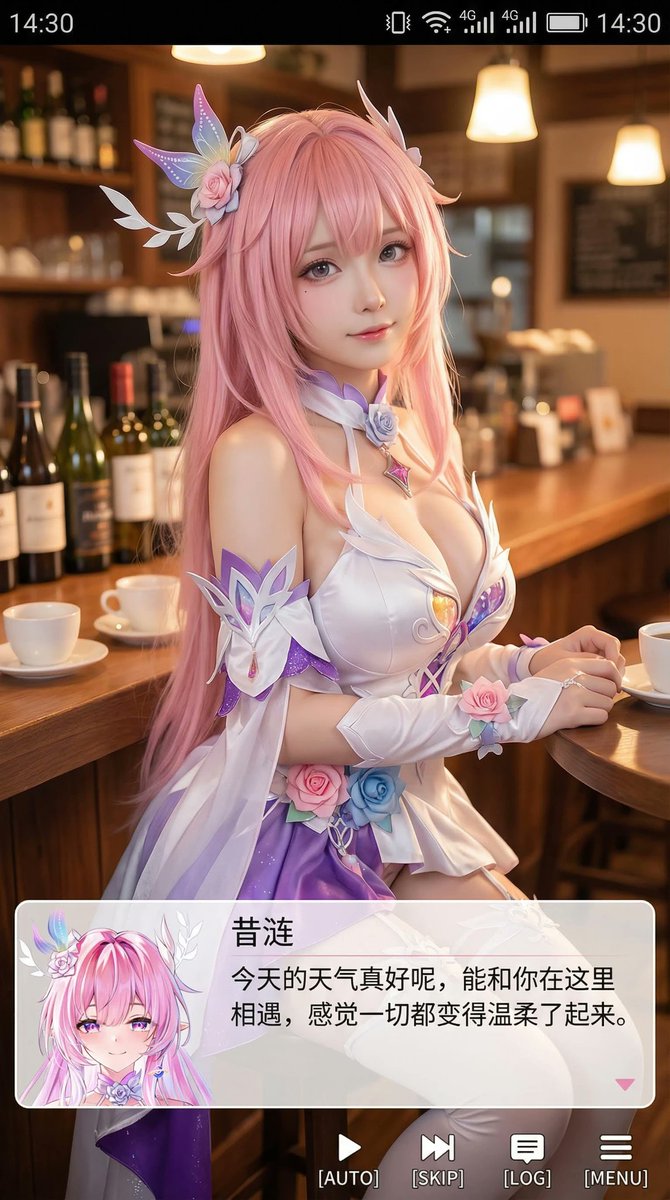
Galgame Style Phone Screenshot — Realistic Cosplay AI Prompt
Create an immersive phone screenshot blending realistic cosplay with anime aesthetics, complete with UI overlays and healing dialogue for a visual novel feel.
提示词 · EN
Generate a vertical phone screenshot-style image, approximately 9:16 ratio. In the center-top area is a realistic cosplayer portraying an anime character. The person is rendered in realistic style but with slightly anime-influenced features 鈥?refined skin, slightly larger eyes, gentle expression looking at the camera, sitting in a casual indoor setting such as a cafe or bar counter, with scene-appropriate props in the background. At the top of the image, add a phone system status bar UI including time, battery, signal, and network icons so the entire image looks like a real phone screenshot. At the bottom, overlay a large semi-transparent galgame-style dialogue box with a small anime or chibi avatar on the left side matching the character; on the right side of the box, display the character name in larger font on the first line, followed by one or two lines of warm, healing dialogue text. Below the dialogue box, add an action bar mimicking a galgame UI. Overall style is high-definition, detail-rich, soft lighting, with a natural blend of anime and live-action photography aesthetics.
关于这个提示词
Create an immersive phone screenshot blending realistic cosplay with anime aesthetics, complete with UI overlays and healing dialogue for a visual novel feel. 它更适合作为 GPT Image 2 的概念艺术起点:先保留画面结构、主体关系和风格约束,再替换成你的品牌、人物或场景。
常见用途包括 portraits、advanced、cosplay、galgame。这些标签只作为创作方向参考,实际生成时仍应以提示词结构和预览图为准。
使用时建议先小幅修改主体、场景、镜头和色调,再生成多个版本对比构图与细节。这样页面内容对用户有实际帮助,也避免把模型名或标签机械堆在正文里。
如何使用这个提示词
- Copy the prompt from [sora2hub.com](https://sora2hub.com) to your clipboard.
- Paste it into an AI image model like Sora 2, Midjourney, or DALL·E 3.
- Adjust variables such as the character’s appearance, dialogue text, or background setting to fit your story.
- Generate the image — most models will output a 9:16 vertical composition.
- If needed, refine with negative prompts (e.g., "no distorted UI elements") for perfect results.


