
GPT Image 2AI 提示词
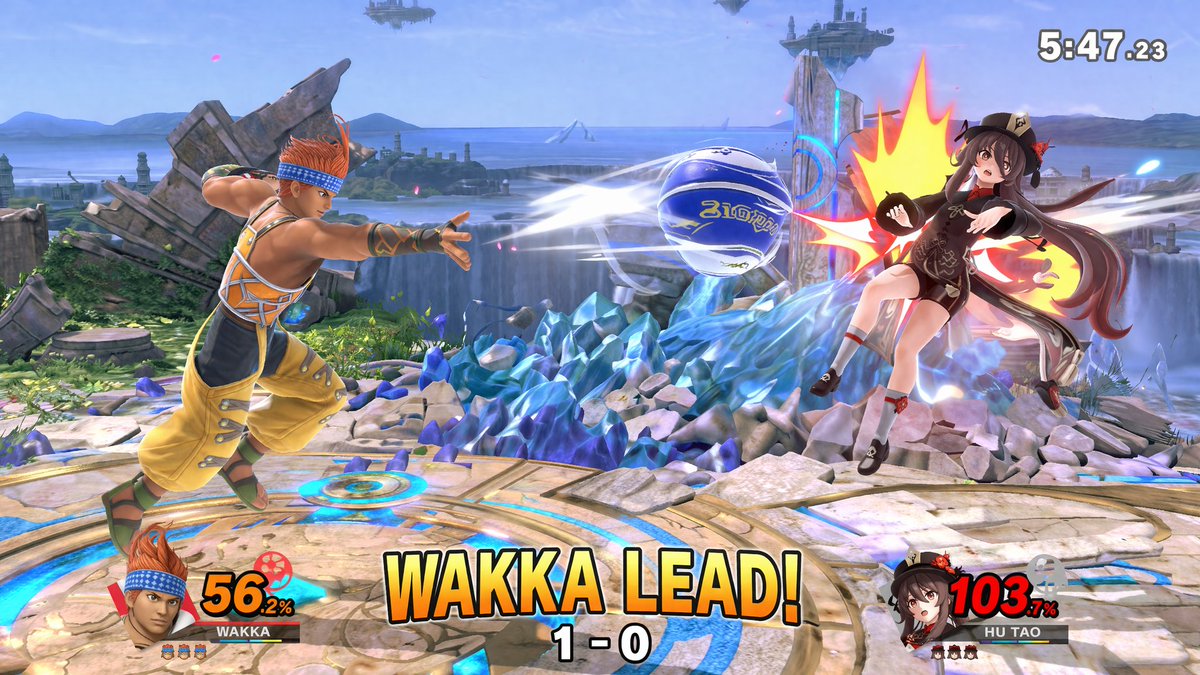
3D Crossover Platform Fighter Game Screenshot Prompt
Create a vibrant, high-fidelity fighting game screenshot with customizable characters, dynamic action, and authentic UI overlays.
提示词 · EN
type
3D platform fighting game screenshotstyle
high-fidelity 3D render, vibrant colors, dynamic action camera angle, video game UI overlayenvironment
stage
{argument name="stage background" default="circular stone platform with glowing blue runes, surrounded by jagged blue crystal formations, waterfalls, ocean, and floating islands in the sky"}characters
item 1
role
Player 1description
{argument name="player 1 character" default="Wakka from Final Fantasy X, wearing yellow and orange outfit with blue headband"}action
lunging forward and throwing a {argument name="projectile" default="blue and white blitzball"} with white motion blur trailsposition
left sideitem 2
role
Player 2description
{argument name="player 2 character" default="Hu Tao from Genshin Impact, wearing black and brown outfit with a floral hat"}action
getting hit by the projectile, reeling backward with a large stylized yellow and red impact flashposition
right side, mid-airui_components
item 1
position
top righttype
match timertext
5:47.23item 2
position
bottom lefttype
player 1 HUDelements
item 1
character portrait of Player 1item 2
nameplate reading 'WAKKA'item 3
damage meter showing '56.2%' in yellow textitem 4
3 small character stock iconsitem 3
position
bottom righttype
player 2 HUDelements
item 1
character portrait of Player 2item 2
nameplate reading 'HU TAO'item 3
damage meter showing '103.7%' in red textitem 4
3 small character stock iconsitem 4
position
bottom centertype
match status overlaymain_text
{argument name="center text" default="WAKKA LEAD!"}sub_text
1 - 0关于这个提示词
Create a vibrant, high-fidelity fighting game screenshot with customizable characters, dynamic action, and authentic UI overlays. 它更适合作为 GPT Image 2 的概念艺术起点:先保留画面结构、主体关系和风格约束,再替换成你的品牌、人物或场景。
这条提示词使用结构化 JSON 组织信息,包含 type、style、environment、characters、ui components 等字段。保留这种层级能让模型更清楚地区分画面主题、布局、界面元素和细节约束。
使用时建议先小幅修改主体、场景、镜头和色调,再生成多个版本对比构图与细节。这样页面内容对用户有实际帮助,也避免把模型名或标签机械堆在正文里。
如何使用这个提示词
- Copy the entire prompt from the page.
- Paste it into your chosen AI image generator (like Sora 2 or similar).
- Customize the 'stage', 'player 1 character', 'projectile', and 'player 2 character' variables to your preferred characters and settings.
- Adjust any other elements in the JSON if desired.
- Generate the image and enjoy your unique crossover battle scene.


