
GPT Image 2AI 提示词
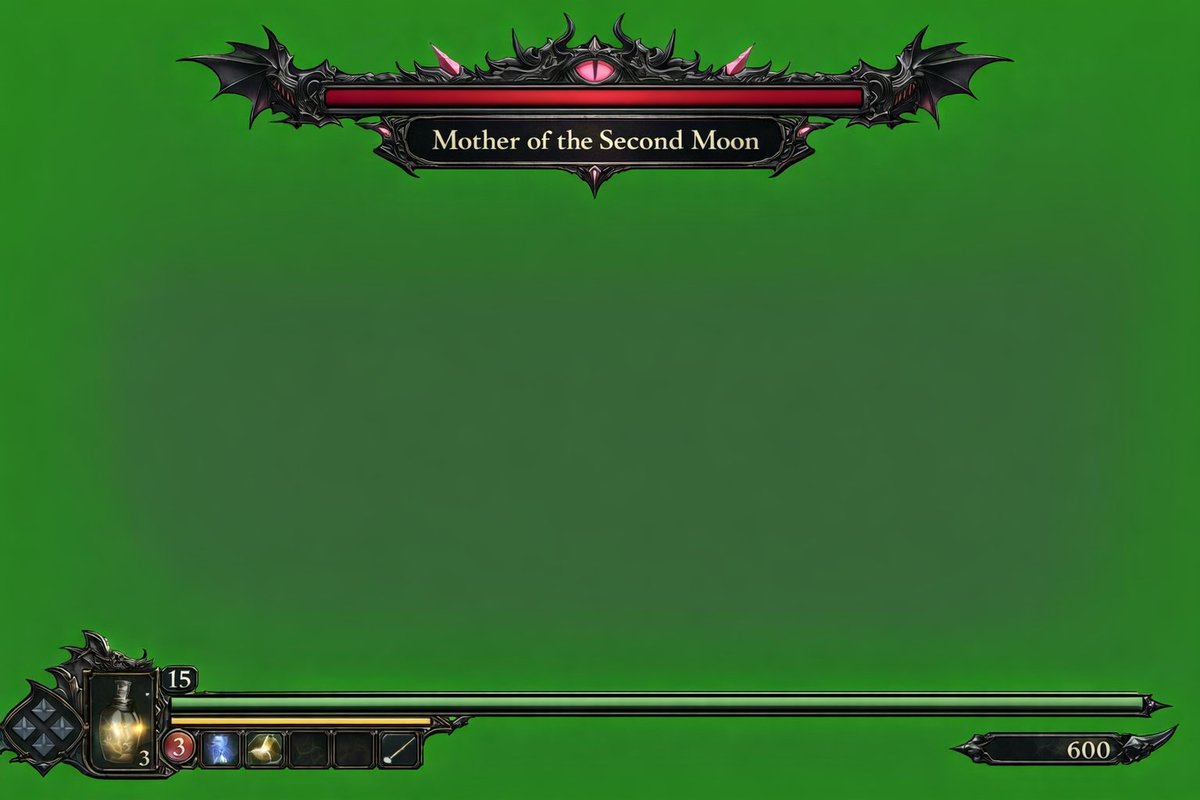
Dark Fantasy Game HUD — Green Screen Overlay Prompt
Create a detailed dark fantasy video game UI overlay on chroma key green, complete with a boss health bar, player status, and inventory slots for easy compositing.
提示词 · EN
type
video game HUD overlaybackground
{argument name="background color" default="solid chroma key green"}theme
{argument name="UI theme" default="dark fantasy gothic"}layout
top_center
component
boss health bardesign
ornate black metal frame with bat wings on the edges and a glowing pink eye in the top centerbar_color
{argument name="boss health bar color" default="red"}label
{argument name="boss name" default="Mother of the Second Moon"}bottom_left
component
player status HUDdesign
intricate dark metal frameelements
item 1
diamond-shaped D-pad indicatoritem 2
glowing yellow potion flask with the number '3'item 3
number '15' in a small top frameitem 4
long {argument name="player health bar color" default="green"} health bar extending to the rightitem 5
shorter yellow bar underneath the green baritem 6
row of 5 square quick-select inventory slots (slot 1: red circle with '3', slot 2: blue icon, slot 3: yellow icon, slot 4: empty, slot 5: white diagonal line)bottom_right
component
score or currency indicatordesign
small black decorative plaque with the number '600'关于这个提示词
Create a detailed dark fantasy video game UI overlay on chroma key green, complete with a boss health bar, player status, and inventory slots for easy compositing. 它更适合作为 GPT Image 2 的概念艺术起点:先保留画面结构、主体关系和风格约束,再替换成你的品牌、人物或场景。
这条提示词使用结构化 JSON 组织信息,包含 type、background、theme、layout 等字段。保留这种层级能让模型更清楚地区分画面主题、布局、界面元素和细节约束。
使用时建议先小幅修改主体、场景、镜头和色调,再生成多个版本对比构图与细节。这样页面内容对用户有实际帮助,也避免把模型名或标签机械堆在正文里。
如何使用这个提示词
- Copy this prompt and paste it into a compatible AI video or image generator like Sora 2.
- Choose your preferred model version (e.g., Sora 2 Pro) for best detail.
- Customize variables like background color, boss name, or health bar colors to match your project.
- Generate the overlay and composite it onto your gameplay footage using video editing software.


