
GPT Image 2AI 提示词
Dense vs MoE Infographic — AI Architecture Comparison Prompt
Generate a side-by-side infographic comparing Dense and Mixture of Experts neural networks, highlighting key differences in architecture and efficiency.
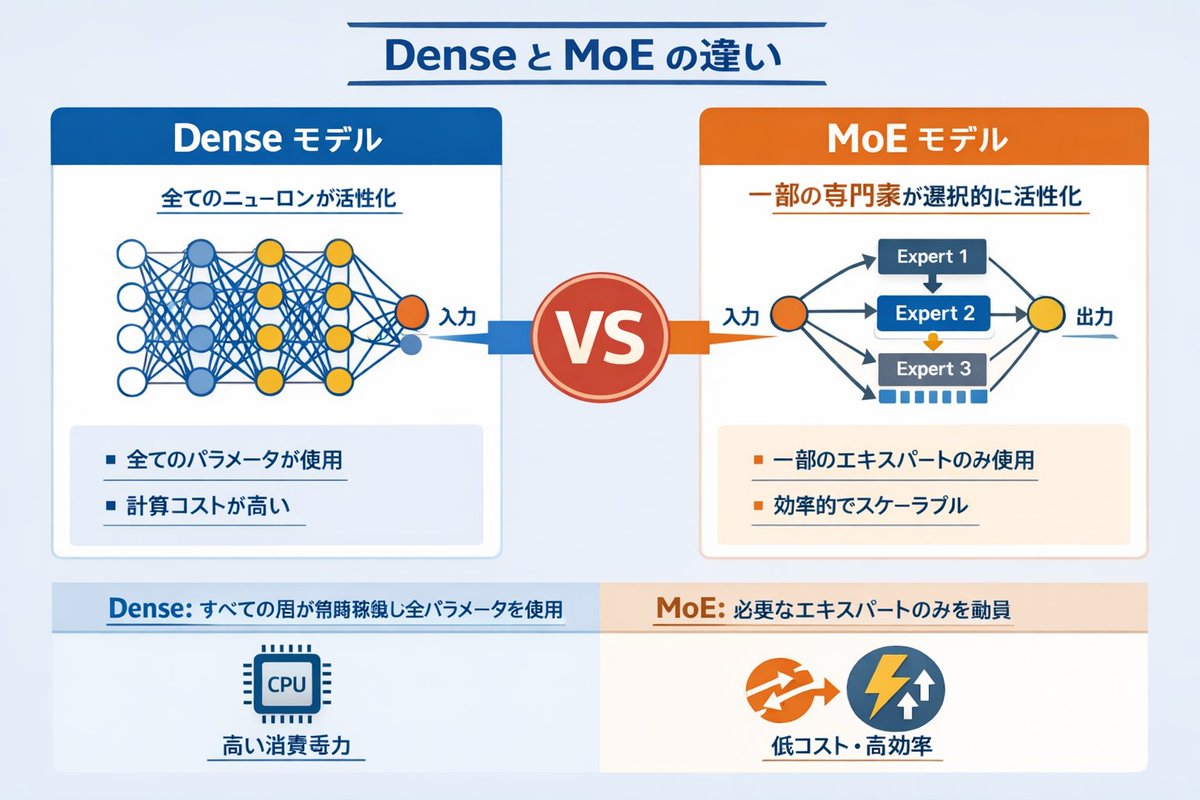
提示词 · EN
type
信息图对比图header
title
{argument name="main title" default="Dense 与 MoE 的区别"}layout
structure
两列式布局,中间由 VS 徽章分隔,底部设有分栏页脚sections
item 1
position
左侧栏theme_color
蓝色header
{argument name="left model name" default="Dense 模型"}subtitle
所有神经元均被激活diagram
type
全连接神经网络elements
item 1
1 个橙色输入节点,标注为“输入”item 2
4 个隐藏层,节点数分别为 4、5、4 和 2item 3
节点颜色为白色、蓝色和黄色item 4
所有相邻节点间密集的交叉连接线bullet_points
count
2items
item 1
{argument name="left bullet point" default="使用所有参数"}item 2
计算成本高item 2
position
右侧栏theme_color
橙色header
{argument name="right model name" default="MoE 模型"}subtitle
选择性激活部分专家diagram
type
混合专家网络elements
item 1
1 个橙色输入节点,标注为“输入”item 2
3 个矩形块,分别标注为 Expert 1、Expert 2、Expert 3item 3
1 个黄色输出节点,标注为“输出”item 4
连接输入到专家、以及专家到输出的分支箭头bullet_points
count
2items
item 1
{argument name="right bullet point" default="仅使用部分专家"}item 2
高效且可扩展item 3
position
中心element
带有 VS 文字的红色圆形徽章connections
指向左侧的蓝色箭头,指向右侧的橙色箭头item 4
position
页脚左侧background
浅蓝色text
Dense:所有层常驻运行并使用全部参数icon
1 个 CPU 芯片图形label
高功耗item 5
position
页脚右侧background
浅橙色text
MoE:仅调用必要的专家icons
2 个圆形图形(橙色箭头、蓝色闪电)label
低成本、高效率关于这个提示词
Generate a side-by-side infographic comparing Dense and Mixture of Experts neural networks, highlighting key differences in architecture and efficiency. 它更适合作为 GPT Image 2 的概念艺术起点:先保留画面结构、主体关系和风格约束,再替换成你的品牌、人物或场景。
这条提示词使用结构化 JSON 组织信息,包含 type、header、layout 等字段。保留这种层级能让模型更清楚地区分画面主题、布局、界面元素和细节约束。
使用时建议先小幅修改主体、场景、镜头和色调,再生成多个版本对比构图与细节。这样页面内容对用户有实际帮助,也避免把模型名或标签机械堆在正文里。
如何使用这个提示词
- Copy the full prompt code above.
- Paste it into a text-to-image AI tool like Sora 2 or DALL·E.
- Replace argument placeholders (e.g., model names, bullet points) with your desired content.
- Generate the infographic and make adjustments if needed.
- Download the image for presentations, articles, or social media.


