
GPT Image 2AI 提示词
Medical Anatomy Split-View — Sora 2 Prompt
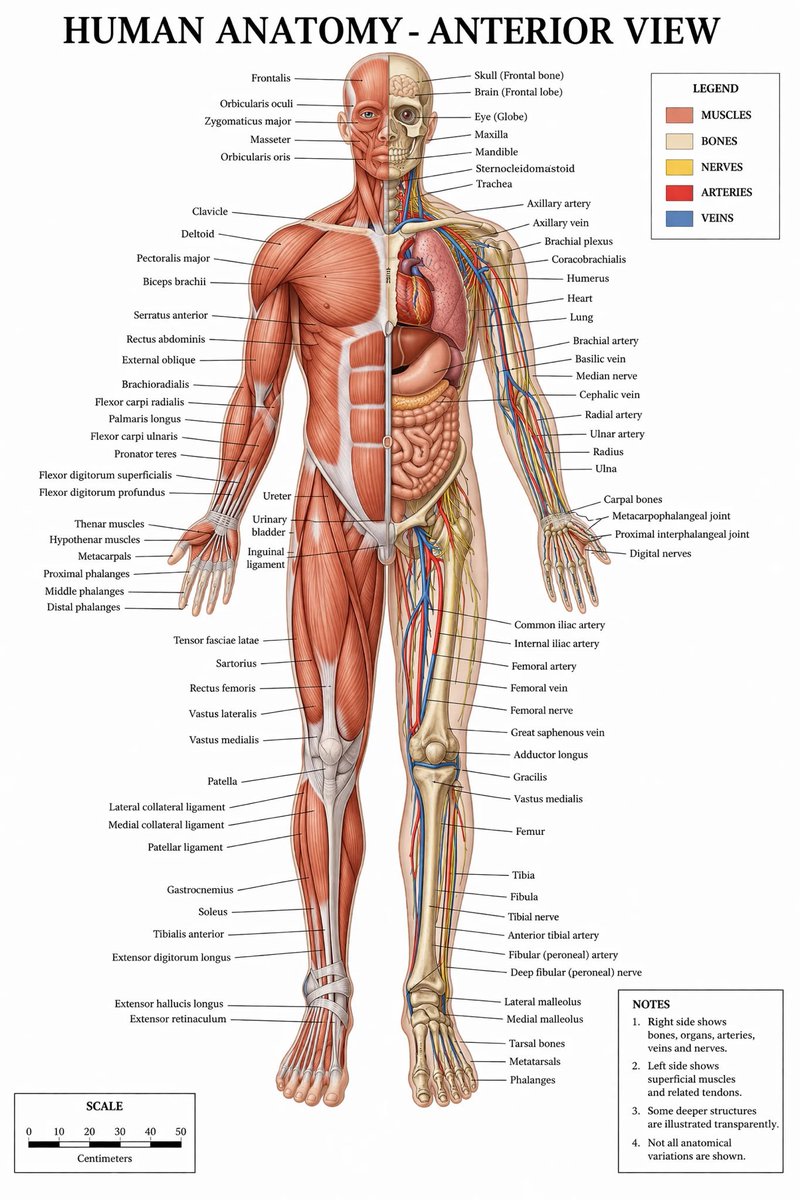
Generates a highly detailed, labeled medical infographic of human anatomy with a split-view of muscles, bones, and internal organs.
提示词 · EN
type
medical infographic postertitle
{argument name="main title" default="HUMAN ANATOMY - ANTERIOR VIEW"}subject
description
Full-body {argument name="subject type" default="male human figure"}, anterior view, split vertically down the midline.viewer_left_side
{argument name="left side focus" default="superficial muscles"}viewer_right_side
{argument name="right side focus" default="bones, internal organs, arteries, veins, and nerves"}style
{argument name="color palette" default="clinical medical textbook colors"}layout
centerpiece
The anatomical figure stands centrally, arms slightly away from the body, palms facing forward.labeling_system
Thin black leader lines connect anatomical structures to text labels arranged neatly on the left and right margins.label_counts
head_and_neck
12torso_and_arms
29hands
10pelvis_and_legs
34feet
5panels
item 1
title
LEGENDposition
top-rightcount
5items
item 1
color
red/brownlabel
MUSCLESitem 2
color
beigelabel
BONESitem 3
color
yellowlabel
NERVESitem 4
color
redlabel
ARTERIESitem 5
color
bluelabel
VEINSitem 2
title
NOTESposition
bottom-rightcount
4items
item 1
1. Right side shows bones, organs, arteries, veins and nerves.item 2
2. Left side shows superficial muscles and related tendons.item 3
3. Some deeper structures are illustrated transparently.item 4
4. Not all anatomical variations are shown.item 3
title
SCALEposition
bottom-leftcount
6description
A horizontal bar scale with 6 numeric markers (0, 10, 20, 30, 40, 50) labeled 'Centimeters'.关于这个提示词
Generates a highly detailed, labeled medical infographic of human anatomy with a split-view of muscles, bones, and internal organs. 它更适合作为 GPT Image 2 的概念艺术起点:先保留画面结构、主体关系和风格约束,再替换成你的品牌、人物或场景。
这条提示词使用结构化 JSON 组织信息,包含 type、title、subject、layout 等字段。保留这种层级能让模型更清楚地区分画面主题、布局、界面元素和细节约束。
使用时建议先小幅修改主体、场景、镜头和色调,再生成多个版本对比构图与细节。这样页面内容对用户有实际帮助,也避免把模型名或标签机械堆在正文里。
如何使用这个提示词
- Copy the prompt JSON from sora2hub.com.
- Choose Sora 2 or a comparable text-to-image model.
- Edit the 'main title' or 'subject type' variables to customize the view (e.g., female, anterior/posterior).
- Paste the customized prompt into the model.
- Generate and refine by tweaking the 'color palette' or 'left/right side focus' arguments.


