
GPT Image 2AI 提示词
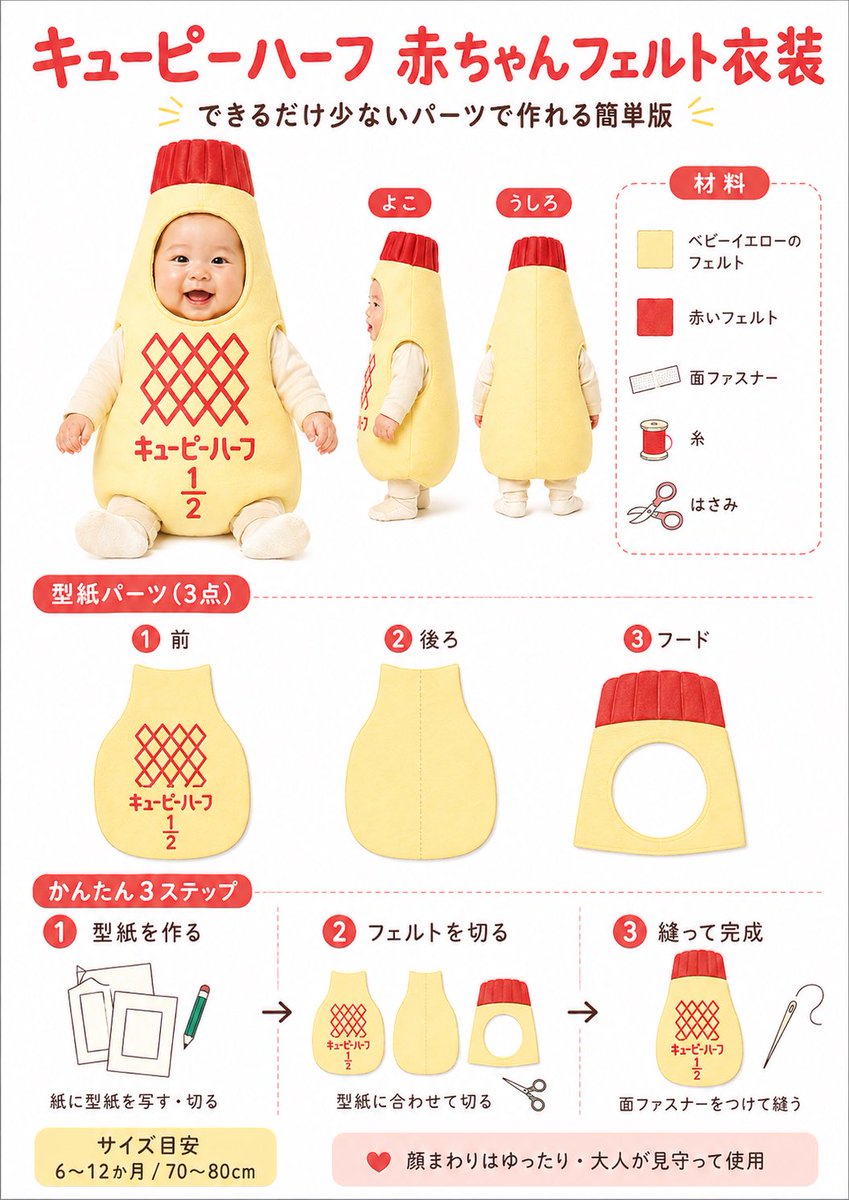
Kewpie Half Baby Felt Costume — DIY Japanese Poster Prompt
Generates a cute, step-by-step Japanese infographic poster for making a DIY baby felt costume inspired by the iconic Kewpie Half mayonnaise bottle.
提示词 · EN
type
日式手工说明海报subject
DIY 仿 Kewpie Half 蛋黄酱包装风格的婴儿毛毡服装style
简洁的信息图海报,明亮的白色背景,柔和的摄影棚灯光,亲切的手工制作美学,红与淡黄配色,圆润的日文标签,整洁的产品说明书布局headline
main
{argument name="headline text" default="キューピーハーフ 赤ちゃんフェルト衣装"}sub
用最少的部件制作的简易版layout
sections
item 1
title
服装主体展示position
左上至中心count
3labels
item 1
正面item 2
侧面item 3
背面details
穿着淡黄色填充毛毡瓶状服装的婴儿,配有红色罗纹帽状头饰,面部刻意模糊处理,内搭奶油色长袖衣物,包含正面坐姿及侧面、背面站姿;正面有红色菱形格纹标志区域及红色日文,带有大号 1/2 分数item 2
title
材料position
右上count
5labels
item 1
淡黄色毛毡item 2
红色毛毡item 3
魔术贴item 4
缝纫线item 5
剪刀details
圆角虚线框内的垂直材料列表,每项配有简单图标:淡黄色毛毡方块、红色毛毡方块、魔术贴条、线轴、剪刀item 3
title
纸样部件 (3 件)position
中间行count
3labels
item 1
1 前片item 2
2 后片item 3
3 帽片details
分别展示三个纸样部件:带有红色格纹和文字印花的前身片、带有中心缝合引导线的纯色后身片、带有圆形面部开口和红色罗纹顶带的帽片item 4
title
简易 3 步position
底部count
3labels
item 1
1 制作纸样item 2
2 裁剪毛毡item 3
3 缝合完成details
步骤 1 展示纸样模板和铅笔,步骤 2 展示三个裁剪好的毛毡部件和剪刀,步骤 3 展示缝合好的服装主体和缝衣针;步骤间有黑色箭头连接footer_notes
item 1
尺寸参考 6〜12 个月 / 70〜80cmitem 2
面部周围空间宽松,请在成人看护下使用design_details
colors
background
白色primary_red
明亮的暖红色primary_yellow
柔和的婴儿黄accent_black
深棕黑色文字typography
标题采用圆润粗体日文展示字体,标签采用简洁的无衬线日文graphic_elements
红色数字圆圈,圆角红色分区标签,浅红色虚线分割线,副标题周围有小型装饰性黄色人字纹image_goal
制作一张可爱且易于遵循的日式手工教程海报,展示灵感源自蛋黄酱瓶的婴儿毛毡服装,适用于社交媒体分享、博客缩略图或可打印的 DIY 说明书customization
product_theme
{argument name="product theme" default="Kewpie Half 风格婴儿服装"}main_color
{argument name="main costume color" default="淡婴儿黄"}accent_color
{argument name="accent color" default="明亮红"}size_note
{argument name="size note" default="6〜12 个月 / 70〜80cm"}关于这个提示词
Generates a cute, step-by-step Japanese infographic poster for making a DIY baby felt costume inspired by the iconic Kewpie Half mayonnaise bottle. 它更适合作为 GPT Image 2 的概念艺术起点:先保留画面结构、主体关系和风格约束,再替换成你的品牌、人物或场景。
这条提示词使用结构化 JSON 组织信息,包含 type、subject、style、headline、layout、design details、image goal 等字段。保留这种层级能让模型更清楚地区分画面主题、布局、界面元素和细节约束。
使用时建议先小幅修改主体、场景、镜头和色调,再生成多个版本对比构图与细节。这样页面内容对用户有实际帮助,也避免把模型名或标签机械堆在正文里。
如何使用这个提示词
- Copy the entire prompt JSON object. 2. Choose an AI model that supports structured image generation (like Sora 2 or Midjourney). 3. Customize the variables in the
customizationobject, such asheadline text,product theme, andmain costume color, to fit your specific design. 4. Paste the customized prompt into the AI model's interface and generate the image. 5. Review the output; you can regenerate or adjust variables for different color schemes or detail emphasis.


