
GPT Image 2AI 提示词
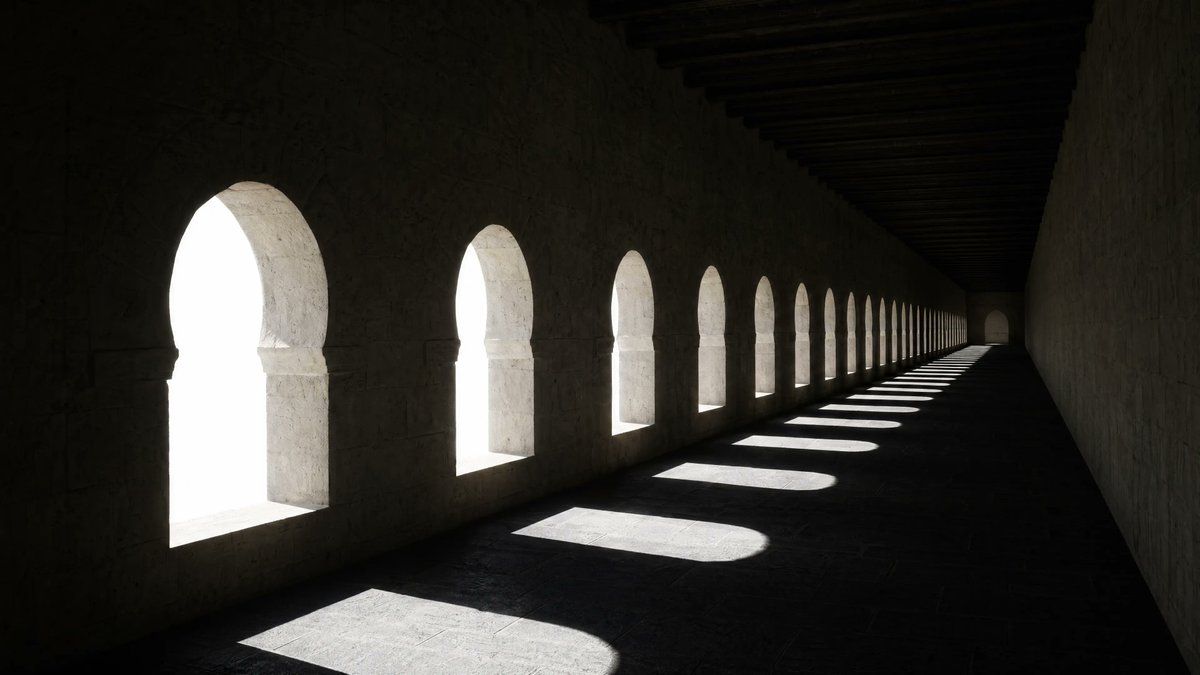
Medieval Stone Corridor with 14 Arched Windows — Sora 2 Prompt
Generates a cinematic, moody architectural interior with dramatic light shafts through repeating arches—perfect for concept art and environment design.
提示词 · EN
A moody photorealistic architectural interior of a long medieval stone corridor with a row of exactly 14 evenly spaced Moorish-style arched window openings along the left wall, viewed from a low eye-level angle looking toward a distant vanishing point. The space is very dark and minimalist, with rough pale limestone walls, a flat stone floor, and heavy dark wooden ceiling beams running across the top. Intense overexposed white daylight pours through the arches, making the exterior completely blown out and invisible, while each window casts a crisp elongated pool of light and shadow across the floor in a repeating rhythm. Strong contrast, dramatic chiaroscuro, quiet empty atmosphere, geometric repetition, deep perspective, cinematic composition, ultra-detailed textures, realistic global illumination, sharp focus, wide horizontal framing.
关于这个提示词
Generates a cinematic, moody architectural interior with dramatic light shafts through repeating arches—perfect for concept art and environment design. 它更适合作为 GPT Image 2 的概念艺术起点:先保留画面结构、主体关系和风格约束,再替换成你的品牌、人物或场景。
常见用途包括 gptimage2api prompts、gptimage2api、ja。这些标签只作为创作方向参考,实际生成时仍应以提示词结构和预览图为准。
使用时建议先小幅修改主体、场景、镜头和色调,再生成多个版本对比构图与细节。这样页面内容对用户有实际帮助,也避免把模型名或标签机械堆在正文里。
如何使用这个提示词
- Copy the full prompt text from the prompt page.
- Open your preferred AI image or video generator (Sora 2, Midjourney, DALL·E, etc.).
- Paste the prompt into the text input field and set your desired aspect ratio (wide/landscape recommended).
- Adjust any model-specific settings like quality or style parameters.
- Generate and iterate—try tweaking the number of windows or light intensity for variations.


