
GPT Image 2AI 提示词
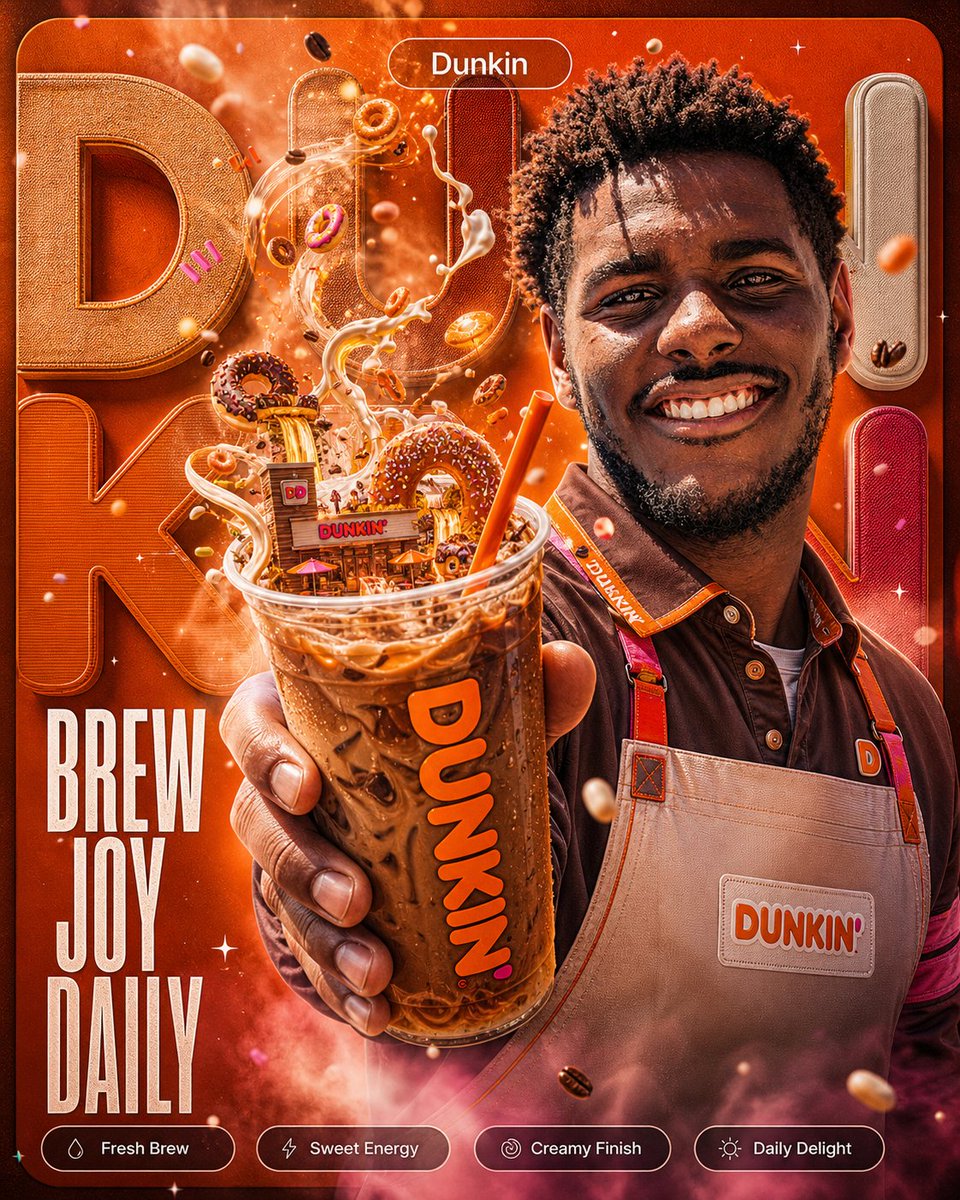
Dunkin' Iced Coffee Surreal Ad — Sora 2 Prompt
A hyper-detailed vertical poster prompt featuring a barista with floating donuts, cream splashes, bold 3D typography, and feature chips for a vibrant social media ad.
提示词 · EN
type
咖啡品牌竖版商业海报brand
{argument name="brand name" default="Dunkin"}aspect_ratio
4:5style
超精细高级广告合成,电影级产品摄影与 3D 排版结合,光泽感的橙棕色调,充满活力的动感,浅景深,闪烁的颗粒感,漂浮的咖啡豆和甜甜圈碎屑main_subject
description
一位面带微笑的咖啡店员工或咖啡师,从胸部以上展示在画面右侧,面部被一个纯中棕色方形占位符遮挡,上方可见深色短卷发,身穿深棕色衬衫,佩戴橙粉色肩带的米色围裙apron_patch_text
{argument name="apron logo text" default="DUNKIN'"}pose
手臂向观众方向伸展,前景中手持一大杯透明塑料冰咖啡product
item
超大透明塑料杯,装满冰咖啡、冰块、冷凝水珠和奶油焦糖漩涡cup_text
{argument name="cup logo text" default="DUNKIN'"}foreground_position
中心下方前景,尺寸非常大,由一只手握住,手指真实地环绕在杯身effects
奶油丝带和咖啡飞溅从杯中向上盘旋,形成动态喷泉,伴有迷你甜甜圈、巧克力碎、咖啡豆和亮橙色吸管surreal_details
count
6items
item 1
杯顶搅动的咖啡飞溅中浮现出一间微型 Dunkin 店铺item 2
多个迷你糖霜甜甜圈环绕着饮料item 3
杯沿附近有一个大型巧克力碎甜甜圈item 4
白色奶油流在空中卷曲item 5
漂浮的烘焙咖啡豆item 6
粉色和橙色的小纸屑background
color
深饱和的 Dunkin 橙色,带有暖红色渐变typography
巨大的 3D 织物感字母拼写出品牌部分名称,包括左上角的巨大 D,产品后方高大的 U,以及左侧类似 N/K 的大字texture
缝合帆布,浮雕边缘,柔和的发光雾气,焦外成像和星光闪烁top_badge
position
顶部中心text
{argument name="top badge text" default="Dunkin"}style
圆角矩形透明轮廓徽章,配白色字体headline
position
左下角text
{argument name="headline text" default="BREW JOY DAILY"}style
高瘦的白色无衬线字体,三行堆叠,醒目的海报排版bottom_feature_chips
count
4position
底部边缘水平排列style
圆角药丸状按钮,带有细白色轮廓,左侧有小图标,白色标签文字labels
item 1
新鲜萃取item 2
甜蜜能量item 3
丝滑口感item 4
每日悦享composition
戏剧性的产品优先特写视角,杯子占据中心位置,员工在右侧,标题在左侧,品牌徽章在顶部,功能标签在底部,高对比度和超清晰细节lighting
温暖的摄影棚灯光,发光的轮廓光,塑料杯上的光泽反射,氛围感闪光quality
高分辨率,精致的社交媒体广告,除指定标签外无额外文字关于这个提示词
A hyper-detailed vertical poster prompt featuring a barista with floating donuts, cream splashes, bold 3D typography, and feature chips for a vibrant social media ad. 它更适合作为 GPT Image 2 的概念艺术起点:先保留画面结构、主体关系和风格约束,再替换成你的品牌、人物或场景。
这条提示词使用结构化 JSON 组织信息,包含 type、brand、aspect ratio、style、main subject、product、surreal details 等字段。保留这种层级能让模型更清楚地区分画面主题、布局、界面元素和细节约束。
使用时建议先小幅修改主体、场景、镜头和色调,再生成多个版本对比构图与细节。这样页面内容对用户有实际帮助,也避免把模型名或标签机械堆在正文里。
如何使用这个提示词
- Copy the full prompt JSON and paste it into your AI image generator that supports structured input.
- Select a model like Sora 2 or DALL·E 3 optimized for high-fidelity commercial art.
- Customize the variables (
brand name,apron logo text,cup logo text,top badge text,headline text) to match your own brand. - Adjust the
aspect_ratio(e.g., 16:9 or 1:1) if you need a different format. - Generate the image and iterate on the surreal details or background color to fine-tune the vibe.


