
GPT Image 2AI 提示词
Japanese eVTOL Air Taxi Infographic — Speed & Commute Prompts
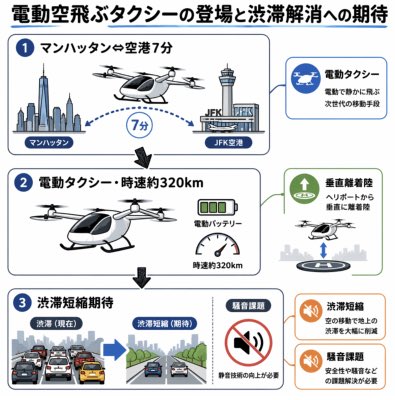
Create a clean, flat-style Japanese infographic explaining electric air taxis, with airport commute times, speed stats, congestion relief benefits, and noise challenges.
提示词 · EN
type
日本信息图海报format
方形垂直社交媒体图片language
日语headline
{argument name="headline text" default="电动空中出租车的到来与缓解交通拥堵的期待"}style
简洁的扁平化矢量信息图,带有圆角矩形面板、蓝灰色轮廓、简约图标、浅灰色背景、加粗的日文无衬线字体、带编号的蓝色圆圈、说明性箭头、极简阴影layout
overall
左侧三个大型堆叠说明面板,右侧两个优势标注卡片及一个问题标注卡片,全部整齐排列在网格中main_sections_count
3main_sections
item 1
number
1title
曼哈顿⇔机场 7 分钟position
左上宽面板visuals
左侧为曼哈顿天际线及世界贸易中心一号大楼,中央为未来感电动空中出租车,右侧为肯尼迪国际机场 (JFK) 控制塔和航站楼,中间有虚线蓝色飞行弧线,圆形徽章标注 7 分钟,带有“曼哈顿”和“JFK 机场”小标签item 2
number
2title
电动出租车・时速约 320kmposition
左中宽面板visuals
大型黑白 eVTOL 空中出租车及旋翼,上方有较小的飞行器轮廓,绿色电池图标标注“电动电池”,速度表弧线标注“时速约 320km”,向下箭头指向第 3 部分item 3
number
3title
缓解拥堵期待position
左下宽面板visuals
两个并排的道路对比插图:左侧标注“拥堵(现状)”,显示城市街道上密集的车辆和黄色出租车;右侧标注“缓解拥堵(期待)”,显示车辆较少且道路通畅;一个独立的小方框标注“噪音降低”,配有静音扬声器图标及文字“需要提升静音技术”right_callouts_count
3right_callouts
item 1
title
电动出租车position
右上蓝色边框卡片icon
带有白色飞行出租车剪影的蓝色圆圈text
环保的下一代交通工具item 2
title
垂直起降position
右中绿色边框卡片icon
圆圈内的绿色向上箭头visuals
小型空中出租车降落在灰色天际线上方的圆形屋顶停机坪上text
从直升机停机坪垂直起降item 3
title
缓解拥堵position
右下橙色边框卡片上半部分icon
橙色扬声器/公告图标text
通过空中交通大幅减少地面拥堵issue_callouts_count
1issue_callouts
item 1
title
噪音挑战position
右下橙色边框卡片下半部分icon
橙色扬声器/公告图标text
需要解决安全性和噪音等问题subject_details
vehicle
{argument name="vehicle type" default="未来感电动空中出租车 eVTOL"}route
{argument name="route" default="曼哈顿至肯尼迪国际机场"}travel_time
{argument name="travel time label" default="7 分钟"}top_speed
{argument name="speed label" default="时速约 320km"}design_constraints
确保所有日文文本清晰易读,保留精确的面板编号 1、2、3,使用带有细蓝灰色边框的白色卡片,强调航空图标和交通对比,采用专业的说明性图形记录风格关于这个提示词
Create a clean, flat-style Japanese infographic explaining electric air taxis, with airport commute times, speed stats, congestion relief benefits, and noise challenges. 它更适合作为 GPT Image 2 的概念艺术起点:先保留画面结构、主体关系和风格约束,再替换成你的品牌、人物或场景。
这条提示词使用结构化 JSON 组织信息,包含 type、format、language、headline、style、layout、subject details 等字段。保留这种层级能让模型更清楚地区分画面主题、布局、界面元素和细节约束。
使用时建议先小幅修改主体、场景、镜头和色调,再生成多个版本对比构图与细节。这样页面内容对用户有实际帮助,也避免把模型名或标签机械堆在正文里。
如何使用这个提示词
- Copy the entire prompt JSON and paste it into your AI image generator (e.g., Sora 2, Midjourney).
- Select a model that supports detailed text rendering and Japanese characters.
- Customize variables like the headline text, vehicle type, route, or travel time to fit your specific scenario.
- Generate the image and review the layout for clarity; adjust style keywords if needed.
- Use the final infographic for social media, presentations, or educational content.


