
GPT Image 2AI 提示词
FACS Expression Grid — 3x3 Portrait Collage Prompt
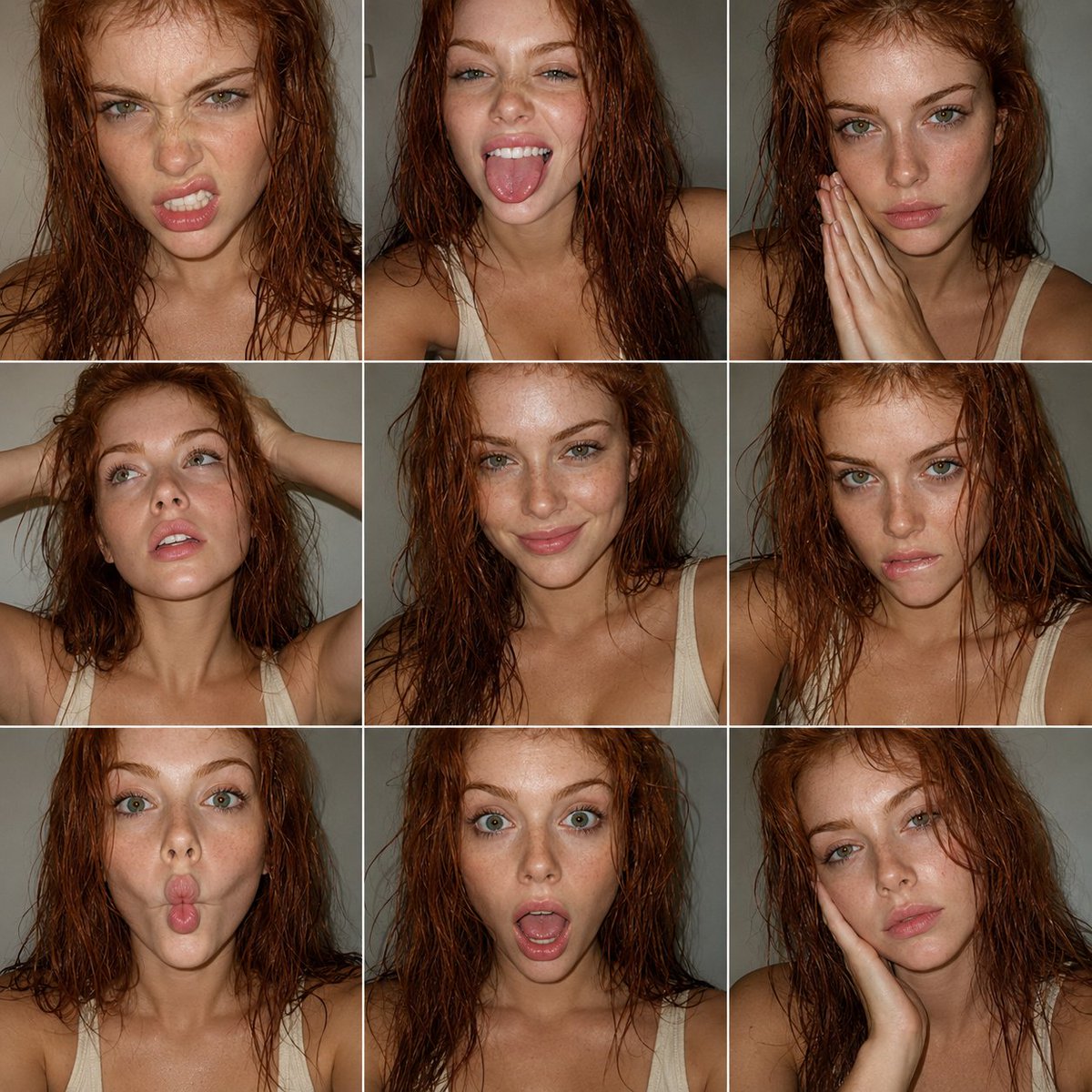
Generate a 9-panel portrait collage capturing precise, expressive facial expressions using FACS (Facial Action Coding System) for stunning emotional range.
提示词 · EN
objective
创建一个受表现力时尚摄影启发的 3x3 人像拼贴画,使用 FACS(面部动作编码系统)来定义每个面部表情。主体为一位 {argument name="subject description" default="极美的红发女性"},拥有 {argument name="eye color" default="绿色眼睛"},以抓拍风格的彩色智能手机摄影呈现aspect_ratio
1:1composition
layout
3x3 网格(9 张等大肖像)framing
紧凑的头部和肩部肖像style
简洁的网格,间距极小,所有面板的构图保持一致consistency
相同的主体、相同的光照,姿势和角度略有变化subject
person
成年女性appearance
hair
天然红发,略带湿润感或纹理感eyes
绿色眼睛,极具表现力beauty
极致之美,五官轮廓分明且柔和skin
自然肤质,未过度磨皮outfit
top
{argument name="clothing" default="低胸奶油色背心"}style
极简、干净facs_expressions
item 1
panel
1action_units
item 1
AU4 (眉毛下压)item 2
AU9 (皱鼻)item 3
AU10 (上唇提升)description
轻微的咆哮表情item 2
panel
2action_units
item 1
AU25 (双唇微张)item 2
AU26 (下颌下垂)item 3
AU19 (舌头外露)description
俏皮的吐舌表情item 3
panel
3action_units
item 1
AU1 (内眉提升)item 2
AU2 (外眉提升)item 3
AU24 (双唇紧闭)description
双手合十的柔和严肃表情item 4
panel
4action_units
item 1
AU5 (上眼睑提升)item 2
AU25 (双唇微张)description
双手抚弄头发,放松地向上凝视item 5
panel
5action_units
item 1
AU12 (嘴角上扬)item 2
AU6 (脸颊提升)description
微妙的自然微笑item 6
panel
6action_units
item 1
AU4 (眉毛下压)item 2
AU10 (上唇提升)item 3
AU25 (双唇微张)description
强烈的咬唇表情item 7
panel
7action_units
item 1
AU18 (双唇噘起)item 2
AU22 (双唇聚拢)description
俏皮的嘟嘴表情item 8
panel
8action_units
item 1
AU25 (双唇微张)item 2
AU26 (下颌下垂)item 3
AU5 (上眼睑提升)description
惊讶的张嘴表情item 9
panel
9action_units
item 1
AU1 (内眉提升)item 2
AU15 (嘴角下垂)description
手抚面部的柔和忧郁或疲惫表情visual_style
genre
编辑类人像摄影color
全彩(非黑白)quality
智能手机抓拍texture
item 1
可见颗粒感item 2
自然的皮肤瑕疵item 3
轻微噪点color_tone
中性至略微暖色调lighting
style
直接闪光灯或简单的正面光照关于这个提示词
Generate a 9-panel portrait collage capturing precise, expressive facial expressions using FACS Facial Action Coding System for stunning emotional range. 它更适合作为 GPT Image 2 的概念艺术起点:先保留画面结构、主体关系和风格约束,再替换成你的品牌、人物或场景。
这条提示词使用结构化 JSON 组织信息,包含 objective、aspect ratio、composition、subject、facs expressions、visual style、lighting 等字段。保留这种层级能让模型更清楚地区分画面主题、布局、界面元素和细节约束。
使用时建议先小幅修改主体、场景、镜头和色调,再生成多个版本对比构图与细节。这样页面内容对用户有实际帮助,也避免把模型名或标签机械堆在正文里。
如何使用这个提示词
- Copy the JSON prompt object below.
- Paste it into your preferred AI image generator (Sora 2, Midjourney, or similar).
- Customize the variables like
subject descriptionandeye colorto match your vision. - Adjust the FACS Action Units if you want different expressions.
- Generate and review the 3x3 grid output.


