
GPT Image 2AI 提示词
Floating Stone Cube Anime — Sora 2 Social Media Prompt
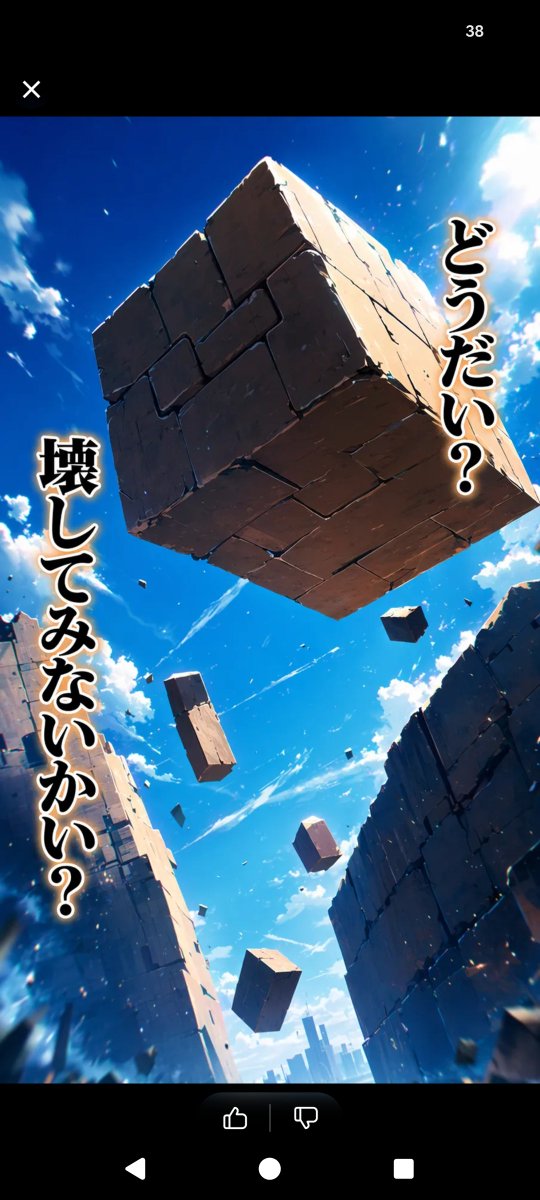
Creates a vertical anime-style screenshot of a dramatic floating stone cube in a ruined canyon with bold Japanese text and social media overlay.
提示词 · EN
Create a vertical smartphone screenshot-style anime fantasy scene with black app UI bars at the top and bottom. In the main image, show a dramatic low-angle view looking up through a ruined canyon of towering cracked stone walls under a vivid deep blue sky with bright white clouds and sunlight flaring from the upper right. A massive cubical stone block floats in the center near the top, made of many cracked rectangular slabs, with sharp rim lighting, chipped edges, and small debris fragments breaking off. Count 6 floating stone objects total: 1 enormous central cube, 1 medium rectangular block below-left of center, 1 small cuboid at upper right, 1 small cuboid near lower center, 1 small cube near bottom center, and 1 tiny distant block among the debris. Add dynamic dust, sparks, and motion streaks to make the block feel suspended or falling. Place bold vertical Japanese manga text with thick black fill, white outline, and warm glow: on the right side, argright vertical text: どうだい?; on the left side, argleft vertical text: 壊してみないかい?. The art style should be cinematic high-detail anime, saturated colors, extreme perspective, dramatic lighting, crisp stone texture, and a sense of awe and challenge. Include a minimal social-media viewer overlay: black top bar with a white X icon at top left and the number argtop counter: 38 at top right, plus a black bottom bar with small like and dislike icons in a rounded dark pill and Android navigation symbols.
关于这个提示词
Creates a vertical anime-style screenshot of a dramatic floating stone cube in a ruined canyon with bold Japanese text and social media overlay. 它更适合作为 GPT Image 2 的概念艺术起点:先保留画面结构、主体关系和风格约束,再替换成你的品牌、人物或场景。
使用时优先替换 right vertical text、left vertical text、top counter 等占位符,并保持镜头、构图和材质描述的顺序不变。这样更容易获得稳定的画面结果,也方便继续做多版本对比。
如何使用这个提示词
- Copy the full prompt text below.
- Select a compatible AI model like Sora 2 or a similar video/image generator.
- Customize the bracketed
{argument}text fields for your own Japanese dialogue and counters. - Generate the image, ensuring the model supports vertical (9:16) output for social media.
- Review and download your anime-style fantasy scene.


