GPT Image 2AI 提示词
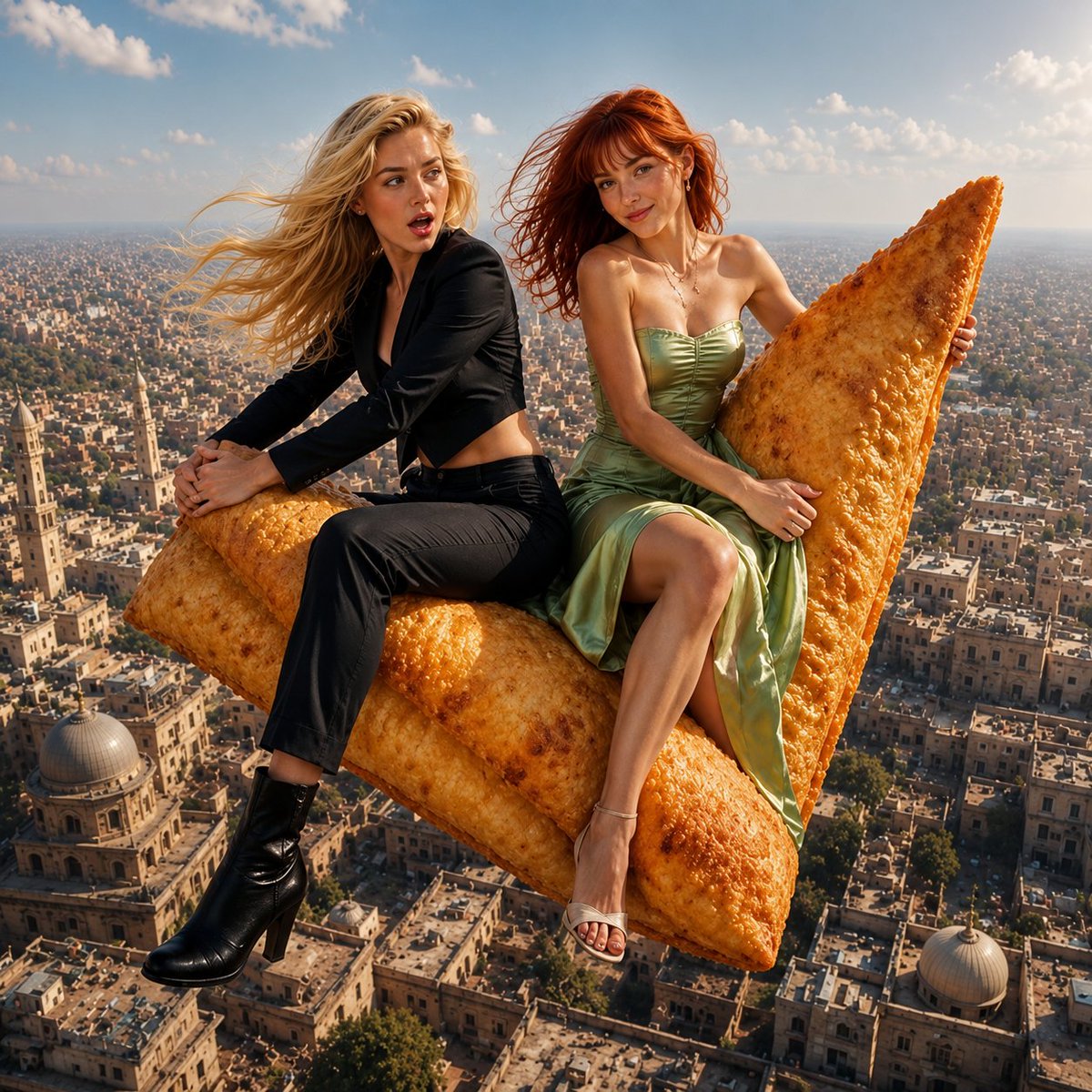
Giant Flying Samosa Over City — Sora 2 Prompt
Generate a stunning aerial fantasy scene of two women riding a giant crispy samosa over a sun-drenched city with detailed cinematic lighting.
1 / 2
提示词 · EN
{ "scene": { "type": "空中奇幻写实", "environment": "高空俯瞰密集城市,建筑低矮,带有圆顶屋顶", "time_of_day": "白天", "sky": { "color": "柔和的蓝色", "elements": ["轻云", "温暖的阳光薄雾"] }, "lighting": { "type": "自然阳光", "direction": "右前方", "quality": "柔和、漫射、微暖", "shadows": "细腻且边缘柔和" }, "camera": { "angle": "略微仰视的前方视角", "framing": "中全景", "focus": "主体清晰,背景轻微虚化", "depth_of_field": "中等" } }, "subjects": [ { "position": "左侧", "gender": "女性", "age_range": "年轻成年人", "skin_tone": "白皙", "hair": { "color": "argleft subject hair color: 金色", "length": "长发", "style": "自然散落,随风飘动" }, "expression": "瞪大双眼,微张嘴巴,表现出惊讶或惊叹", "outfit": { "type": "现代西装", "top": "黑色短款西装外套", "bottom": "黑色修身长裤", "footwear": "黑色踝靴" }, "pose": { "body": "侧身坐在物体上", "legs": "一条腿弯曲,另一条腿自然下垂", "arms": "双臂环抱物体以保持平衡" } }, { "position": "右侧", "gender": "女性", "age_range": "年轻成年人", "skin_tone": "白皙,带有淡淡的雀斑", "hair": { "color": "argright subject hair color: 红色", "length": "中长发", "style": "自然散落,带有刘海,随风轻拂" }, "expression": "温柔微笑,神情冷静而愉悦", "outfit": { "type": "晚礼服", "color": "浅绿色", "style": "抹胸缎面裙", "details": "质感顺滑,修身胸衣", "footwear": "浅色高跟鞋" }, "accessories": [ "吊坠项链", "小巧耳环" ], "pose": { "body": "侧身坐在物体上", "legs": "一条腿弯曲,另一条腿自然下垂", "arms": "双手扶住物体以保持平衡" } } ], "main_object": { "type": "argflying object: samosa", "size": "超大(足以承载两人)", "position": "中心前景", "orientation": "略微向上倾斜", "texture": "酥脆,金棕色,带有细小气泡", "lighting": "光照均匀,带有柔和的高光" }, "interaction": { "subjects_with_object": "两位主体都坐在 samosa 上并扶住它以保持平衡", "emotion": "共同的兴奋与愉悦" }, "background": { "city": { "style": "带有传统建筑风格的密集城市", "details": [ "平坦屋顶", "圆顶结构", "狭窄街道", "柔和的大地色调" ] } }
}
关于这个提示词
Generate a stunning aerial fantasy scene of two women riding a giant crispy samosa over a sun-drenched city with detailed cinematic lighting. 它更适合作为 GPT Image 2 的概念艺术起点:先保留画面结构、主体关系和风格约束,再替换成你的品牌、人物或场景。
使用时优先替换 left subject hair color、right subject hair color、flying object 等占位符,并保持镜头、构图和材质描述的顺序不变。这样更容易获得稳定的画面结果,也方便继续做多版本对比。
如何使用这个提示词
- Copy the full prompt JSON.
- Open your chosen AI video generator (e.g., Sora 2, Runway, Kling).
- Paste the prompt into the input field.
- Customize variables like
{argument name="flying object"}to change the flying object (e.g., 'pizza slice'). - Set your desired aspect ratio and duration, then generate.