
GPT Image 2AI 提示词
Cute Sci-Fi Gacha Game UI Mockup Prompt
Generates a polished mobile game UI for a robot blind box or gacha app, featuring a glassmorphism design with neon accents and customizable characters.
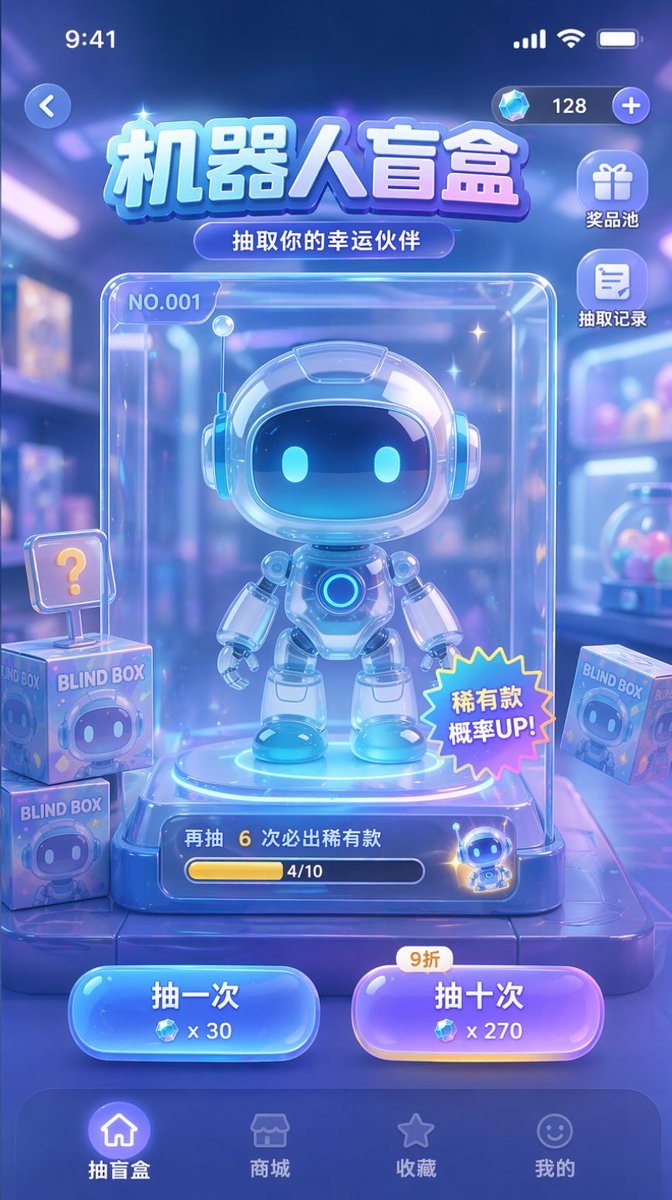
提示词 · EN
type
mobile game UI mockuptheme
sci-fi, cute, glassmorphism, neon blue and purple color paletteheader
status_bar
standard iOS status bar at toptop_controls
back button on left, currency display with diamond icon and '128' on righttitle
{argument name="main title" default="机器人盲盒"}subtitle
{argument name="subtitle" default="抽取你的幸运伙伴"}layout
side_menu
position
top right below currencycount
2items
item 1
icon
giftlabel
奖品池item 2
icon
documentlabel
抽取记录centerpiece
description
clear glass display case containing the main prizesubject
{argument name="robot character description" default="cute chibi-style robot with glowing blue eyes and white glossy armor"}case_details
item 1
label 'NO.001' in top leftitem 2
starburst sticker '稀有款 概率UP!' on bottom rightitem 3
progress bar at bottom with text '再抽 6 次必出稀有款' and '4/10'background_elements
description
blurred toy store backgroundfloating_items
count
3description
square boxes labeled 'BLIND BOX' with robot faces, one with a '?' signaction_buttons
position
bottom center above nav barcount
2buttons
item 1
color
bluetext
{argument name="left button text" default="抽一次"}cost
x 30item 2
color
purpletext
{argument name="right button text" default="抽十次"}cost
x 270tag
9折bottom_navigation
count
4items
item 1
icon
homelabel
抽盲盒state
activeitem 2
icon
storelabel
商城item 3
icon
starlabel
收藏item 4
icon
smileylabel
我的关于这个提示词
Generates a polished mobile game UI for a robot blind box or gacha app, featuring a glassmorphism design with neon accents and customizable characters. 它更适合作为 GPT Image 2 的概念艺术起点:先保留画面结构、主体关系和风格约束,再替换成你的品牌、人物或场景。
这条提示词使用结构化 JSON 组织信息,包含 type、theme、header、layout 等字段。保留这种层级能让模型更清楚地区分画面主题、布局、界面元素和细节约束。
使用时建议先小幅修改主体、场景、镜头和色调,再生成多个版本对比构图与细节。这样页面内容对用户有实际帮助,也避免把模型名或标签机械堆在正文里。
如何使用这个提示词
- Copy the entire prompt and paste it into your chosen AI model interface (e.g., Sora, Midjourney, or DALL-E).
- Find and customize the argument variables like
{argument name="main title"}with your preferred text (e.g., change "机器人盲盒" to "Robo Box"). - Modify the default character description in the prompt to feature your own robot design or theme.
- Adjust the action button texts, costs, or reward probabilities to match your game's specific mechanics.
- Generate the image and review the mockup. You can tweak variables and regenerate to refine the layout and details.


