
GPT Image 2AI 提示词
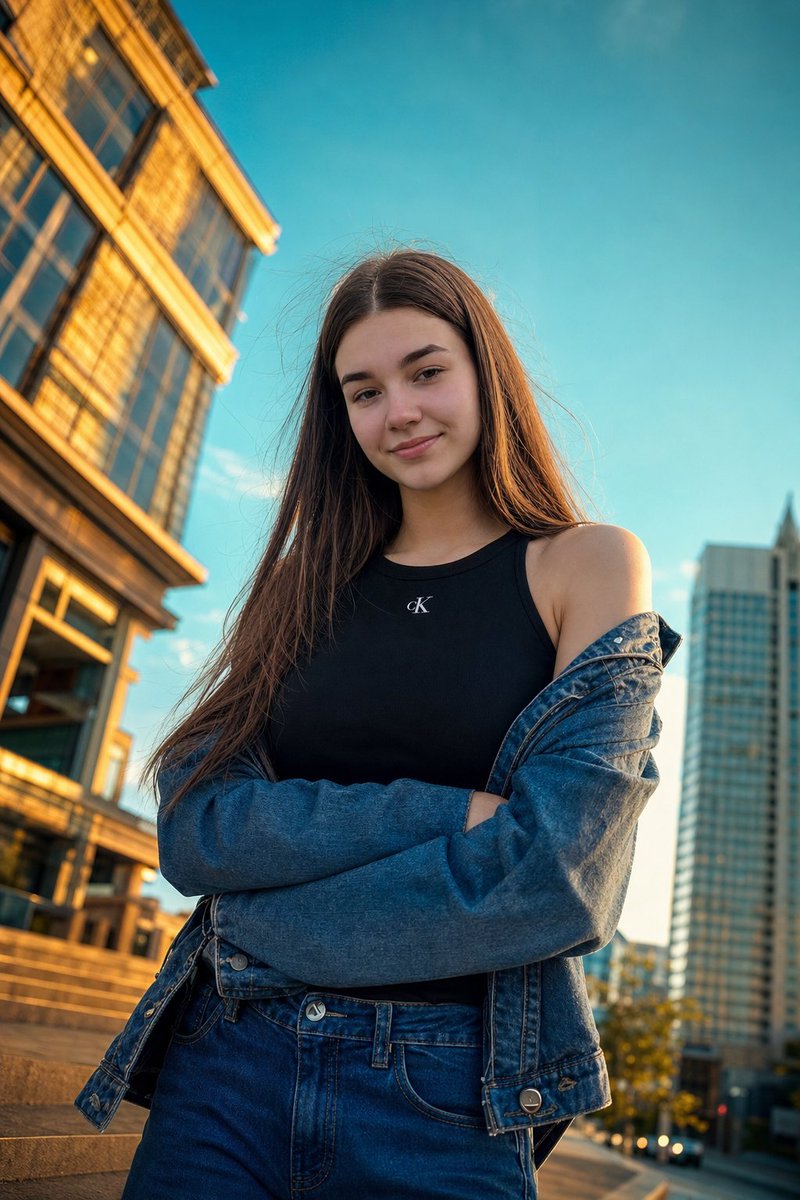
Golden Hour Street Portrait — Sora 2 Photorealistic Prompt
Create a stunning, cinematic low-angle portrait with bold editorial style, warm lighting, and a blurred urban backdrop for a high-fashion look.
提示词 · EN
Use my uploaded photo as the exact facial reference, preserving my real face, skin tone, and features with high accuracy. Create a photorealistic low-angle street-style portrait during argtime of day: golden hour in a argsetting: modern urban setting, shot slightly tilted upward for a bold editorial look. I wear a argoutfit: black minimalist top with a subtle logo and a loose denim jacket slipping off one shoulder, arms crossed casually, with slightly messy wind-blown hair for a natural candid feel. The lighting is warm and cinematic with strong contrast—golden highlights on buildings against a deep teal-blue sky. Composition is fashion-forward with sharp focus on my face and a softly blurred architectural background, vibrant yet balanced colors, moody high contrast, captured on a 24mm wide-angle lens for a dynamic perspective
关于这个提示词
Create a stunning, cinematic low-angle portrait with bold editorial style, warm lighting, and a blurred urban backdrop for a high-fashion look. 它更适合作为 GPT Image 2 的概念艺术起点:先保留画面结构、主体关系和风格约束,再替换成你的品牌、人物或场景。
使用时优先替换 time of day、setting、outfit 等占位符,并保持镜头、构图和材质描述的顺序不变。这样更容易获得稳定的画面结果,也方便继续做多版本对比。
如何使用这个提示词
- Copy the entire prompt text from the prompt page.
- Open your preferred AI video generation tool (such as Sora) and select the appropriate model or style setting.
- Paste the prompt into the input field.
- Edit the customizable variables like
{time of day}and{outfit}to match your vision. - Generate the portrait and review the results. Adjust and regenerate if needed.


