
GPT Image 2AI 提示词
How to Use Google Fonts: Japanese Infographic — Sora 2 Prompt
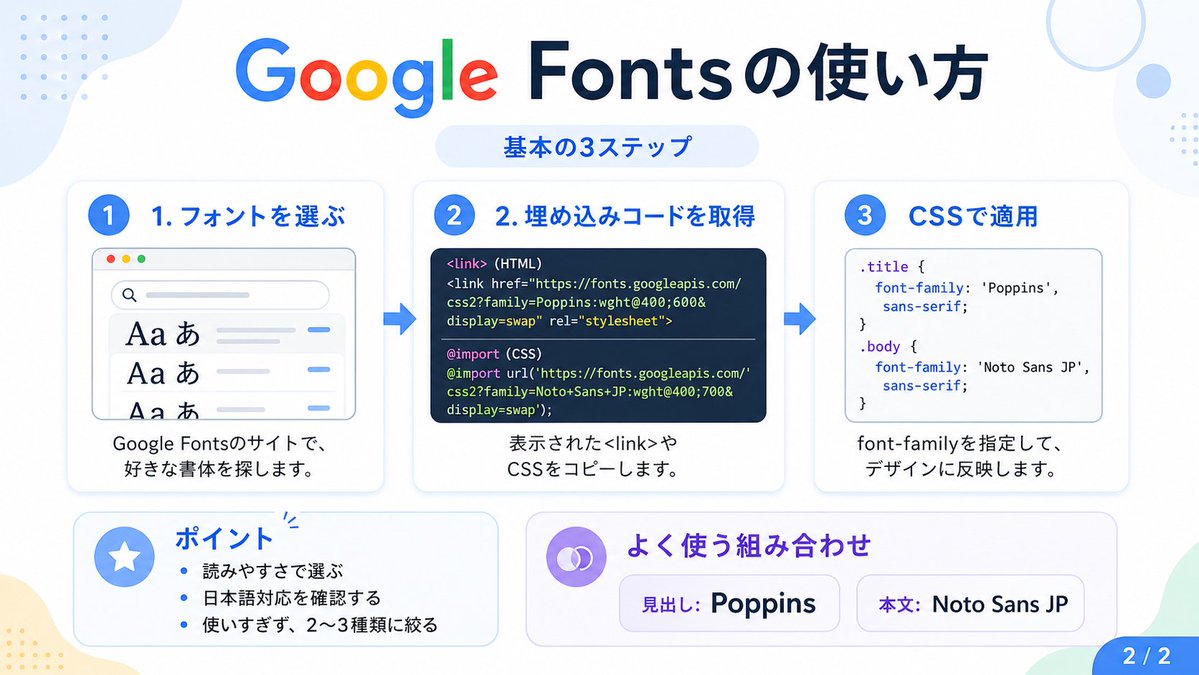
Generate a clean Japanese infographic explaining 3 steps to use Google Fonts: selection, embedding, and CSS application, ideal for social media or tutorials.
提示词 · EN
type
日语信息图topic
如何使用 Google Fontsstyle
简洁现代的扁平化设计,白色背景,柔和的淡蓝色和薄荷绿角落色块,带有细微阴影的圆角卡片,科技教程美学,清晰的矢量排版和 UI 插图canvas
aspect_ratio
16:9headline
main
Google Fonts 的使用方法sub
基本 3 步骤layout
sections
item 1
title
1. 选择字体position
leftcount
1labels
item 1
1. 选择字体card_style
带有浅蓝色边框/阴影的圆角白色面板icon
蓝色数字 1 圆圈illustration
显示字体搜索界面的浏览器窗口,3 行可见的字体预览,带有大号 Aa あ 样本,顶部有搜索栏,小型彩色窗口按钮,浅灰色界面线条和蓝色强调短划线body_text
在 Google Fonts 网站上,搜索你喜欢的字体。item 2
title
2. 获取嵌入代码position
centercount
1labels
item 1
2. 获取嵌入代码card_style
带有浅蓝色边框/阴影的圆角白色面板icon
蓝色数字 2 圆圈illustration
深色代码面板,包含两个由细分隔线隔开的带标签代码示例code_blocks
count
2labels
item 1
<link> (HTML)item 2
@import (CSS)content
item 1
<link href="https://fonts.googleapis.com/css2?family=Poppins:wght;600&display=swap" rel="stylesheet">item 2
@import url('https://fonts.googleapis.com/css2?family=Noto+Sans+JP:wght;700&display=swap');body_text
复制显示的 <link> 或 CSS 代码。item 3
title
3. 在 CSS 中应用position
rightcount
1labels
item 1
3. 在 CSS 中应用card_style
带有浅蓝色边框/阴影的圆角白色面板icon
蓝色数字 3 圆圈illustration
包含 CSS 的白色代码卡片,带有两个选择器和 font-family 规则code_blocks
count
2labels
item 1
.titleitem 2
bodycontent
item 1
.title { font-family: 'Poppins', sans-serif; }item 2
body { font-family: 'Noto Sans JP', sans-serif; }body_text
指定 font-family,将其应用到设计中。item 4
title
要点position
bottom-leftcount
3labels
item 1
根据易读性选择item 2
确认是否支持日语item 3
不要过度使用,限制在 2-3 种以内card_style
带有淡蓝色调的圆角白色面板icon
圆圈中的蓝色星星body_format
项目符号列表item 5
title
常用组合position
bottom-center-rightcount
2labels
item 1
标题: Poppinsitem 2
正文: Noto Sans JPcard_style
带有淡紫色调的圆角白色面板icon
紫色链环符号body_format
两个药丸形状的示例框connectors
count
2style
3 张顶部卡片之间的大型蓝色向右箭头pagination
text
2 / 2position
bottom-rightstyle
蓝色圆角标签text_language
日语color_palette
primary_blue
#2f80ffnavy
#0f2b5bgoogle_colors
item 1
#4285F4item 2
#DB4437item 3
#F4B400item 4
#0F9D58lavender
#8b6cffbackground
#ffffff关于这个提示词
Generate a clean Japanese infographic explaining 3 steps to use Google Fonts: selection, embedding, and CSS application, ideal for social media or tutorials. 它更适合作为 GPT Image 2 的概念艺术起点:先保留画面结构、主体关系和风格约束,再替换成你的品牌、人物或场景。
这条提示词使用结构化 JSON 组织信息,包含 type、topic、style、canvas、headline、layout、text language 等字段。保留这种层级能让模型更清楚地区分画面主题、布局、界面元素和细节约束。
使用时建议先小幅修改主体、场景、镜头和色调,再生成多个版本对比构图与细节。这样页面内容对用户有实际帮助,也避免把模型名或标签机械堆在正文里。
如何使用这个提示词
- Copy the provided prompt text.
- Paste into an AI image generator (e.g., Midjourney, DALL-E, Stable Diffusion) that supports detailed text prompts.
- Optionally tweak the style or language (e.g., switch Japanese to English) to fit your needs.
- Generate the infographic.
- Download and use the image for presentations, social media posts, or tutorial materials.


