
GPT Image 2AI 提示词
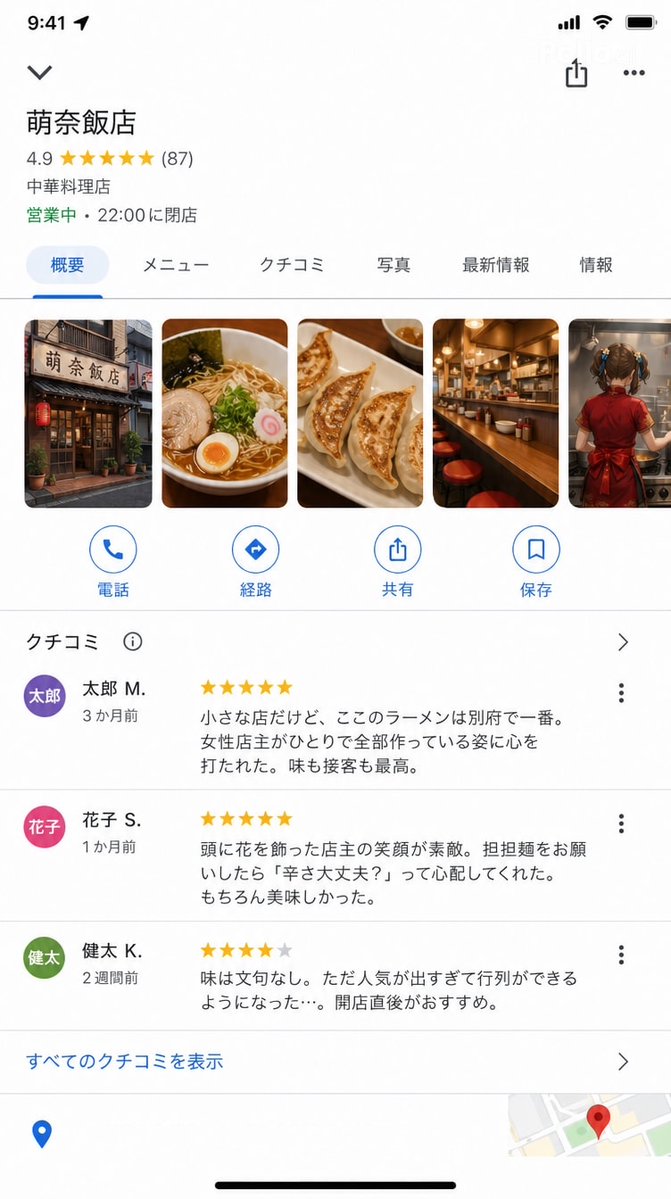
Google Maps iOS UI Screenshot — Hyper-Realistic Restaurant Detail Prompt
Generate a pixel-perfect Google Maps iOS app store listing for a fictional restaurant, complete with custom store name, reviews, and photo gallery.
提示词 · EN
Google Maps iOS 应用商店详情页截图(9:16)。 具备精准的 Google Maps UI: 店铺名称:"argstore name: Mona Hanten"
评分:★★★★★ 4.9(87 条评价)
类别:"中餐厅"
状态:"营业中 · 22:00 结束营业" 照片部分(横向滚动):
店铺外观 / 拉面照片 / 饺子 / 吧台 / argphoto content: 一位年轻女孩正在烹饪的背影 评价部分(部分内容可见): ★★★★★ "这是一家小店,但这里的拉面是别府最好吃的。女店主独自打理一切,让我非常感动。味道和服务都是一流的。" — argreviewer: Taro M.(3 个月前) ★★★★★ "店主发间别着花朵,笑容非常灿烂。当我点担担面时,她问我‘你能吃辣吗?’,非常贴心。当然,味道也很棒。" — Hanako S.(1 个月前) ★★★★☆ "味道无可挑剔。不过因为太受欢迎,总是需要排队……建议刚开门时就去。" — Kenta K.(2 周前) 底部的 Google Maps UI 元素(路线、通话、保存按钮)。 UI 精确度极高,足以以假乱真,看起来就像真实的 Google Maps 截图。
关于这个提示词
Generate a pixel-perfect Google Maps iOS app store listing for a fictional restaurant, complete with custom store name, reviews, and photo gallery. 它更适合作为 GPT Image 2 的概念艺术起点:先保留画面结构、主体关系和风格约束,再替换成你的品牌、人物或场景。
使用时优先替换 store name、photo content、reviewer 等占位符,并保持镜头、构图和材质描述的顺序不变。这样更容易获得稳定的画面结果,也方便继续做多版本对比。
如何使用这个提示词
- Copy the full prompt text and paste it into your preferred Sora 2 compatible AI model interface.
- Replace the default variables like store name, reviewer, or photo content with your own custom details.
- Choose a model that excels at UI and interface rendering for best results.
- Generate the image and review the output for UI accuracy—tweak any details as needed.
- Download your final hyper-realistic Google Maps screenshot for mockup or creative use.


