GPT Image 2AI 提示词
Gothic Fallen Angel Queen — Sora 2 Prompt
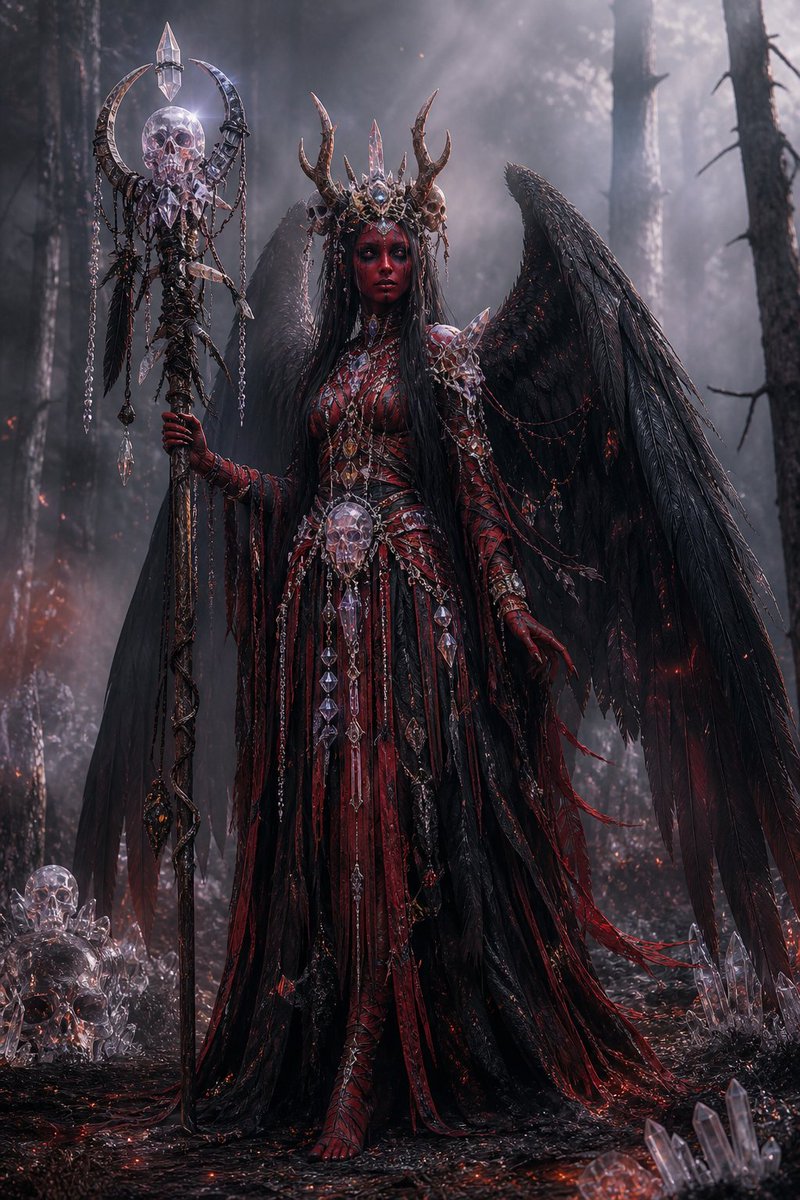
Create a cinematic dark fantasy portrait of an ornate winged necromancer queen in a charred forest, ideal for gothic character art or villain design.
提示词 · EN
Create a dark fantasy full-body portrait of a gothic fallen angel queen standing in a smoky burned forest at night, centered in the frame. She has enormous ragged black feathered wings spread behind her, very long straight arghair color: jet black hair, and a mysterious featureless shadowed face hidden beneath an ornate antlered crown made of blackened metal, crystal spikes, tiny skulls, and bone-like horns. Her outfit is an elaborate argdress colors: blood red and black ceremonial gown with layered shredded fabric, leather-like panels, thorny armor, ribbed bodice details, long clawed gloves, dangling chains, ruby accents, skull ornaments, and many clear crystal pendants. She holds a tall necromancer staff in her left hand: a dark twisted pole topped with a crescent-shaped metal frame, a translucent crystal skull, a pointed crystal finial, hanging chains, feathers, and dangling crystal shards. Add a large crystal skull pendant at her waist and scattered crystal skulls and quartz clusters on the charred ground around her. The environment is a dense dead forest with tall black tree trunks, drifting fog, ash, tiny red embers, faint fires in the distance, wet black soil, and dramatic cold moonlit haze from the upper right. Use an ultra-detailed cinematic photoreal fantasy style, high contrast, intricate gothic jewelry, sharp textures, volumetric light rays, moody desaturated blacks and grays with glowing crimson highlights, vertical composition, imposing regal pose, ominous supernatural atmosphere.
关于这个提示词
Create a cinematic dark fantasy portrait of an ornate winged necromancer queen in a charred forest, ideal for gothic character art or villain design. 它更适合作为 GPT Image 2 的概念艺术起点:先保留画面结构、主体关系和风格约束,再替换成你的品牌、人物或场景。
使用时优先替换 hair color、dress colors 等占位符,并保持镜头、构图和材质描述的顺序不变。这样更容易获得稳定的画面结果,也方便继续做多版本对比。
如何使用这个提示词
- Copy the full prompt text below.
- Open your preferred AI image generator (e.g., Sora 2, Midjourney, DALL·E).
- Customize the
hair coloranddress colorsvariables to suit your vision. - Paste the prompt and generate.
- Adjust details like staff design or lighting for variations.