
GPT Image 2AI 提示词
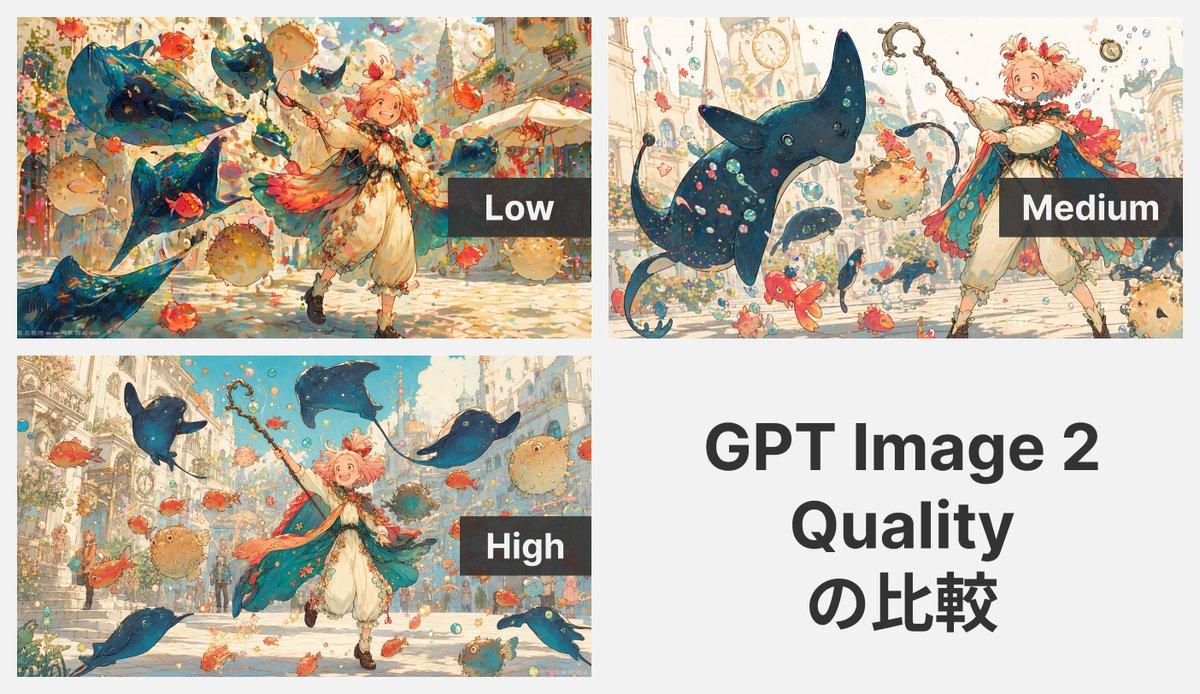
GPT Image 2: Low, Medium, High Quality Fantasy Art
Create a side-by-side quality comparison grid of a whimsical fantasy anime scene, showcasing how detail and clarity evolve from low to high settings.
提示词 · EN
type
质量对比拼图subject
在三种质量设置下生成的奇幻动漫插画style
轻盈的水彩墨水绘本动漫风格,柔和的粉彩调色板,细腻的线条,绘画质感,明亮的魔法氛围canvas
background
整体浅灰色背景aspect_ratio
16:9 演示 Slideslayout
sections
item 1
title
Lowposition
左上count
1labels
item 1
低image
一个生动的奇幻街道场景,画面中有 1 名年轻的中性化儿童法师正在移动,面带微笑并举起魔杖,周围环绕着 4 只巨大的蓝色蝠鲼状飞行生物、多条橙红色金鱼、几条圆形河豚、漂浮的气泡和五彩纸屑,背景是华丽的欧式建筑;构图繁忙且色彩丰富,但精致度略低overlay
右侧附近的深色半透明矩形,带有白色大号无衬线字体“Low”item 2
title
Mediumposition
右上count
1labels
item 1
中image
同一提示词再次渲染,儿童法师位于右侧,脸部被桃色方形遮挡块遮住,向上举着法杖,前景中有一只占主导地位的大型蓝色蝠鲼生物,周围有较小的蓝色鱼类生物、橙红色鱼、河豚、气泡,背景是带有塔楼和时钟细节的苍白奇幻城市;相比低质量版本,间距更整洁,形态更易读overlay
右下角附近的深色半透明矩形,带有白色大号无衬线字体“Medium”item 3
title
Highposition
左下count
1labels
item 1
高image
以最高精度渲染的同一奇幻场景:1 名快乐的儿童法师向前奔跑,举着魔杖,身穿带有温暖粉橙色羽毛装饰的飘逸青色斗篷、奶油色束腰外衣和灯笼裤、棕色靴子,留着蓬松的粉色短发;周围环绕着 4 只蓝色蝠鲼状飞行生物、许多橙红色鱼、几条棕褐色河豚、气泡和闪光,背景是阳光明媚、带有楼梯和优雅建筑的城市街道;图像清晰、平衡、细节丰富且明亮overlay
中右侧附近的深色半透明矩形,带有白色大号无衬线字体“High”item 4
title
GPT Image 2 Quality 对比position
右下count
1labels
item 1
GPT Image 2item 2
质量item 3
对比image
纯浅灰色背景上的纯文本面板typography
居中的大型粗体黑色无衬线文本,分 3 行显示 '{argument name="headline text" default="GPT Image 2 Quality 对比"}'grid
2x2 拼图,包含 3 个图像面板和 1 个文本面板margins
面板间细缝character
count
1description
年轻的奇幻儿童法师或冒险家,开朗,动态姿势,蓬松的 {argument name="hair color" default="粉色"} 短发,华丽的魔杖或法杖,带有珊瑚色和金色装饰的飘逸青蓝色斗篷,奶油色服装配灯笼裤,奇幻绘本设计environment
setting
阳光明媚的奇幻欧式街道或广场floating_elements_count
4 只大型蝠鲼生物,加上无数小鱼、几条河豚和许多气泡mood
俏皮、魔法、庆典rendering_notes
comparison_purpose
使用相同的提示词展示 3 种质量等级之间的视觉差异quality_labels_count
3text_panels_count
1关于这个提示词
Create a side-by-side quality comparison grid of a whimsical fantasy anime scene, showcasing how detail and clarity evolve from low to high settings. 它更适合作为 GPT Image 2 的概念艺术起点:先保留画面结构、主体关系和风格约束,再替换成你的品牌、人物或场景。
这条提示词使用结构化 JSON 组织信息,包含 type、subject、style、canvas、layout、character、environment 等字段。保留这种层级能让模型更清楚地区分画面主题、布局、界面元素和细节约束。
使用时建议先小幅修改主体、场景、镜头和色调,再生成多个版本对比构图与细节。这样页面内容对用户有实际帮助,也避免把模型名或标签机械堆在正文里。
如何使用这个提示词
- Copy the prompt text and paste it into your AI image generator (e.g., GPT Image 2, DALL·E, or similar).
- Ensure your model supports multi‑panel generation and quality‑setting interpretation (adjust keywords if needed).
- [Optional] Customize the child mage’s hair color or styling by editing the
{hair color}argument. - Generate the image to produce a 2×2 grid comparing low, medium, and high quality outputs of the same scene.
- Use the result to analyze how rendering fidelity changes with quality settings.


