
GPT Image 2AI 提示词
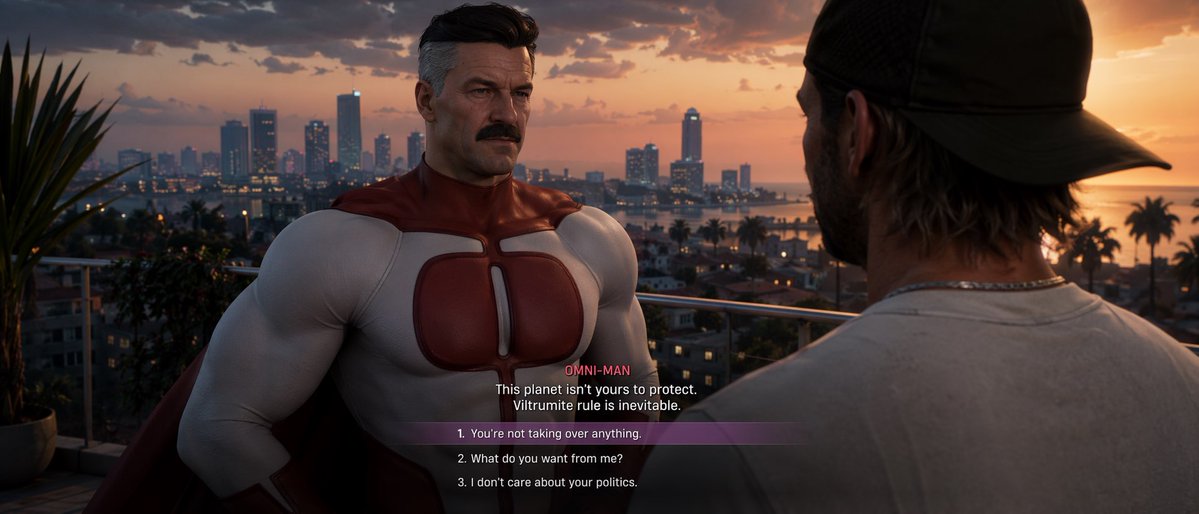
GTA VI Dialogue Screenshot: Omni-Man & Choices — Sora 2
Generate a hyper-realistic GTA VI-style game screenshot with cinematic dialogue, a customizable Omni-Man NPC, and multiple choice selections.
提示词 · EN
type
电子游戏截图style
{argument name="art style" default="Grand Theft Auto VI 美学,写实 3D 图形"}setting
日落时分俯瞰沿海城市的阳台,棕榈树,摩天大楼,温暖的灯光characters
item 1
role
NPCdescription
{argument name="npc description" default="全能侠 (Omni-Man),肌肉发达的中年男子,留着胡须,鬓角灰白,身穿红白相间的超级英雄制服"}position
中左,面向镜头item 2
role
玩家description
戴着反戴深色棒球帽、身穿浅灰色 T 恤的男子position
右前景,背对镜头ui_elements
type
对话菜单position
底部中央speaker_name
{argument name="speaker name" default="全能侠 (OMNI-MAN)"}dialogue_text
{argument name="npc dialogue" default="这个星球不是由你来保护的。维尔特鲁姆人的统治是不可避免的。"}choices_count
3choices
item 1
1. {argument name="choice 1" default="你休想接管任何东西。"}item 2
2. 你到底想从我这里得到什么?item 3
3. 我不在乎你们的政治。highlight
选项 1 具有半透明的紫色背景条关于这个提示词
Generate a hyper-realistic GTA VI-style game screenshot with cinematic dialogue, a customizable Omni-Man NPC, and multiple choice selections. 它更适合作为 GPT Image 2 的概念艺术起点:先保留画面结构、主体关系和风格约束,再替换成你的品牌、人物或场景。
这条提示词使用结构化 JSON 组织信息,包含 type、style、setting、characters、ui elements 等字段。保留这种层级能让模型更清楚地区分画面主题、布局、界面元素和细节约束。
使用时建议先小幅修改主体、场景、镜头和色调,再生成多个版本对比构图与细节。这样页面内容对用户有实际帮助,也避免把模型名或标签机械堆在正文里。
如何使用这个提示词
- Copy the full prompt from this page.
- Open Sora 2 or your preferred AI image generator and paste the prompt.
- Replace the argument placeholders (e.g., art style, NPC description, dialogue) with your own values to customize the scene.
- Generate the image and refine as needed.


