
GPT Image 2AI 提示词
Gucci Luxury Fashion Poster — Split-Screen Editorial Ad Prompt
Generate a cinematic, wide-format luxury fashion poster featuring bold serif typography, a deep wine-red layout, and high-end editorial photography inspired by Milan.
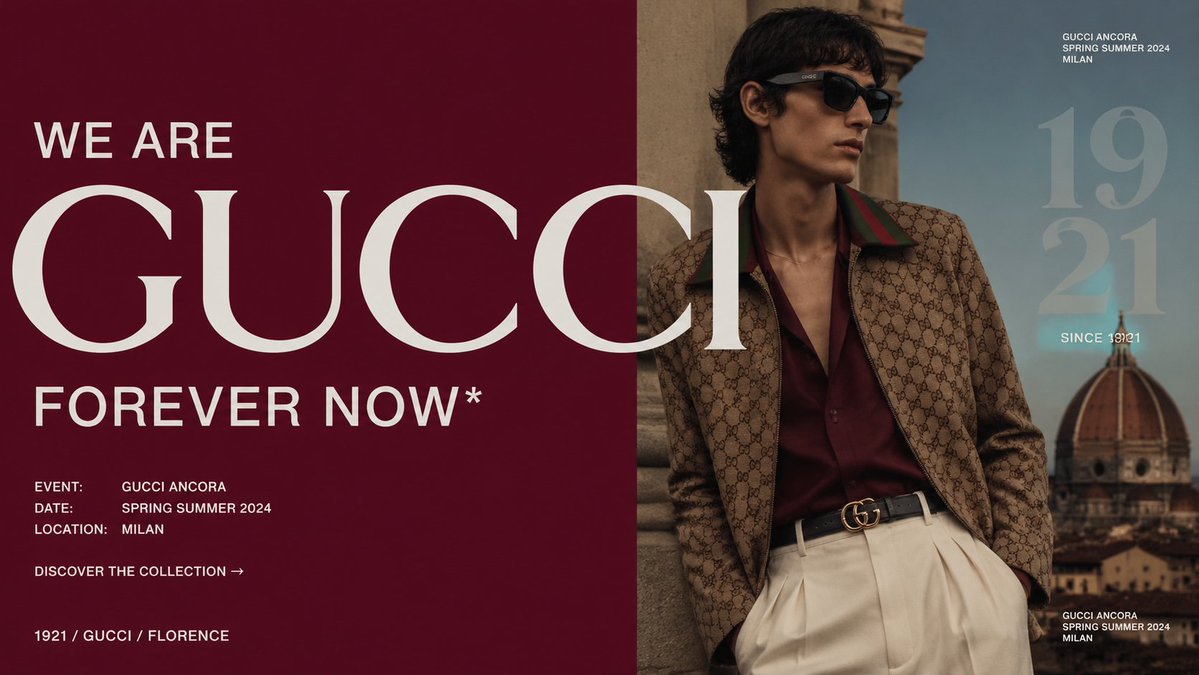
提示词 · EN
type
奢华时尚宣传海报format
宽幅横向编辑广告,16:9brand
main headline
WE ARE {argument name="brand name" default="GUCCI"}subheadline
{argument name="campaign slogan" default="FOREVER NOW*"}style
超大高对比度白色衬线字体,极简奢华布局layout
split
垂直分屏构图,左侧为纯深酒红色面板,右侧为电影质感时尚摄影left panel
background
浓郁牛血酒红色text blocks
item 1
position
左上text
WE AREstyle
小型大写白色无衬线字体item 2
position
左中跨越至照片text
GUCCIstyle
超大优雅白色衬线字母,被画面边缘裁切item 3
position
左下text
FOREVER NOW*style
大型大写白色无衬线字体item 4
position
左下角count
3labels
item 1
活动:GUCCI ANCORAitem 2
日期:2024 年春夏item 3
地点:米兰style
小型大写白色活动详情item 5
position
详情下方text
探索系列 →style
小型大写行动号召item 6
position
左下角边缘text
1921 / GUCCI / 佛罗伦萨style
小型大写白色品牌传承线right panel
scene
男性时尚模特斜倚在米兰古老的石质建筑旁,背景可见大教堂圆顶,忧郁的蓝天与温暖的历史城市色调subject
gender
男pose
放松倚靠,一只手靠近口袋,躯干略微朝向镜头face
故意被居中的不透明深棕色方块遮挡hair
深色波浪中长发outfit
count
4items
item 1
棕褐色 GG 老花图案夹克,配绿红条纹领口item 2
深酒红色开领丝绸衬衫item 3
米白色高腰百褶长裤item 4
黑色皮革腰带,配金色双 G 扣photo style
电影级编辑摄影,浅景深,低饱和度奢华调色,真实的织物纹理,柔和的自然日光right overlay text
count
4labels
item 1
GUCCI ANCORA 2024 年春夏米兰item 2
19 21item 3
始于 1921item 4
GUCCI ANCORA 2024 年春夏米兰style
小型白色大写标题,天空上方叠加巨大的半透明浅色数字color palette
count
5colors
item 1
深酒红色item 2
象牙白item 3
棕褐色老花棕item 4
米白色长裤item 5
雾霾蓝天空composition notes
让巨大的 GUCCI 字样从酒红色面板延伸至照片中,部分遮盖模特;左侧保持充足的留白,并体现高端杂志广告的对称感;除所述文字外,不添加额外标志parameters
event text
{argument name="event text" default="GUCCI ANCORA"}season text
{argument name="season text" default="2024 年春夏"}location text
{argument name="location text" default="米兰"}关于这个提示词
Generate a cinematic, wide-format luxury fashion poster featuring bold serif typography, a deep wine-red layout, and high-end editorial photography inspired by Milan. 它更适合作为 GPT Image 2 的概念艺术起点:先保留画面结构、主体关系和风格约束,再替换成你的品牌、人物或场景。
这条提示词使用结构化 JSON 组织信息,包含 type、format、brand、layout、color palette、composition notes、parameters 等字段。保留这种层级能让模型更清楚地区分画面主题、布局、界面元素和细节约束。
使用时建议先小幅修改主体、场景、镜头和色调,再生成多个版本对比构图与细节。这样页面内容对用户有实际帮助,也避免把模型名或标签机械堆在正文里。
如何使用这个提示词
- Copy the full prompt from the page.
- Select an advanced AI image generator like Sora 2 or Midjourney.
- Replace the default variables (e.g., brand name, slogan, season) with your specific details.
- Generate the image and refine the prompt if needed to perfect the layout or subject.


