
GPT Image 2AI 提示词
Travel Photo to Vertical Calendar Card — Sora 2 Prompt
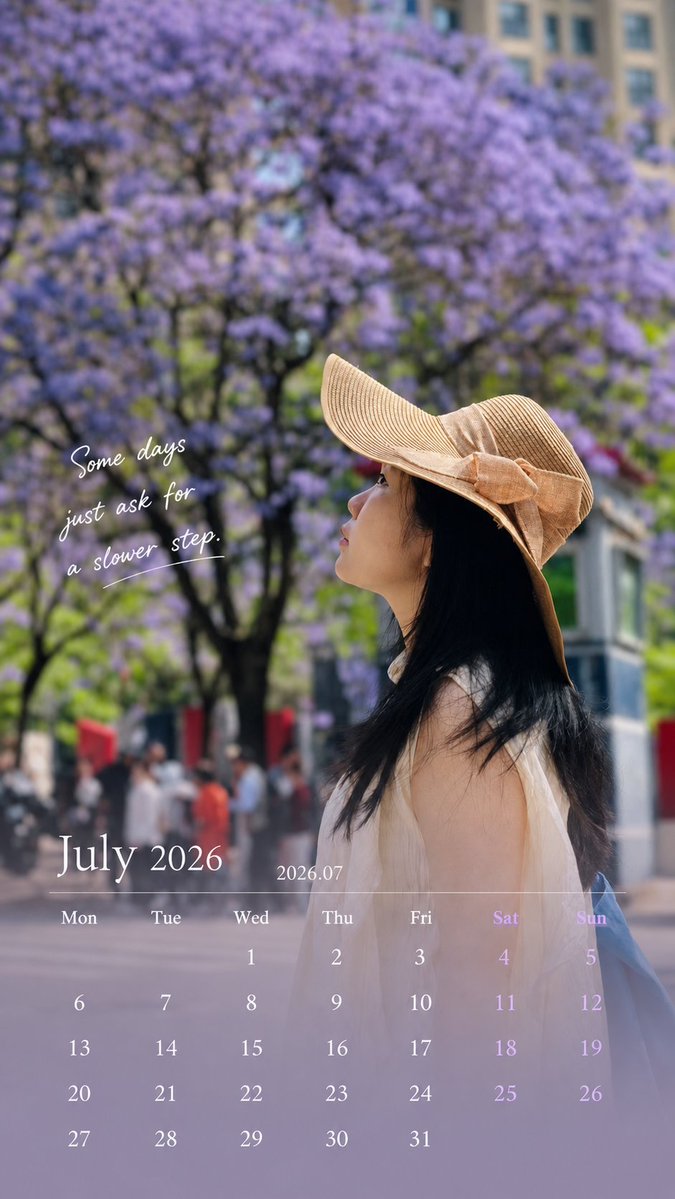
Transform a personal travel photo into a 9:16 vertical calendar card with a clean, magazine-style overlay, preserving every original detail of the subject.
1 / 2
提示词 · EN
Use the uploaded photo to generate a 9:16 vertical calendar card. [1. Execution Mode — Critical] This is an image editing task, NOT image generation. Use the original photo as the base layer
Do NOT recreate, redraw, or reinterpret the image Strictly preserve: face, identity, expression, hair, body, clothing
original lighting, shadows, color temperature
environment and composition ❗ No beautification, no smoothing, no retouching
❗ The photo must look unchanged [2. Allowed Operations — Overlay Only] Only add design elements on top: bottom 30% soft gradient extension (for calendar area)
subtle translucent mask for readability
calendar layout, month title, and short caption Forbidden: repainting or altering existing pixels
changing global color style
applying “design filters”
[3. Color Strategy] Colors must come from the current image: extract primary / secondary / accent colors
apply slight desaturation and brightness normalization only
keep original photo color feeling 👉 Respect the image, do not redesign the color system [4. Layout Structure]
Top 70%: original image (untouched)
Bottom 30%: gradient + calendar
smooth transition, no hard edges
clean spacing, minimal design
magazine-like, not template-style
[5. Calendar Content — Must Be Accurate] Generate correct calendar for the given month: Title: argmonth title: July 2026 / 2026.07
Weekdays: Mon Tue Wed Thu Fri Sat Sun
Dates: accurate alignment based on real calendar
[6. Caption Rules — Important] Length: 8–16 words (or equivalent short phrase) Requirements: max 2 lines
no exclamation marks
no clichés, no motivational tone
do NOT explain emotions Preferred style: subtle, atmospheric
fragment-like, not fully explanatory
leave emotional space 👉 Make people pause, not finish reading [7. Image Selection Guidance — Key to Success] Prefer: side face / partially hidden face
natural遮挡 (hat, hand, shadow)
motion (walking, turning)
mood > facial detail Avoid:
front-facing portraits
strong identity-focused close-ups 👉 Reduce face-modification risk [Final Principle] 👉 Do NOT generate a better photo.
Gently place design on the original photo.
关于这个提示词
Transform a personal travel photo into a 9:16 vertical calendar card with a clean, magazine-style overlay, preserving every original detail of the subject. 它更适合作为 GPT Image 2 的概念艺术起点:先保留画面结构、主体关系和风格约束,再替换成你的品牌、人物或场景。
使用时优先替换 month title 等占位符,并保持镜头、构图和材质描述的顺序不变。这样更容易获得稳定的画面结果,也方便继续做多版本对比。
如何使用这个提示词
- Copy the entire prompt body.
- Select your preferred AI model (e.g., Sora 2) that supports image editing and overlays.
- Upload your travel photo as the input image.
- Edit the
[month title]variable in the prompt to match your desired month and year (e.g., "July 2026"). - Generate the image. Review and regenerate if needed.


