
GPT Image 2AI 提示词
VIP Lounge Whisper — Realistic Sora 2 Prompt
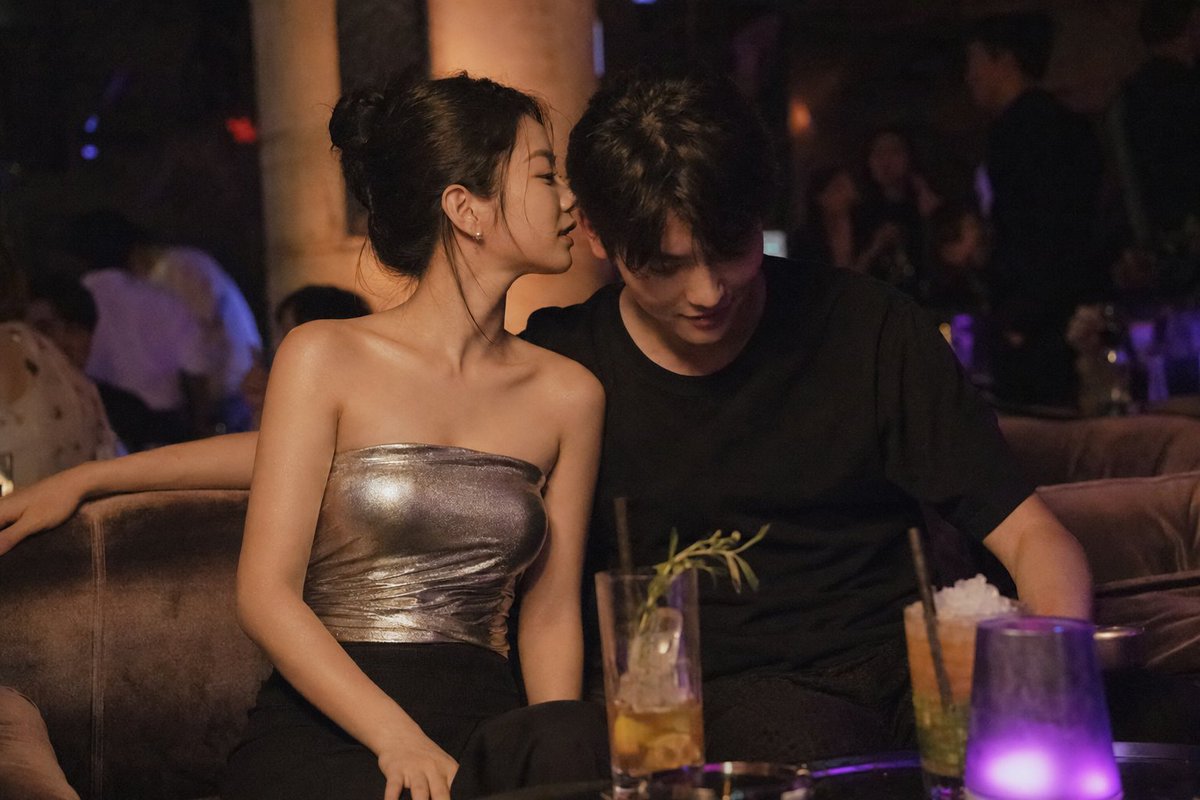
Generate a hyper-realistic candid photo of two people sharing an intimate moment in a warm amber-lit club VIP lounge with cinematic film grain.
1 / 2
提示词 · EN
A three-quarter shot of two young people seated side by side on a low velvet sofa in a club's VIP lounge section, authentic daily life photography, natural candid moment. She is turned slightly toward him, lips close to his ear — saying something only he can hear over the music.
East Asian young woman in her early 20s. Almond-shaped eyes with natural double eyelids, slightly elongated eye corners, a quiet confident expression. Straight refined nose with a delicate bridge. Skin tone fair to light beige (NC10–NC20). Skin subsurface scattering visible under warm amber lounge light, specular micro-highlights on her bare shoulder and jawline, fine foundation powder grain perceptible. She wears a silver metallic bandeau top — fitted, strapless, catching every light shift. He sits beside her in a relaxed posture, dark trousers and a black tee, one arm draped along the sofa back behind her shoulder. Two or three stray hairs fall softly across the side of her neck, displaced by faint air movement, natural unplanned imperfection, not geometrically symmetrical.
Warm low amber lounge lighting creates a private golden pool around the sofa. A dim purple accent light glows from a low table lamp nearby. Tall cocktail glasses with ice and garnish sit on the table in front of them. The mood is relaxed and unhurried — intimate closeness, bodies angled inward, a sense of shared quiet within the noise. Subtle ISO 400 film grain in shadow areas, photographic noise texture not CG render smoothness. Aspect ratio 3:2. No watermark, no text overlay, not cartoon, not digitally painted, not illustration, not anime.
关于这个提示词
Generate a hyper-realistic candid photo of two people sharing an intimate moment in a warm amber-lit club VIP lounge with cinematic film grain. 它更适合作为 GPT Image 2 的概念艺术起点:先保留画面结构、主体关系和风格约束,再替换成你的品牌、人物或场景。
使用时建议先小幅修改主体、场景、镜头和色调,再生成多个版本对比构图与细节。这样页面内容对用户有实际帮助,也避免把模型名或标签机械堆在正文里。
如何使用这个提示词
- Copy the full prompt and paste it into your chosen AI image or video generator.
- Select a photorealistic model like Sora 2, Runway Gen-3, or similar — prioritize models tuned for lifelike skin and lighting.
- Tweak variables such as the woman's outfit, lighting color temperature, or camera angle to match your creative vision.
- Generate multiple outputs and pick the composition that best captures the candid, unposed intimacy described.
- Upscale or refine your chosen result for final use in mood boards, portfolios, or creative projects.


