
GPT Image 2AI 提示词
iPhone App Store Mockup — Cozy Desk Scene Sora 2 Prompt
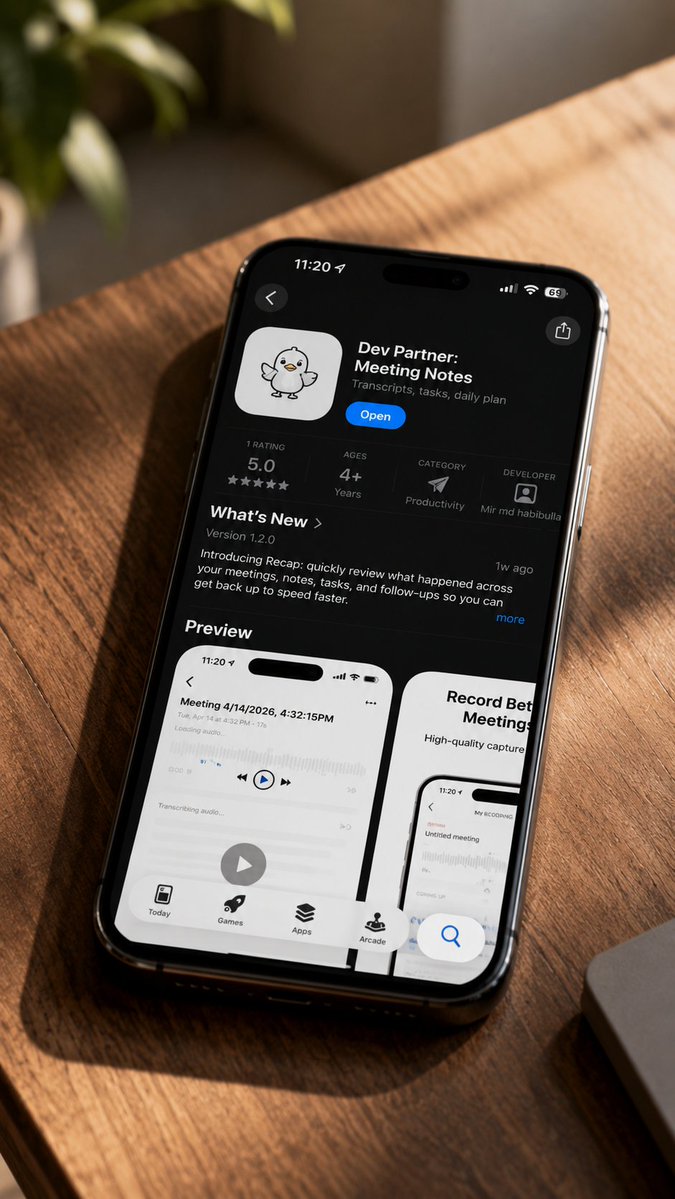
Generate a photorealistic iPhone App Store product mockup on a sunlit wooden desk, perfect for showcasing your app's listing page with lifelike lighting and detail.
提示词 · EN
创作一张写实的居家风格产品样机照片,画面中一部黑色 iPhone 对角放置在洒满金色阳光的暖色木质桌面上,采用俯视微倾角度拍摄,具有浅景深效果。手机屏幕显示深色模式下的 iOS App Store 应用详情页,应用名称为 argapp name: Dev Partner: Meeting Notes,配有一个可爱的白色 App 图标,上面绘有一只手绘小鸭子/小鸡吉祥物,显示蓝色“打开”按钮,副标题为 argapp subtitle: Transcripts, tasks, daily plan。iPhone 顶部状态栏显示 11:20、蜂窝网络/Wi‑Fi/电池图标以及灵动岛;左上角包含返回箭头,右上角包含分享图标。应用信息栏必须包含 4 个独立的统计数据:评分显示 5.0 及五颗星,年龄分级为 4+ 岁,类别为“效率”并配有纸飞机样式的图标,开发者为 Mir md habibulla 并配有小头像。下方显示“新功能”部分,版本号为 1.2.0,简短的更新段落介绍 Recap 功能,用于快速回顾会议、笔记、任务和后续跟进,并附有“1w ago”标签和“更多”链接。再下方显示“预览”标题,并展示 2 张可见的预览卡片:左侧卡片为白色手机截图,标题为“Meeting 4/14/2026, 4:32:15PM”,包含音频波形、播放控件、一个大的圆形播放按钮和底部标签栏;右侧卡片部分可见,标题为“Record Better Meetings”,显示手机截图。App Store 屏幕底部显示 4 个导航标签,分别为 Today、Games、Apps 和 Arcade,右下角附近有一个浮动的蓝色搜索按钮。环境:左上角背景中有模糊的绿色植物,右下角有银色笔记本电脑边缘,强烈的对角阳光和木纹阴影投射在桌面上,高端纪实科技摄影,高细节,手机玻璃上有自然反光,无手部,无额外设备,无水印。
关于这个提示词
Generate a photorealistic iPhone App Store product mockup on a sunlit wooden desk, perfect for showcasing your app's listing page with lifelike lighting and detail. 它更适合作为 GPT Image 2 的概念艺术起点:先保留画面结构、主体关系和风格约束,再替换成你的品牌、人物或场景。
使用时优先替换 app name、app subtitle 等占位符,并保持镜头、构图和材质描述的顺序不变。这样更容易获得稳定的画面结果,也方便继续做多版本对比。
如何使用这个提示词
- Copy the full prompt text and paste it into your preferred AI image generator (e.g., Sora 2, Midjourney, or DALL·E).
- Replace the default
app nameandapp subtitlevariables with your own app's details. - Adjust any other specifics like the version number or update notes to match your product.
- Select a model that excels at photorealistic imagery and detailed UI rendering.
- Generate the image and refine as needed by tweaking lighting or angle descriptions.


