
GPT Image 2AI 提示词
Iridescent Butterfly UI/UX • Dark Mode Nature Design System
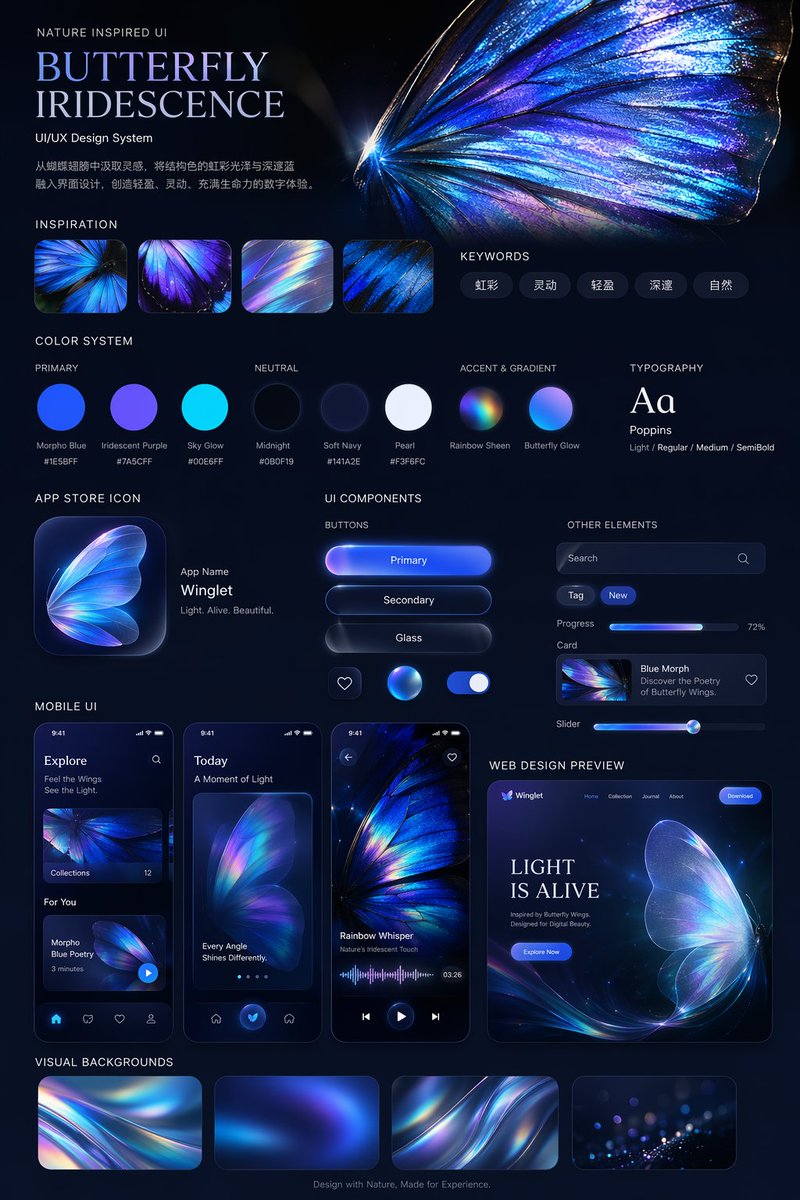
Generate a sleek dark-mode UI/UX design system inspired by iridescent butterfly wings, complete with luminous colors, mobile interfaces, and a web preview.
提示词 · EN
type
UI/UX 设计系统展示项目theme
深色模式,自然灵感,发光虹彩美学header
title
自然灵感 UI
{argument name="system title" default="蝴蝶虹彩"}
UI/UX 设计系统description
{argument name="chinese description" default="从蝴蝶翅膀中汲取灵感,将结构色的虹彩光泽与深邃蓝融入界面设计,创造轻盈、灵动、充满生命力的数字体验。"}hero_image
大型、高细节、发光的蓝紫色虹彩蝴蝶翅膀layout
sections
item 1
title
设计灵感count
4description
展示虹彩蝴蝶翅膀特写和光线折射的方形缩略图item 2
title
关键词count
5labels
item 1
虹彩item 2
灵动item 3
轻盈item 4
深邃item 5
自然item 3
title
色彩系统subsections
item 1
title
主色count
3labels
item 1
大闪蝶蓝 #1E5BFFitem 2
虹彩紫 #7A5CFFitem 3
天空光 #00E6FFitem 2
title
中性色count
3labels
item 1
午夜黑 #0B0F19item 2
柔和海军蓝 #141A2Eitem 3
珍珠白 #F3F6FCitem 3
title
强调色与渐变count
2labels
item 1
彩虹光泽item 2
蝴蝶光芒item 4
title
排版content
Aa Poppins Light / Regular / Medium / SemiBolditem 5
title
应用图标count
1text
应用名称 {argument name="app name" default="Winglet"} 轻盈。灵动。优美。item 6
title
UI 组件subsections
item 1
title
按钮count
6labels
item 1
主要按钮item 2
次要按钮item 3
玻璃质感item 4
心形图标item 5
发光球体图标item 6
开关item 2
title
其他元素count
5labels
item 1
搜索栏item 2
标签 (New)item 3
进度条 (72%)item 4
卡片 (Blue Morph)item 5
滑块item 7
title
移动端 UIcount
3screens
item 1
探索页面item 2
带有大型蝴蝶翅膀的今日页面item 3
带有波形图的音频播放页面item 8
title
网页设计预览count
1details
桌面浏览器模型,首屏区域包含 '{argument name="web hero headline" default="光之生命"}' 和 '立即探索' 按钮item 9
title
视觉背景count
4description
展示抽象虹彩波纹的矩形缩略图footer
源于自然的设计,为体验而生。关于这个提示词
Generate a sleek dark-mode UI/UX design system inspired by iridescent butterfly wings, complete with luminous colors, mobile interfaces, and a web preview. 它更适合作为 GPT Image 2 的概念艺术起点:先保留画面结构、主体关系和风格约束,再替换成你的品牌、人物或场景。
这条提示词使用结构化 JSON 组织信息,包含 type、theme、header、layout 等字段。保留这种层级能让模型更清楚地区分画面主题、布局、界面元素和细节约束。
使用时建议先小幅修改主体、场景、镜头和色调,再生成多个版本对比构图与细节。这样页面内容对用户有实际帮助,也避免把模型名或标签机械堆在正文里。
如何使用这个提示词
- Copy the entire prompt text.
- Go to your preferred AI image or video generation platform (like Sora, Midjourney, or DALL·E).
- Paste the prompt into the model’s text input.
- Adjust any variable arguments (e.g., system title, app name, hero headline) to customize the design theme if desired.
- Generate and review the resulting UI/UX design system showcase.


