
GPT Image 2AI 提示词
Japanese Beer Advertisement Banner — Sora 2 Prompt
Create a photorealistic Japanese promotional banner for a beer product with a model, catchphrases, feature highlights, and a campaign QR code.
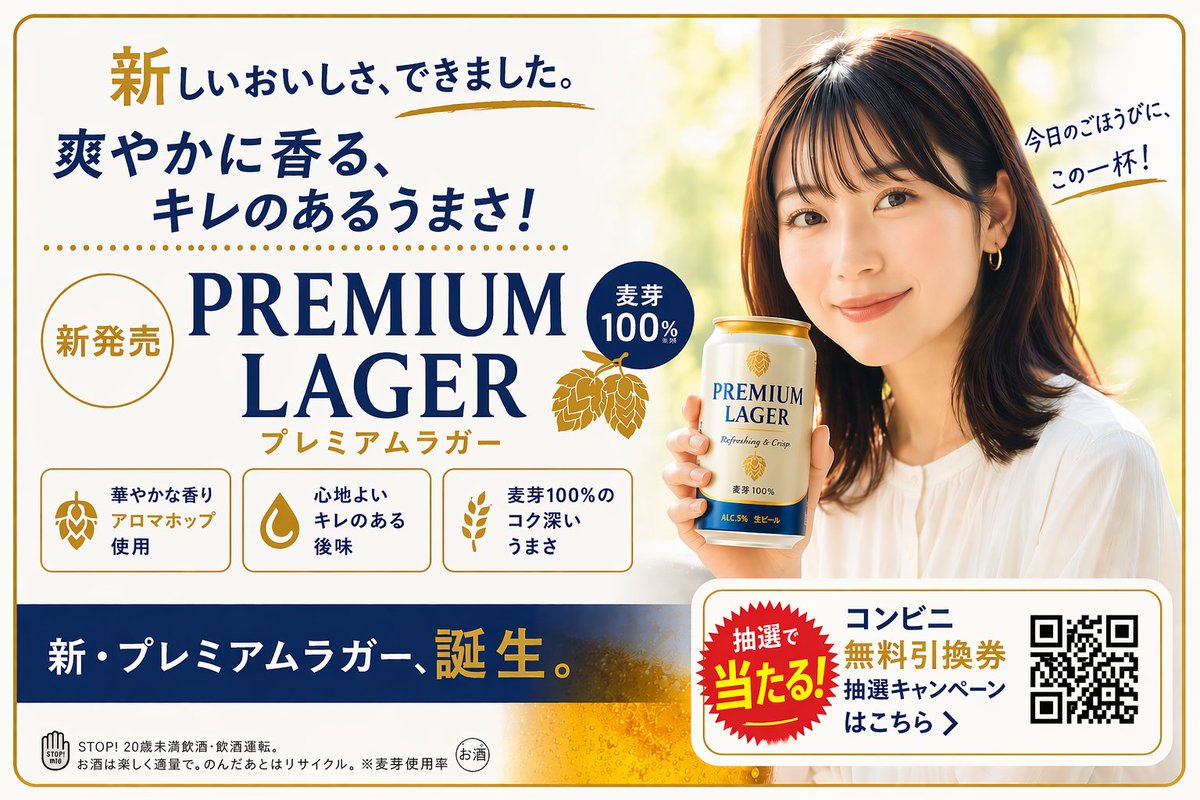
提示词 · EN
type
Japanese beverage advertisement bannersubject
description
Young Japanese woman, smiling warmly, looking at the viewer, wearing a white blouse, holding a can of beer.speech_bubble
{argument name="speech bubble text" default="今日のごほうびに、この一杯!"}product
name
{argument name="product name" default="PREMIUM LAGER"}packaging
white and gold beer can with hop graphic and blue textlayout
background
soft, bright, out-of-focus outdoor greenerysections
item 1
position
top-lefttype
catchphrasestext
item 1
{argument name="main catchphrase" default="新しいおいしさ、できました。"}item 2
{argument name="secondary catchphrase" default="爽やかに香る、キレのあるうまさ!"}item 2
position
center-lefttype
product_brandingmain_text
{argument name="product name" default="PREMIUM LAGER"}sub_text
プレミアムラガーbadges
item 1
新発売item 2
麦芽100%graphics
golden hop illustrationitem 3
position
middle-lefttype
feature_highlightscount
3style
rounded rectangular boxes with iconsitems
item 1
icon
hoptext
華やかな香り アロマホップ使用item 2
icon
water droptext
心地よい キレのある後味item 3
icon
wheattext
麦芽100%の コク深いうまさitem 4
position
bottomtype
promotional_bannerbackground_color
dark bluemain_text
新・プレミアムラガー、誕生。campaign_box
badge
抽選で当たる!text
{argument name="campaign text" default="コンビニ無料引換券 抽選キャンペーンはこちら >"}element
QR codefooter
legal drinking age warnings and recycling logos关于这个提示词
Create a photorealistic Japanese promotional banner for a beer product with a model, catchphrases, feature highlights, and a campaign QR code. 它更适合作为 GPT Image 2 的概念艺术起点:先保留画面结构、主体关系和风格约束,再替换成你的品牌、人物或场景。
这条提示词使用结构化 JSON 组织信息,包含 type、subject、product、layout 等字段。保留这种层级能让模型更清楚地区分画面主题、布局、界面元素和细节约束。
使用时建议先小幅修改主体、场景、镜头和色调,再生成多个版本对比构图与细节。这样页面内容对用户有实际帮助,也避免把模型名或标签机械堆在正文里。
如何使用这个提示词
- Copy the entire prompt JSON from this page.
- Open your preferred AI image generator (e.g., Sora 2, Midjourney, DALL·E 3).
- Paste the prompt into the input field. Adjust the customizable variables in curly braces
{}like the product name or main catchphrase to match your brand. - Generate the image. Experiment with different keywords for the background or model style for varied results.


