
GPT Image 2AI 提示词
Japanese AI Education Promotional Banner — Sora 2 Prompt
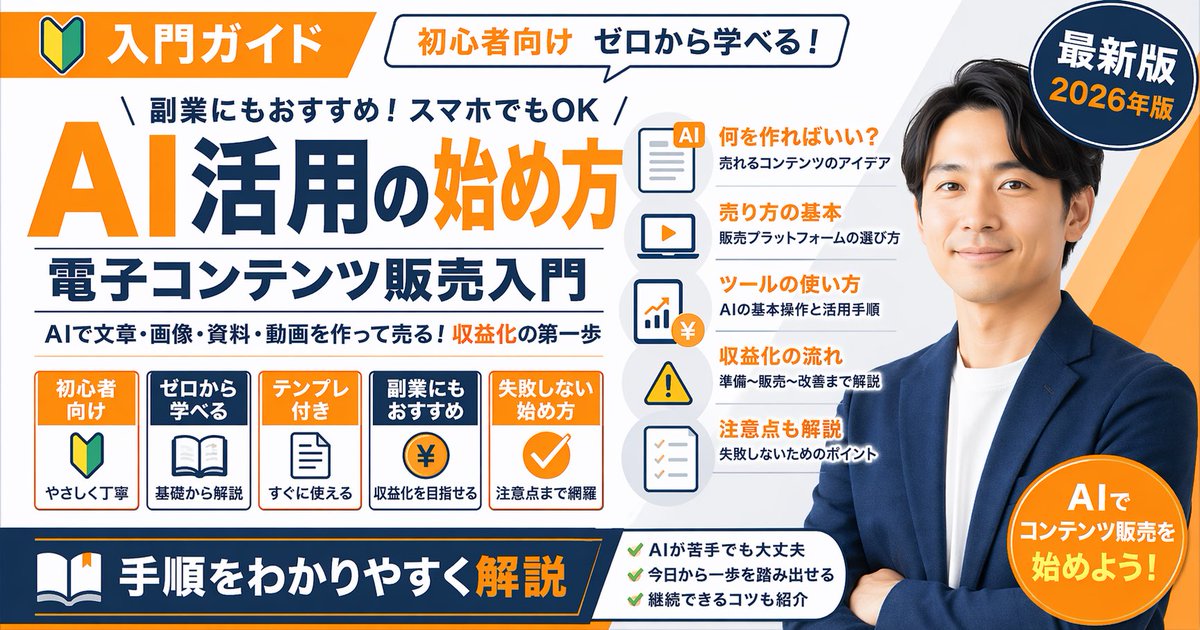
Creates a detailed, text-heavy corporate banner for a Japanese AI guide, featuring a spokesperson, multiple feature lists, and a clean, professional design.
提示词 · EN
type
promotional banner infographicstyle
clean, professional, flat design, corporate educational graphic, white background with orange and dark blue accentssubject
{argument name="spokesperson" default="smiling Asian man in a blue blazer and white t-shirt, arms crossed"}layout
top_section
left_badge
Orange banner with beginner mark icon and text '入門ガイド'speech_bubble
White bubble with text '初心者向け ゼロから学べる!'right_badge
Dark blue circle with text '最新版' and '{argument name="year edition" default="2026年版"}'main_title_section
top_small_text
\ 副業にもおすすめ!スマホでもOK /large_title
{argument name="main title" default="AI活用の始め方"}subtitle
{argument name="subtitle" default="電子コンテンツ販売入門"}bottom_small_text
AIで文章・画像・資料・動画を作って売る!収益化の第一歩middle_sections
item 1
position
middle-lefttype
feature boxescount
5items
item 1
Orange box: '初心者向け', beginner mark icon, 'やさしく丁寧'item 2
Blue box: 'ゼロから学べる', open book icon, '基礎から解説'item 3
Orange box: 'テンプレ付き', document icon, 'すぐに使える'item 4
Blue box: '副業にもおすすめ', coin with ¥ icon, '収益化を目指せる'item 5
Orange box: '失敗しない始め方', checkmark icon, '注意点まで網羅'item 2
position
middle-centertype
list items with iconscount
5items
item 1
Document icon: '何を作ればいい?' / '売れるコンテンツのアイデア'item 2
Laptop icon: '売り方の基本' / '販売プラットフォームの選び方'item 3
Chart icon: 'ツールの使い方' / 'AIの基本操作と活用手順'item 4
Warning icon: '収益化の流れ' / '準備〜販売〜改善まで解説'item 5
Checklist icon: '注意点も解説' / '失敗しないためのポイント'bottom_section
left_banner
Dark blue banner with book icon and text '{argument name="bottom banner text" default="手順をわかりやすく解説"}'center_checklist
count
3items
item 1
AIが苦手でも大丈夫item 2
今日から一歩を踏み出せるitem 3
継続できるコツも紹介right_badge
Orange circle with text 'AIでコンテンツ販売を始めよう!'关于这个提示词
Creates a detailed, text-heavy corporate banner for a Japanese AI guide, featuring a spokesperson, multiple feature lists, and a clean, professional design. 它更适合作为 GPT Image 2 的概念艺术起点:先保留画面结构、主体关系和风格约束,再替换成你的品牌、人物或场景。
这条提示词使用结构化 JSON 组织信息,包含 type、style、subject、layout 等字段。保留这种层级能让模型更清楚地区分画面主题、布局、界面元素和细节约束。
使用时建议先小幅修改主体、场景、镜头和色调,再生成多个版本对比构图与细节。这样页面内容对用户有实际帮助,也避免把模型名或标签机械堆在正文里。
如何使用这个提示词
- Copy the full prompt JSON and paste it into a compatible AI image generator like Sora 2.
- Use the variables (
spokesperson,year edition,main title,subtitle) to customize the subject and text. - Adjust the prompt's style or layout instructions if you need a different visual tone.
- Generate the image and review the output for accurate text rendering and design.
- Use the final banner for social media, courses, or YouTube thumbnails.


