
GPT Image 2AI 提示词
Japanese News Broadcast Scene — Sora 2 Prompt
Create a photorealistic TV news studio with customizable anchor, headlines, and ticker text for any media project.
提示词 · EN
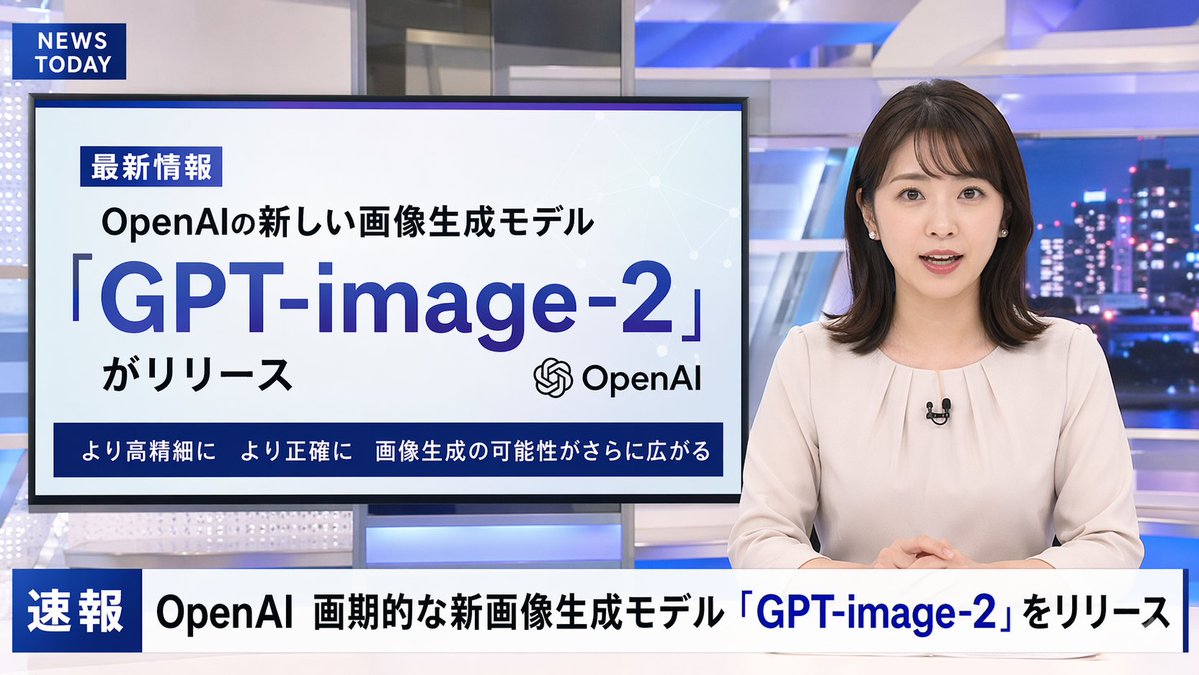
A photorealistic television news broadcast scene featuring a arganchor appearance: young Japanese female with shoulder-length dark hair wearing a light beige blouse and a small black lapel microphone, sitting at a news desk and speaking directly to the camera. The studio background is modern with blue and white lighting and a blurred nighttime city skyline on the right. In the top left corner, there is a dark blue graphic with the white text "argchannel logo text: NEWS TODAY". To the anchor's left is a large presentation monitor displaying a news graphic with a white background and light blue network nodes. The monitor features a dark blue "最新情報" tag, the text "argsubheadline: OpenAIの新しい画像生成モデル", a large prominent headline "argmain headline: 「GPT-image-2」", the text "がリリース", an OpenAI logo, and a dark blue bottom banner reading "より高精細に より正確に 画像生成の可能性がさらに広がる". Across the bottom of the entire screen is a news ticker lower third with a dark blue "速報" box and the scrolling text "argticker text: OpenAI 画期的な新画像生成モデル「GPT-image-2」をリリース".
关于这个提示词
Create a photorealistic TV news studio with customizable anchor, headlines, and ticker text for any media project. 它更适合作为 GPT Image 2 的概念艺术起点:先保留画面结构、主体关系和风格约束,再替换成你的品牌、人物或场景。
常见用途包括 gptimage2api prompts、gptimage2api、en。这些标签只作为创作方向参考,实际生成时仍应以提示词结构和预览图为准。
使用时优先替换 anchor appearance、channel logo text、subheadline、main headline 等占位符,并保持镜头、构图和材质描述的顺序不变。这样更容易获得稳定的画面结果,也方便继续做多版本对比。
如何使用这个提示词
- Copy the full prompt text.
- Select Sora 2 as your AI model.
- Customize the bracketed variables like anchor appearance, headline, and ticker text.
- Generate the video to see your unique broadcast scene.


