
GPT Image 2AI 提示词
Heart Attack Causal Chain — 3D Medical Infographic Prompt
Generate a detailed 3D medical infographic illustrating the step-by-step pathophysiology of a heart attack, from risk factors to cellular damage.
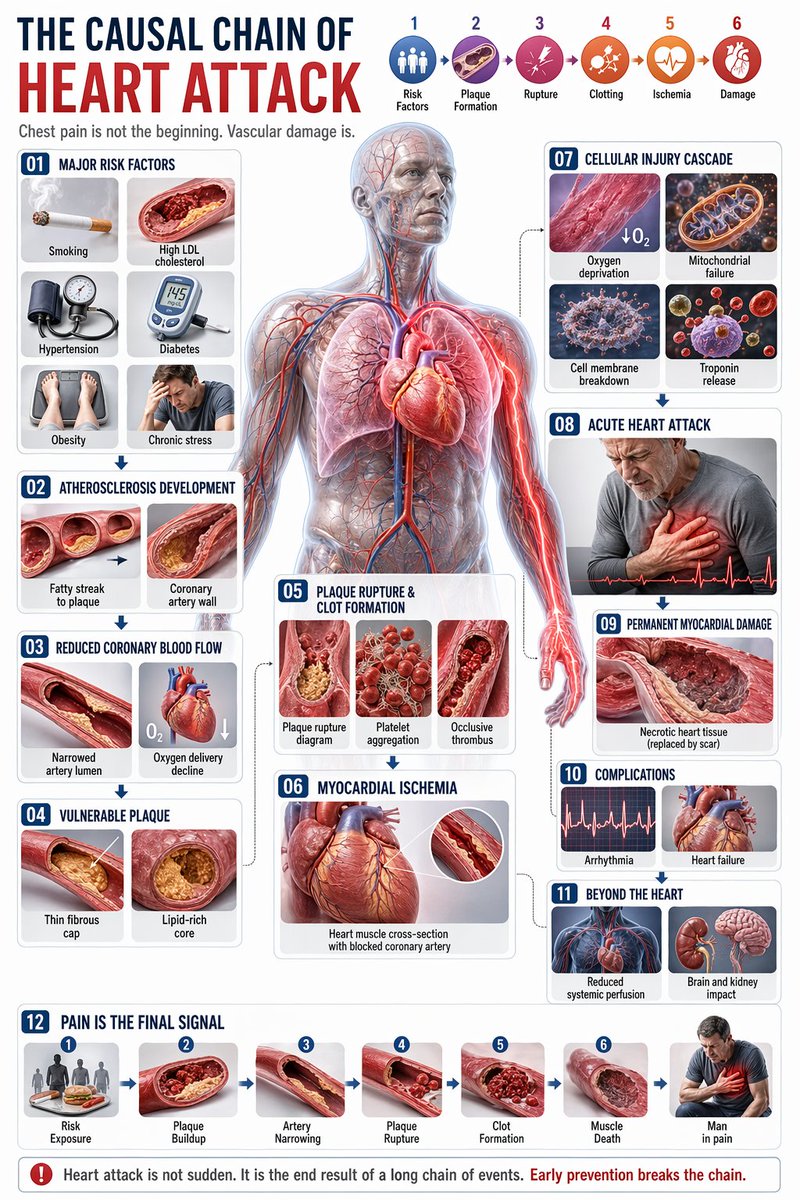
提示词 · EN
type
综合医疗信息图style
高度精细的 3D 医学插图,临床白色背景,简洁的排版header
title_cn
心脏病发作的因果链title_en
{argument name="english title" default="THE CAUSAL CHAIN OF HEART ATTACK"}subtitle
胸痛并非起点,血管损伤才是。top_right_sequence
count
6labels
item 1
风险因素item 2
斑块形成item 3
斑块破裂item 4
血栓形成item 5
缺血item 6
损伤centerpiece
description
{argument name="central figure" default="透明人体解剖模型,展示心脏、冠状动脉、肺部和血管系统"}details
以 {argument name="highlight color" default="发光红色"} 高亮显示的路径,重点展示冠状动脉以及放射至胸部和左臂的疼痛layout
left_column
item 1
id
01title
主要风险因素elements
6labels
item 1
吸烟item 2
高 LDL 胆固醇item 3
高血压item 4
糖尿病item 5
肥胖item 6
慢性压力item 2
id
02title
动脉粥样硬化发展elements
2labels
item 1
从脂肪条纹到斑块item 2
冠状动脉壁item 3
id
03title
冠状动脉血流减少elements
2labels
item 1
动脉管腔狭窄item 2
氧气输送下降item 4
id
04title
易损斑块elements
2labels
item 1
薄纤维帽item 2
富含脂质的核心center_overlay
item 1
id
05title
斑块破裂与血栓形成elements
3labels
item 1
斑块破裂示意图item 2
血小板聚集item 3
闭塞性血栓item 2
id
06title
心肌缺血elements
1labels
item 1
冠状动脉阻塞的心肌横截面right_column
item 1
id
07title
细胞损伤级联反应elements
4labels
item 1
缺氧item 2
线粒体功能衰竭item 3
细胞膜破裂item 4
肌钙蛋白释放item 2
id
08title
急性心脏病发作elements
1labels
item 1
捂住胸口的患者item 3
id
09title
永久性心肌损伤elements
1labels
item 1
坏死的心肌组织item 4
id
10title
并发症elements
2labels
item 1
心律失常item 2
心力衰竭item 5
id
11title
心脏之外的影响elements
2labels
item 1
全身灌注减少item 2
对大脑和肾脏的影响bottom_row
item 1
id
12title
疼痛是最终信号elements
7labels
item 1
风险暴露item 2
斑块积聚item 3
动脉狭窄item 4
斑块破裂item 5
血栓形成item 6
心肌坏死item 7
处于疼痛中的人theme
{argument name="disease focus" default="心脏病发作与冠状动脉阻塞"}关于这个提示词
Generate a detailed 3D medical infographic illustrating the step-by-step pathophysiology of a heart attack, from risk factors to cellular damage. 它更适合作为 GPT Image 2 的概念艺术起点:先保留画面结构、主体关系和风格约束,再替换成你的品牌、人物或场景。
这条提示词使用结构化 JSON 组织信息,包含 type、style、header、centerpiece、layout、theme 等字段。保留这种层级能让模型更清楚地区分画面主题、布局、界面元素和细节约束。
使用时建议先小幅修改主体、场景、镜头和色调,再生成多个版本对比构图与细节。这样页面内容对用户有实际帮助,也避免把模型名或标签机械堆在正文里。
如何使用这个提示词
- Copy the entire JSON prompt from this page.
- Paste it into your preferred AI image generator (like Sora 2).
- Customize the variables in curly braces {} (e.g.,
english title,highlight color) to match your specific needs. - Submit the prompt and generate the image.
- Review the output and adjust variables as needed for the best result.


