
GPT Image 2AI 提示词
AI Benchmark Report Photo — Sora 2 Prompt
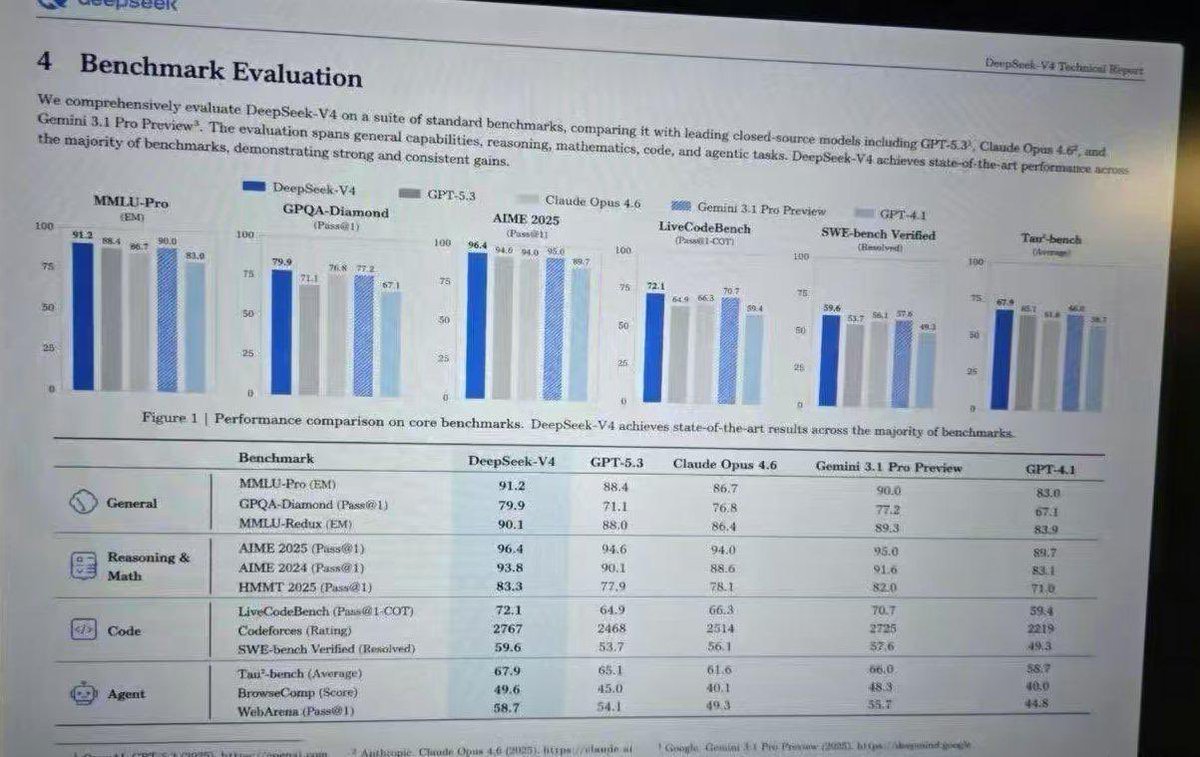
Generate a realistic screenshot of an academic AI benchmark report with bar charts and detailed performance tables.
提示词 · EN
type
photograph of a computer monitor displaying an academic technical reportstyle
slightly angled screen photo, visible moire pattern, LCD pixel grid, slight glare, LaTeX document formatting, serif fontsdocument_header
left
4 Benchmark Evaluationright
{argument name="report title" default="DeepSeek-V4 Technical Report"}introductory_text
Paragraph summarizing comprehensive evaluation of {argument name="main model name" default="DeepSeek-V4"} against {argument name="competitor model 1" default="GPT-5.3"}, {argument name="competitor model 2" default="Claude Opus 4.6"}, and {argument name="competitor model 3" default="Gemini 3.1 Pro Preview"}.visualizations
legend
5 items with color codes: dark blue, grey, light grey, blue striped, light bluebar_charts
count
6labels
item 1
MMLU-Pro (EM)item 2
GPQA-Diamond (Pass@1)item 3
AIME 2025 (Pass@1)item 4
LiveCodeBench (Pass@1-COT)item 5
SWE-bench Verified (Resolved)item 6
Tau-bench (Average)caption
Figure 1 | Performance comparison on core benchmarks. DeepSeek-V4 achieves state-of-the-art results across the majority of benchmarks.data_table
columns
item 1
Benchmarkitem 2
{argument name="main model name" default="DeepSeek-V4"}item 3
{argument name="competitor model 1" default="GPT-5.3"}item 4
{argument name="competitor model 2" default="Claude Opus 4.6"}item 5
{argument name="competitor model 3" default="Gemini 3.1 Pro Preview"}item 6
GPT-4.1categories
count
4rows
item 1
label
Generalicon
globe/networksub_items
3item 2
label
Reasoning & Mathicon
calculator/clipboardsub_items
3item 3
label
Codeicon
code bracketssub_items
3item 4
label
Agenticon
robot facesub_items
3关于这个提示词
Generate a realistic screenshot of an academic AI benchmark report with bar charts and detailed performance tables. 它更适合作为 GPT Image 2 的概念艺术起点:先保留画面结构、主体关系和风格约束,再替换成你的品牌、人物或场景。
这条提示词使用结构化 JSON 组织信息,包含 type、style、document header、introductory text、visualizations、data table 等字段。保留这种层级能让模型更清楚地区分画面主题、布局、界面元素和细节约束。
使用时建议先小幅修改主体、场景、镜头和色调,再生成多个版本对比构图与细节。这样页面内容对用户有实际帮助,也避免把模型名或标签机械堆在正文里。
如何使用这个提示词
- Copy the full prompt JSON from the page. 2. Select your preferred AI image model (e.g., Sora 2). 3. Edit the 'argument' fields like model names or report title to customize the report. 4. Generate and refine until the screen photo has the desired moiré pattern and LaTeX formatting.


