
GPT Image 2AI 提示词
LEGO Video Game Screenshot Generator — Sora 2 Prompt
Generate a classic LEGO video game fake screenshot with customizable characters, a detailed street scene, and a complete in-game HUD.
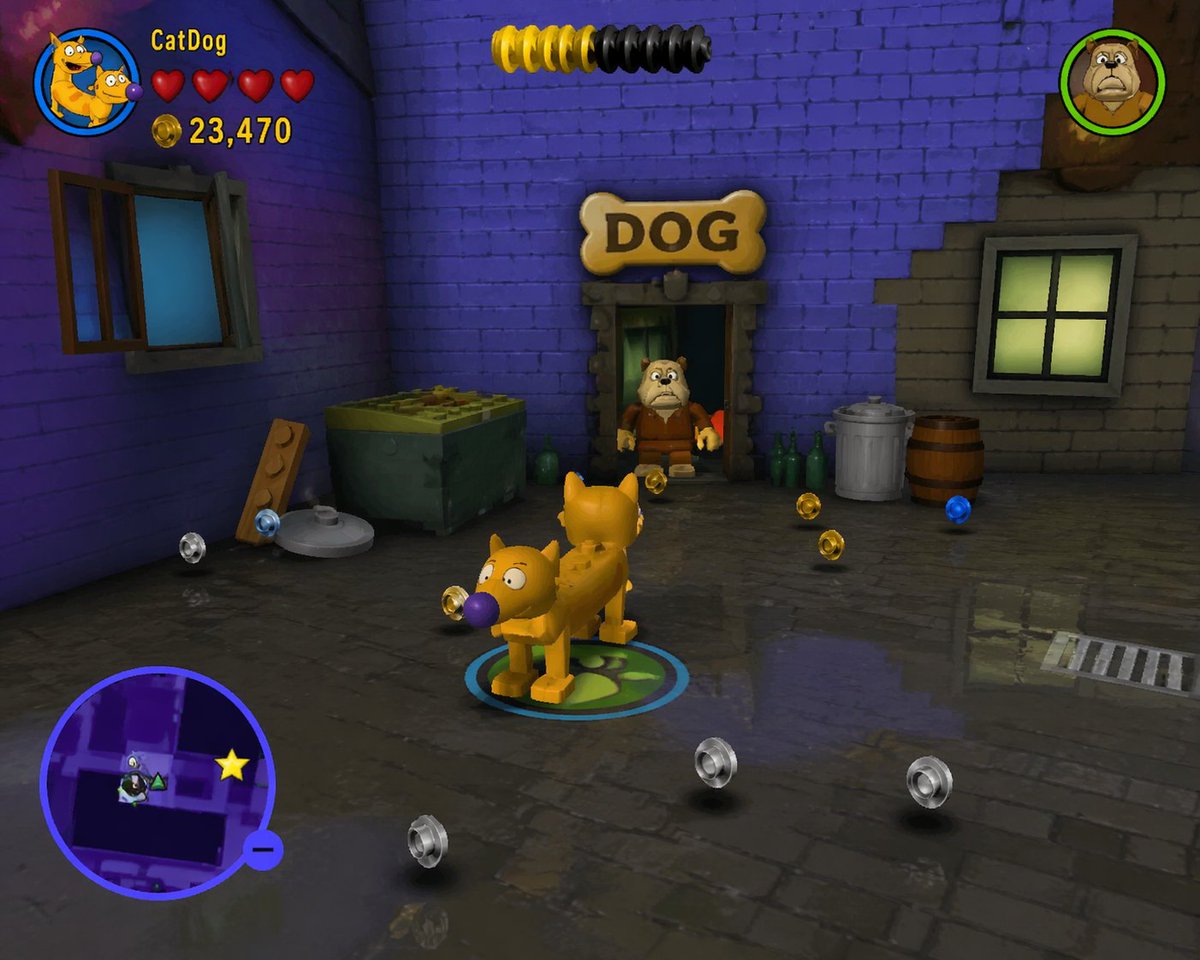
提示词 · EN
type
电子游戏截图style
{argument name="game style" default="经典 LEGO 电子游戏"}scene
environment
阴暗的小巷,左侧为紫色砖墙,右侧为灰色砖墙,潮湿的鹅卵石地面带有倒影props
item 1
1 个绿色垃圾箱item 2
1 块带有颗粒的木板item 3
1 个金属垃圾桶item 4
1 个木桶item 5
3 个绿色玻璃瓶item 6
1 个写着 'DOG' 的骨头形状标志collectibles
10 个漂浮的颗粒(4 个银色,4 个金色,2 个蓝色)characters
item 1
description
{argument name="player character" default="CatDog"} 渲染为积木塑料人偶action
站在中心,脚下是一个发光的蓝绿色圆形玩家标记item 2
description
渲染为塑料小人偶的斗牛犬action
站在门口layout
ui_elements
item 1
position
左上角description
玩家 HUDcomponents
item 1
圆形角色头像item 2
文本 '{argument name="player name" default="CatDog"}'item 3
4 颗红心item 4
带有文本 '{argument name="score" default="23,470"}' 的金币图标item 2
position
顶部中心description
黄黑相间的圆柱形进度条item 3
position
右上角description
斗牛犬的圆形角色头像item 4
position
左下角description
带有紫色边框、地图布局和黄色星形图标的圆形小地图关于这个提示词
Generate a classic LEGO video game fake screenshot with customizable characters, a detailed street scene, and a complete in-game HUD. 它更适合作为 GPT Image 2 的概念艺术起点:先保留画面结构、主体关系和风格约束,再替换成你的品牌、人物或场景。
这条提示词使用结构化 JSON 组织信息,包含 type、style、scene、characters、layout 等字段。保留这种层级能让模型更清楚地区分画面主题、布局、界面元素和细节约束。
使用时建议先小幅修改主体、场景、镜头和色调,再生成多个版本对比构图与细节。这样页面内容对用户有实际帮助,也避免把模型名或标签机械堆在正文里。
如何使用这个提示词
- Copy the entire JSON prompt structure below.
- Open your preferred AI image generator (e.g., Sora 2, Midjourney).
- Paste the prompt. Edit the
{argument}variables likeplayer characterorscoreto personalize your scene. - Generate the image. The model will render a LEGO-style video game screenshot based on your specifications.


