
GPT Image 2AI 提示词
Japanese Coworking LINE Registration Poster — Sora 2 Prompt
Generates a clean, professional Japanese-style poster for a coworking space, visually explaining how to register, book, and check in using LINE.
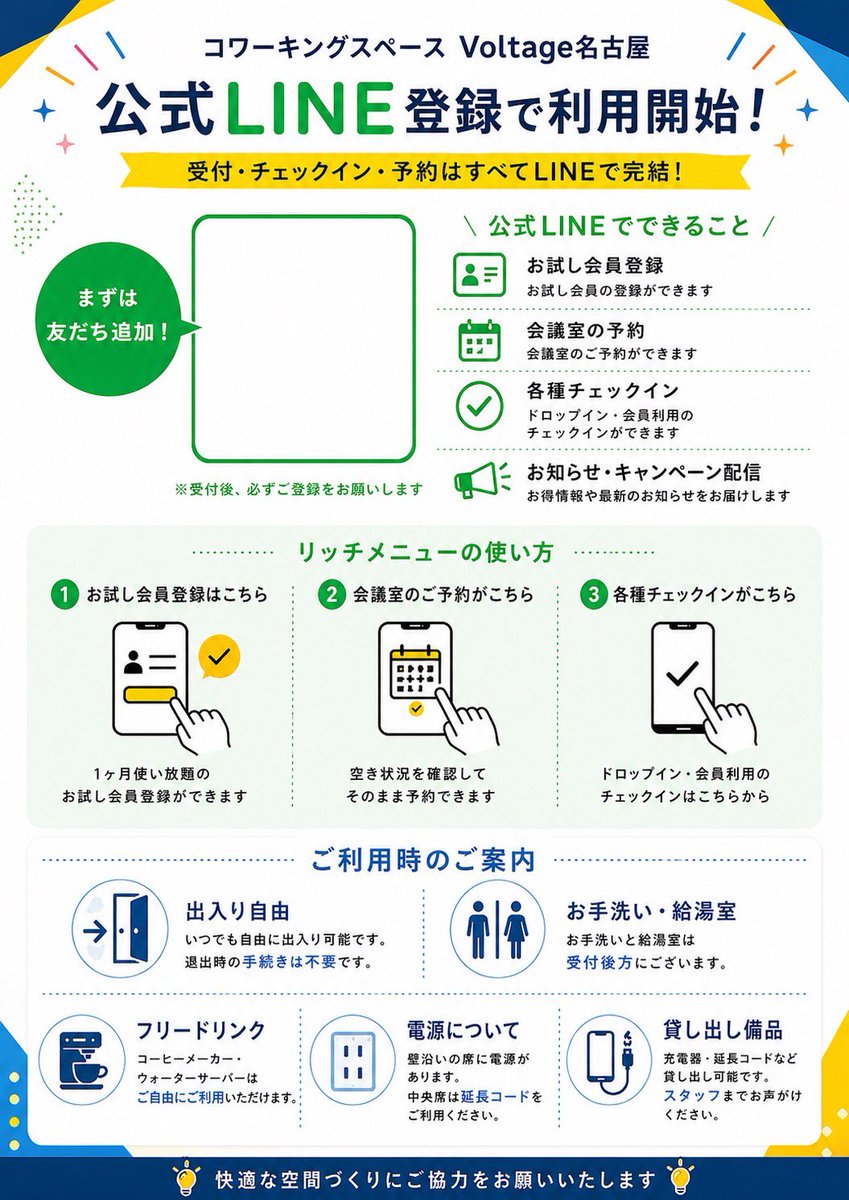
提示词 · EN
type
日本宣传海报传单purpose
共享办公空间的 LINE 注册指南style
简洁的企业扁平化设计,现代日本广告排版,矢量图标,白色背景配以醒目的蓝色和绿色点缀,高可读性,适合印刷的海报构图brand
name
Voltage名古屋category
共享办公空间header
共享办公空间 {argument name="venue name" default="Voltage名古屋"}layout
orientation
纵向sections
item 1
title
注册官方 LINE 即可开始使用!position
顶部标题count
2labels
item 1
注册官方 LINE 即可开始使用!item 2
接待、签到、预约全部通过 LINE 完成!item 2
title
主要注册区position
中上部count
3labels
item 1
首先添加好友!item 2
二维码占位符item 3
※接待后,请务必完成注册item 3
title
官方 LINE 功能position
右上部count
4labels
item 1
试用会员注册item 2
会议室预约item 3
各类签到item 4
通知与活动推送item 4
title
富媒体菜单使用方法position
中部count
3labels
item 1
1 点击此处进行试用会员注册item 2
2 点击此处进行会议室预约item 3
3 点击此处进行各类签到item 5
title
使用指南position
中下部count
5labels
item 1
自由出入item 2
洗手间与茶水间item 3
免费饮品item 4
电源说明item 5
借用设备item 6
title
页脚信息position
底部count
1labels
item 1
请协助我们共同营造舒适的空间content_blocks
line_features
item 1
icon
绿色轮廓的 ID 卡个人资料图标heading
试用会员注册text
可进行试用会员注册item 2
icon
绿色轮廓的日历图标heading
会议室预约text
可进行会议室预约item 3
icon
绿色轮廓的勾选图标heading
各类签到text
可进行临时使用或会员使用的签到item 4
icon
绿色轮廓的扩音器图标heading
通知与活动推送text
为您发送优惠信息及最新通知rich_menu_steps
item 1
step
1heading
点击此处进行试用会员注册visual
显示个人资料表单的智能手机屏幕,黄色按钮,手指点击,黄色 LINE 风格勾选气泡text
可注册 1 个月无限次使用的试用会员item 2
step
2heading
点击此处进行会议室预约visual
带有日历的智能手机屏幕,手指点击日期text
确认空闲状态后即可直接预约item 3
step
3heading
点击此处进行各类签到visual
带有大勾选标记的智能手机屏幕,手指点击text
在此进行临时使用或会员使用的签到facility_info
item 1
heading
自由出入icon
带箭头的开门图标text
可随时自由出入。离开时无需办理手续。item 2
heading
洗手间与茶水间icon
男女洗手间符号text
洗手间和茶水间位于接待处后方。item 3
heading
免费饮品icon
咖啡机杯子text
咖啡机和饮水机可供自由使用。item 4
heading
电源说明icon
电源插座text
靠墙座位配有电源。中间座位请使用延长线。item 5
heading
借用设备icon
充电线或充电宝设备text
可借用充电器、延长线等。请咨询工作人员。visual_details
top_decorations
顶部角落有少量彩色纸屑和闪光装饰frame
海报边缘有微妙的几何蓝色和黄色边角形状main_colors
item 1
深蓝色item 2
明亮的 LINE 绿色item 3
黄色item 4
白色item 5
浅灰色typography
加粗的日文无衬线标题,LINE 处有醒目的绿色强调,较小的黑色说明文字,绿色和蓝色的章节标题icons
具有一致线条粗细的简单轮廓矢量图标qr_area
大的空白圆角矩形占位符,绿色边框,用于 {argument name="QR code area" default="官方 LINE 二维码"}speech_circle
左侧的实心绿色圆形标注,内有白色文字“首先添加好友!”customizable_fields
headline
{argument name="main headline" default="注册官方 LINE 即可开始使用!"}subheadline
{argument name="subheadline text" default="接待、签到、预约全部通过 LINE 完成!"}brand_green
{argument name="accent green" default="LINE 绿色"}footer_note
{argument name="footer message" default="请协助我们共同营造舒适的空间"}关于这个提示词
Generates a clean, professional Japanese-style poster for a coworking space, visually explaining how to register, book, and check in using LINE. 它更适合作为 GPT Image 2 的概念艺术起点:先保留画面结构、主体关系和风格约束,再替换成你的品牌、人物或场景。
这条提示词使用结构化 JSON 组织信息,包含 type、purpose、style、brand、layout、content blocks、visual details 等字段。保留这种层级能让模型更清楚地区分画面主题、布局、界面元素和细节约束。
使用时建议先小幅修改主体、场景、镜头和色调,再生成多个版本对比构图与细节。这样页面内容对用户有实际帮助,也避免把模型名或标签机械堆在正文里。
如何使用这个提示词
- Copy the entire prompt body (the JSON object starting with
type). - Paste it into your preferred AI image generator (like Sora 2 or a compatible text-to-image model).
- Optionally tweak the
venue nameargument in the header section to your own space name. - Adjust style keywords (e.g., color accents) in the style field if desired.
- Generate the image. The output will be a vertical, print-ready poster layout.


