GPT Image 2AI 提示词
Mobile Live-Streaming E-commerce UI Mockup — Sora 2 Prompt
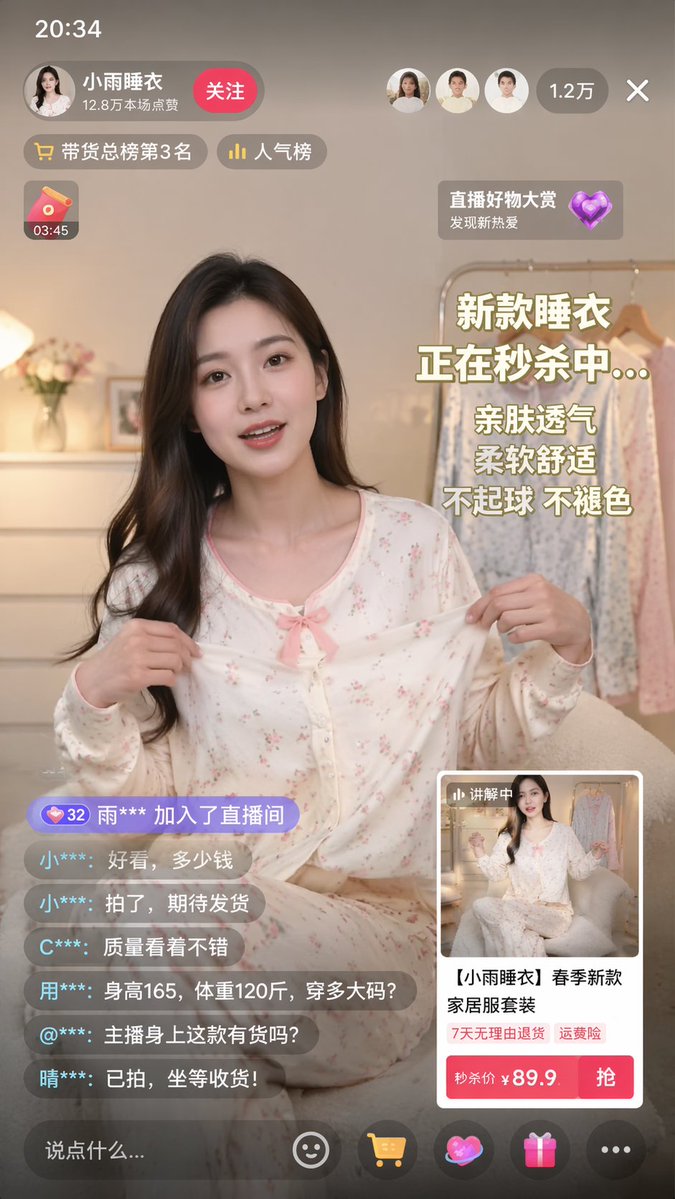
Create a realistic mobile e-commerce livestream interface mockup with a host, chat log, product card, and promotional overlays for social commerce content.
提示词 · EN
type
mobile live-streaming e-commerce interface mockupsubject
description
young Asian woman, long dark hair, wearing light-colored floral pajama set with a pink bow, holding the pajama top outward to show the fabricbackground
cozy room, clothing rack with pajamas, flowers, warm lightingui_layout
top_bar
time
20:34host_info
name
{argument name="host name" default="小雨睡衣"}stats
12.8万本场点赞button
关注viewer_info
avatars_count
3total_viewers
1.2万floating_tags
count
2labels
item 1
带货总榜第3名item 2
人气榜widgets
top_left
red envelope icon with timer 03:45top_right
floating heart icon with text 直播好物大赏 发现新热爱marketing_text_overlay
position
mid-rightlines_count
5lines
item 1
{argument name="main headline" default="新款睡衣"}item 2
{argument name="sub headline" default="正在秒杀中..."}item 3
亲肤透气item 4
柔软舒适item 5
不起球 不褪色chat_log
position
bottom-leftmessage_count
7messages
item 1
32 雨*** 加入了直播间item 2
小***: 好看,多少钱item 3
小***: 拍了,期待发货item 4
C***: 质量看着不错item 5
用***: 身高165,体重120斤,穿多大码?item 6
@***: 主播身上这款有货吗?item 7
晴***: 已拍,坐等收货!product_card
position
bottom-rightthumbnail
miniature of the hosttitle
{argument name="product title" default="【小雨睡衣】春季新款家居服套装"}tags_count
2tags
item 1
7天无理由退货item 2
运费险price_section
秒杀价 ¥ {argument name="product price" default="89.9"}action_button
抢bottom_bar
input_placeholder
说点什么...icon_count
5icons
item 1
smiley faceitem 2
shopping cartitem 3
heart/giftitem 4
gift boxitem 5
three dots关于这个提示词
Create a realistic mobile e-commerce livestream interface mockup with a host, chat log, product card, and promotional overlays for social commerce content. 它更适合作为 GPT Image 2 的概念艺术起点:先保留画面结构、主体关系和风格约束,再替换成你的品牌、人物或场景。
这条提示词使用结构化 JSON 组织信息,包含 type、subject、ui layout 等字段。保留这种层级能让模型更清楚地区分画面主题、布局、界面元素和细节约束。
使用时建议先小幅修改主体、场景、镜头和色调,再生成多个版本对比构图与细节。这样页面内容对用户有实际帮助,也避免把模型名或标签机械堆在正文里。
如何使用这个提示词
- Copy this prompt into a compatible AI model like Sora 2 or another text-to-image generator.
- Review the default variables (e.g., host name, price, product title) and replace them with your own details if desired.
- Choose a model or setting that supports detailed UI rendering and complex scene composition.
- Generate the image and review the output for layout accuracy and visual appeal.
- Iterate by adjusting variables, refining the background description, or adding specific UI elements to match your brand.