
GPT Image 2AI 提示词
Luxury Aesthetics Clinic Landing Page Mockup — Sora 2 Prompt
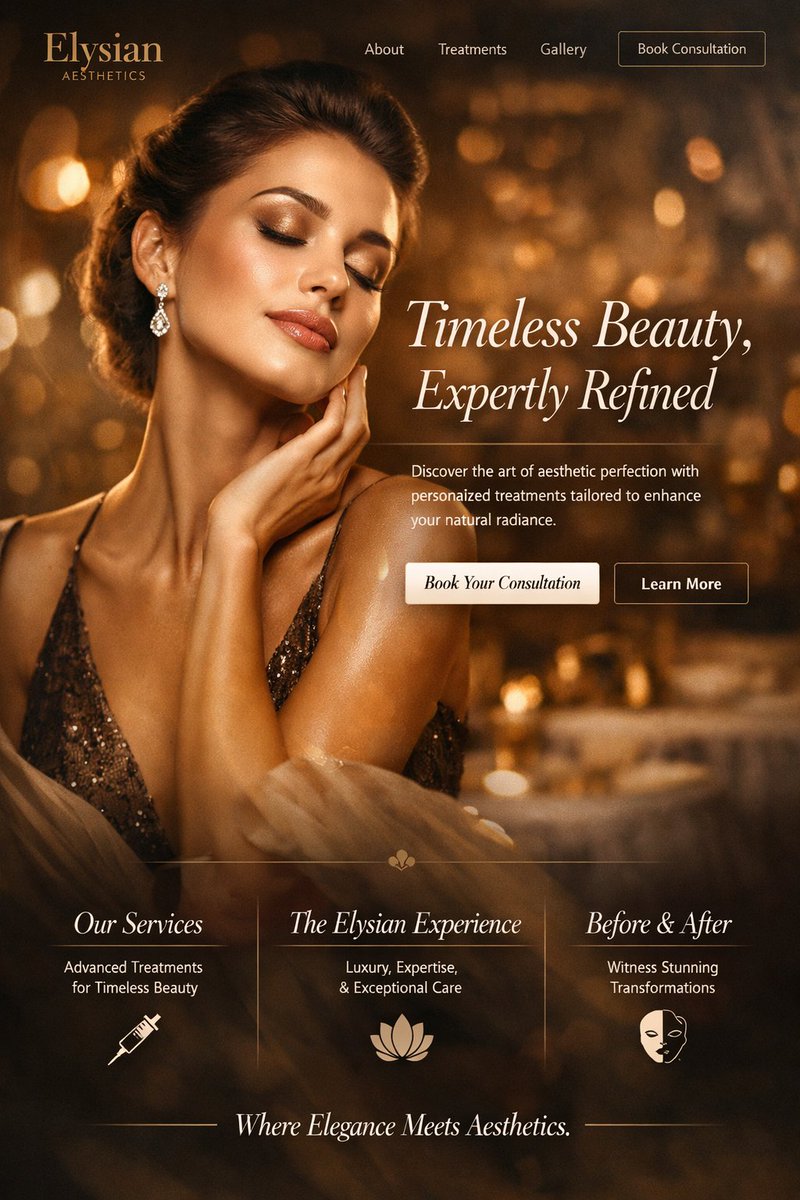
Generate a stunning, high-end website mockup for a beauty clinic with a customizable hero portrait, elegant typography, and a 3-column feature section.
提示词 · EN
type
website landing page mockupindustry
{argument name="industry" default="luxury aesthetics clinic"}style
color_palette
{argument name="color theme" default="warm golden and bronze"}typography
elegant serif fontsatmosphere
high-end, luxurious, glowing bokeh backgroundlayout
header
logo
{argument name="brand name" default="Elysian"} AESTHETICSnavigation_links
item 1
Aboutitem 2
Treatmentsitem 3
Gallerycta_button
Book Consultationhero_section
imagery
portrait of an {argument name="hero subject" default="elegant woman with glowing skin and closed eyes touching her neck"}, wearing a sparkly bronze dress and diamond drop earringstypography
headline
{argument name="headline text" default="Timeless Beauty, Expertly Refined"}subheadline
Discover the art of aesthetic perfection with personalized treatments tailored to enhance your natural radiance.buttons
item 1
text
Book Your Consultationstyle
solid light creamitem 2
text
Learn Morestyle
outlinefeatures_section
count
3columns
item 1
title
Our Servicessubtitle
Advanced Treatments for Timeless Beautyicon
syringeitem 2
title
The Elysian Experiencesubtitle
Luxury, Expertise, & Exceptional Careicon
lotus floweritem 3
title
Before & Aftersubtitle
Witness Stunning Transformationsicon
half-face maskdivider
thin vertical lines between columnsfooter
tagline
Where Elegance Meets Aesthetics.styling
flanked by horizontal lines关于这个提示词
Generate a stunning, high-end website mockup for a beauty clinic with a customizable hero portrait, elegant typography, and a 3-column feature section. 它更适合作为 GPT Image 2 的概念艺术起点:先保留画面结构、主体关系和风格约束,再替换成你的品牌、人物或场景。
这条提示词使用结构化 JSON 组织信息,包含 type、industry、style、layout 等字段。保留这种层级能让模型更清楚地区分画面主题、布局、界面元素和细节约束。
使用时建议先小幅修改主体、场景、镜头和色调,再生成多个版本对比构图与细节。这样页面内容对用户有实际帮助,也避免把模型名或标签机械堆在正文里。
如何使用这个提示词
- Copy the JSON prompt code block from the page.
- Paste it into your preferred AI model's interface (e.g., Sora 2).
- Customize the variables like
industry,color theme, orbrand nameby editing the default values in the JSON. - Generate the image to receive a professional website mockup based on your inputs.


