
GPT Image 2AI 提示词
Luxury Fitness Editorial — Sora 2 Prompt
Generate a premium cinematic fitness campaign with clean studio lighting, athletic posing, and minimalist branded typography.
提示词 · EN
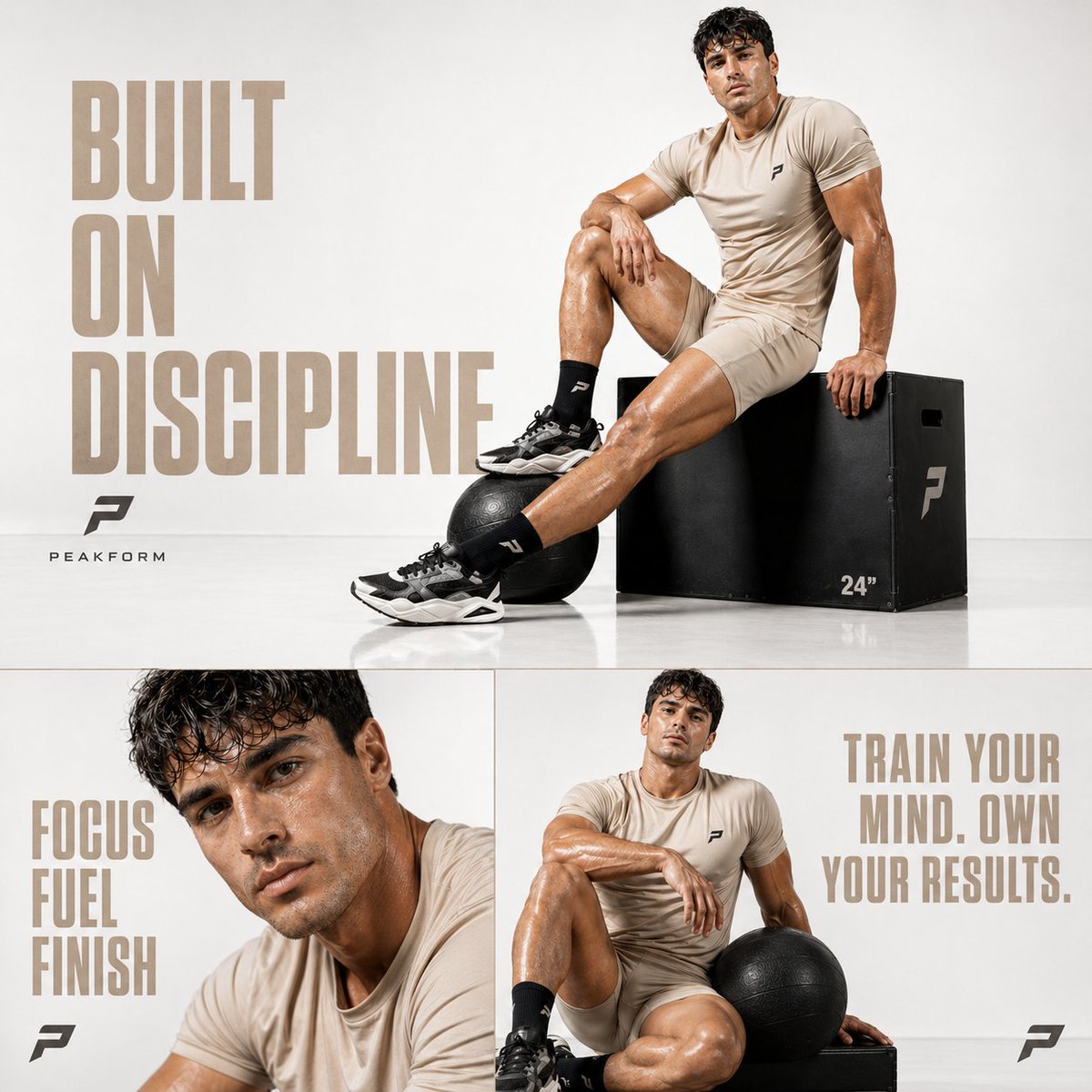
Cinematic luxury fitness editorial, ultra-clean white studio background with soft gradient falloff, minimal texture, high-key lighting with soft directional shadows, premium commercial photoshoot style
male athlete with a toned, aesthetic physique sitting confidently on a matte black plyometric box, one leg extended and one bent, relaxed yet powerful posture
wearing a minimal argoutfit color: beige sports set (fitted athletic t-shirt + tailored shorts), black crew socks and chunky modern trainers
argprop: black medicine ball placed beside his foot, subtle reflections on a glossy white floor surface
skin has glossy highlights (sweat sheen), sharp facial features, confident and focused expression, editorial fashion fitness vibe
composition: balanced negative space on left side for typography, subject placed slightly right
typography (left side):
“argtext: BUILT ON DISCIPLINE” — large bold modern sans-serif, muted beige color, high spacing, clean alignment
minimal logo below (simple geometric fitness brand mark)
bottom split layout:
– left panel: close-up portrait, dewy skin, intense gaze, text “FOCUS FUEL FINISH”
– right panel: seated relaxed pose holding medicine ball, text “TRAIN YOUR MIND. OWN YOUR RESULTS.”
ultra-clean composition, high contrast but bright tone, sharp details, premium sports campaign aesthetic, luxury brand advertising feel
style references: Nike / Gymshark / Alo Yoga campaign style
aspect ratio: 1:1
quality: 8K, ultra-detailed, sharp focus
关于这个提示词
Generate a premium cinematic fitness campaign with clean studio lighting, athletic posing, and minimalist branded typography. 它更适合作为 GPT Image 2 的概念艺术起点:先保留画面结构、主体关系和风格约束,再替换成你的品牌、人物或场景。
常见用途包括 gptimage2api prompts、gptimage2api、ja。这些标签只作为创作方向参考,实际生成时仍应以提示词结构和预览图为准。
使用时优先替换 outfit color、prop、text 等占位符,并保持镜头、构图和材质描述的顺序不变。这样更容易获得稳定的画面结果,也方便继续做多版本对比。
如何使用这个提示词
- Copy the entire prompt text above.
- Open your preferred AI video or image generator (e.g., Sora 2, Runway, Pika).
- Paste the prompt and customize the variables like outfit color, prop, and main text.
- Adjust aspect ratio or duration settings if available for your chosen platform.
- Generate and review the output, refining variables for your desired aesthetic.


