
GPT Image 2AI 提示词
Realistic MacBook Video Call Screenshot — Sora 2 Prompt
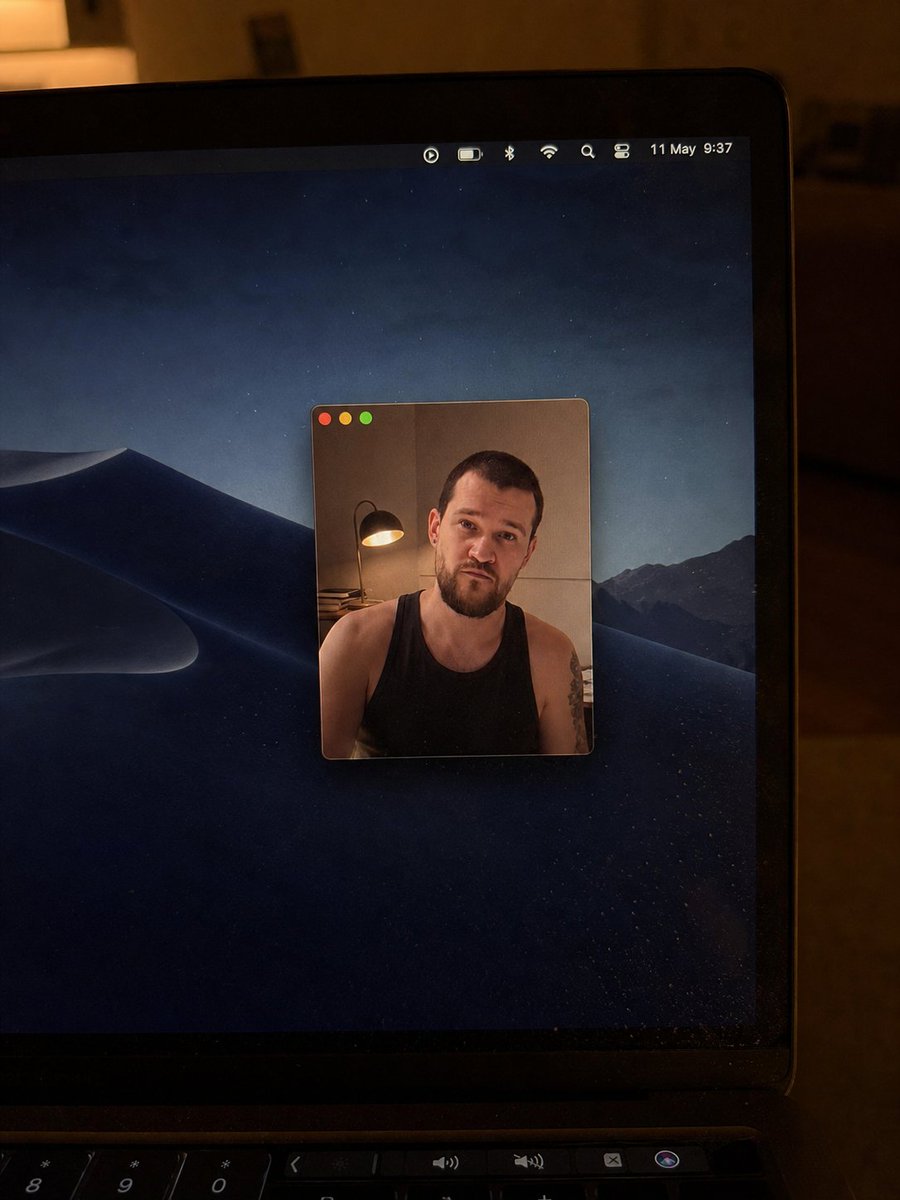
Generate a hyper-realistic, low-light photo of a MacBook showing a video call with a censored face, perfect for tech mockups or social media posts.
提示词 · EN
创建一张逼真的手持智能手机拍摄照片,画面中是一台在昏暗、温暖的室内夜晚打开的 argdevice: MacBook 笔记本电脑。镜头从右上方近距离拍摄,露出黑色边框、屏幕右侧边缘以及部分键盘/触控栏。屏幕显示深色的 macOS 沙丘夜景壁纸,背景为山脉和星光熠熠的蓝黑色天空。屏幕中央有一个小型悬浮视频通话/照片窗口,带有圆角和细边框;窗口左上角有三个 macOS 标志性的红、黄、绿交通灯按钮。窗口内坐着一名成年男子,身穿 argshirt color: 黑色 背心,露出肩膀和手臂上的纹身;他身后左侧有一盏温暖的台灯,背景为米色墙壁;他的脸部被一个 argcensor color: 中等棕色肤色 的方形像素马赛克遮挡。在笔记本电脑屏幕右上角的菜单栏中,包含七个小型状态图标:一个圆形播放图标、电池图标、蓝牙图标、Wi-Fi 图标、放大镜搜索图标、控制中心风格的切换图标,以及日期/时间文本 argdate and time text: 5 月 11 日 9:37。照片应呈现出不完美且真实的质感,带有轻微的屏幕反光、灰尘颗粒、低光噪点、边框上的暖色环境反射、浅景深,避免过于精致的摄影棚效果。
关于这个提示词
Generate a hyper-realistic, low-light photo of a MacBook showing a video call with a censored face, perfect for tech mockups or social media posts. 它更适合作为 GPT Image 2 的概念艺术起点:先保留画面结构、主体关系和风格约束,再替换成你的品牌、人物或场景。
使用时优先替换 device、shirt color、censor color、date and time text 等占位符,并保持镜头、构图和材质描述的顺序不变。这样更容易获得稳定的画面结果,也方便继续做多版本对比。
如何使用这个提示词
- Copy the full prompt text from this page.
- Select a compatible AI image generator like Sora 2.
- Edit the bracketed variables (device, shirt color, censor color, date/time) to match your desired scene.
- Paste the customized prompt into the model's input field.
- Generate the image and review the output for realism.


