
GPT Image 2AI 提示词
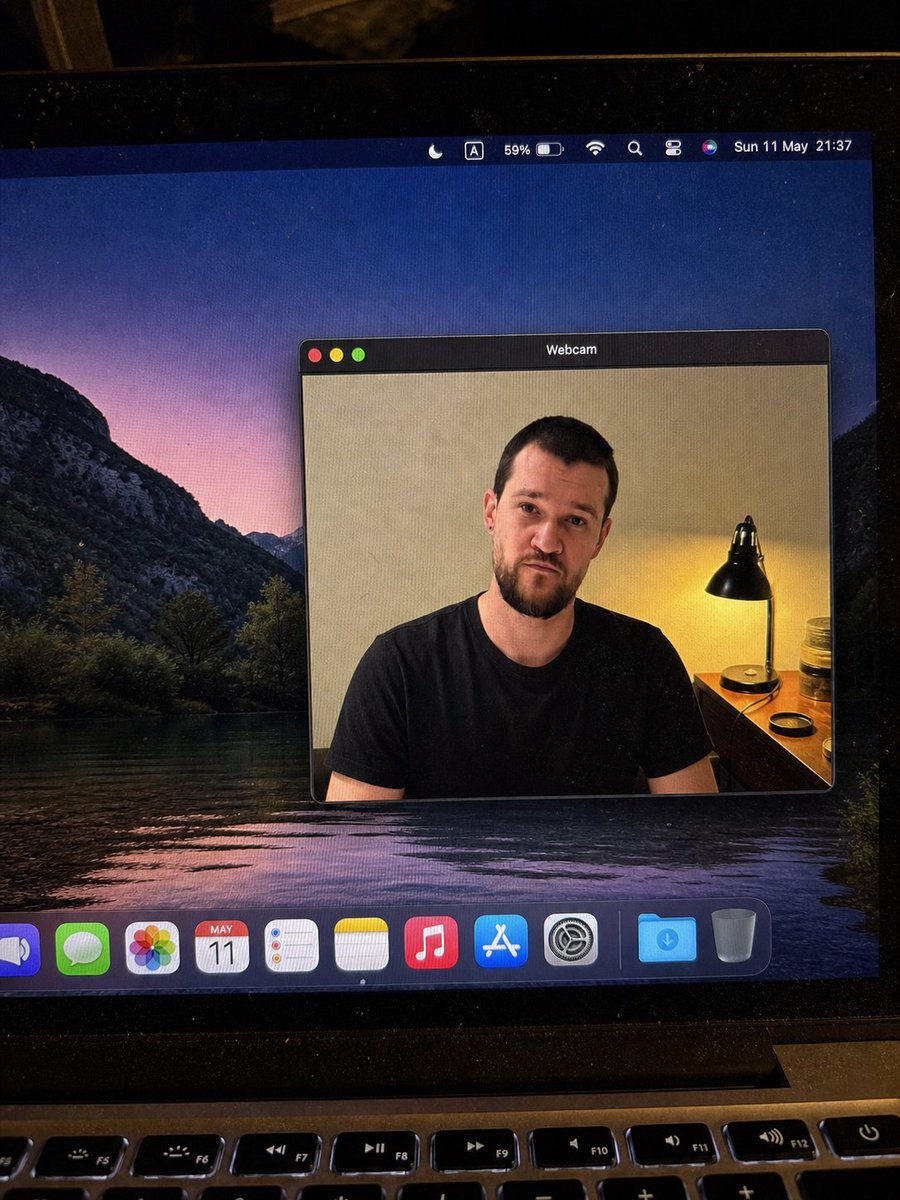
MacBook Webcam Photo with Blurred Face — Realistic AI Prompt
Generate a hyper-realistic smartphone photo of a MacBook screen featuring a macOS webcam window with an anonymous, blurred figure, perfect for UI mockups or social media posts.
提示词 · EN
type
逼真的手持智能手机拍摄的笔记本电脑屏幕照片scene
一张在昏暗房间内略微倾斜的 MacBook 显示屏特写照片,可见屏幕像素、灰尘颗粒、眩光、黑色边框以及底部的物理键盘顶排按键。桌面壁纸显示的是黄昏时分的深色山湖景观,紫粉色的天空倒映在水中。main_subject
description
一个 macOS 风格的浮动窗口,标题为 {argument name="window title" default="Webcam"},位于桌面中央,显示 {argument name="person description" default="一名身穿纯黑色 T 恤的成年男性"} 的摄像头画面。人物面部被一个平滑的矩形模糊/马赛克块有意遮盖,色调与肤色相近,隐藏了所有面部细节,但保留了头发、耳朵、脖子、肩膀和衬衫的可见度。webcam_background
室内米色墙壁,右侧有一盏带黑色金属灯罩的暖色床头灯,小木桌或梳妆台,灯旁有罐子和一个圆形盖子。灯光呈现暖黄色,与冷色调的桌面壁纸形成对比。pose
正面坐姿,肩膀可见,休闲中性姿态layout
screen_elements
top_menu_bar
count
8items
item 1
月牙形专注模式图标item 2
带框字母 A 输入法图标item 3
59% 电量指示器item 4
Wi-Fi 图标item 5
放大镜搜索图标item 6
控制中心样式图标item 7
Siri 多彩球item 8
日期和时间文本:{argument name="menu bar date and time" default="5 月 11 日周日 21:37"}webcam_window
position
显示屏中右侧style
深色 macOS 标题栏,圆角矩形,细灰色边框,逼真的阴影traffic_light_buttons
count
3colors
item 1
红色item 2
黄色item 3
绿色dock
position
屏幕底部count
11items
item 1
部分裁剪的蓝色扬声器或音量应用图标item 2
绿色信息图标item 3
彩色照片图标item 4
显示 {argument name="calendar date" default="5 月 11 日"} 的日历图标item 5
提醒事项图标item 6
备忘录图标item 7
音乐图标item 8
App Store 图标item 9
系统设置齿轮图标item 10
蓝色下载文件夹item 11
废纸篓camera_framing
竖屏拍摄的笔记本电脑照片,非纯净截图;屏幕以轻微角度拍摄,可见笔记本转轴和键盘。style
高度逼真、抓拍感、不完美的手机摄像头拍摄,自然噪点,显示器上有细微的摩尔纹,非插画或 CGI 外观quality_constraints
保持所有可见 UI 文字清晰可辨,保留面部模糊矩形,避免出现额外窗口或多余人物,保持逼真的反射和透视效果。关于这个提示词
Generate a hyper-realistic smartphone photo of a MacBook screen featuring a macOS webcam window with an anonymous, blurred figure, perfect for UI mockups or social media posts. 它更适合作为 GPT Image 2 的概念艺术起点:先保留画面结构、主体关系和风格约束,再替换成你的品牌、人物或场景。
这条提示词使用结构化 JSON 组织信息,包含 type、scene、main subject、layout 等字段。保留这种层级能让模型更清楚地区分画面主题、布局、界面元素和细节约束。
使用时建议先小幅修改主体、场景、镜头和色调,再生成多个版本对比构图与细节。这样页面内容对用户有实际帮助,也避免把模型名或标签机械堆在正文里。
如何使用这个提示词
- Copy the entire prompt text from the page.
- Paste it into your preferred AI image generator like Sora 2, DALL-E, or Midjourney.
- Customize the optional variables in curly braces
{}(e.g., window title, person description, date) to fit your needs. - Generate the image and review the output for realistic details like screen glare, pixels, and the intentional face blur.


